Appendix A: Multiple Chassis Local Connect
Multi-chassis Extension Unit
102 | SmartBits 600x/6000x Installation Guide
Hierarchical Connection
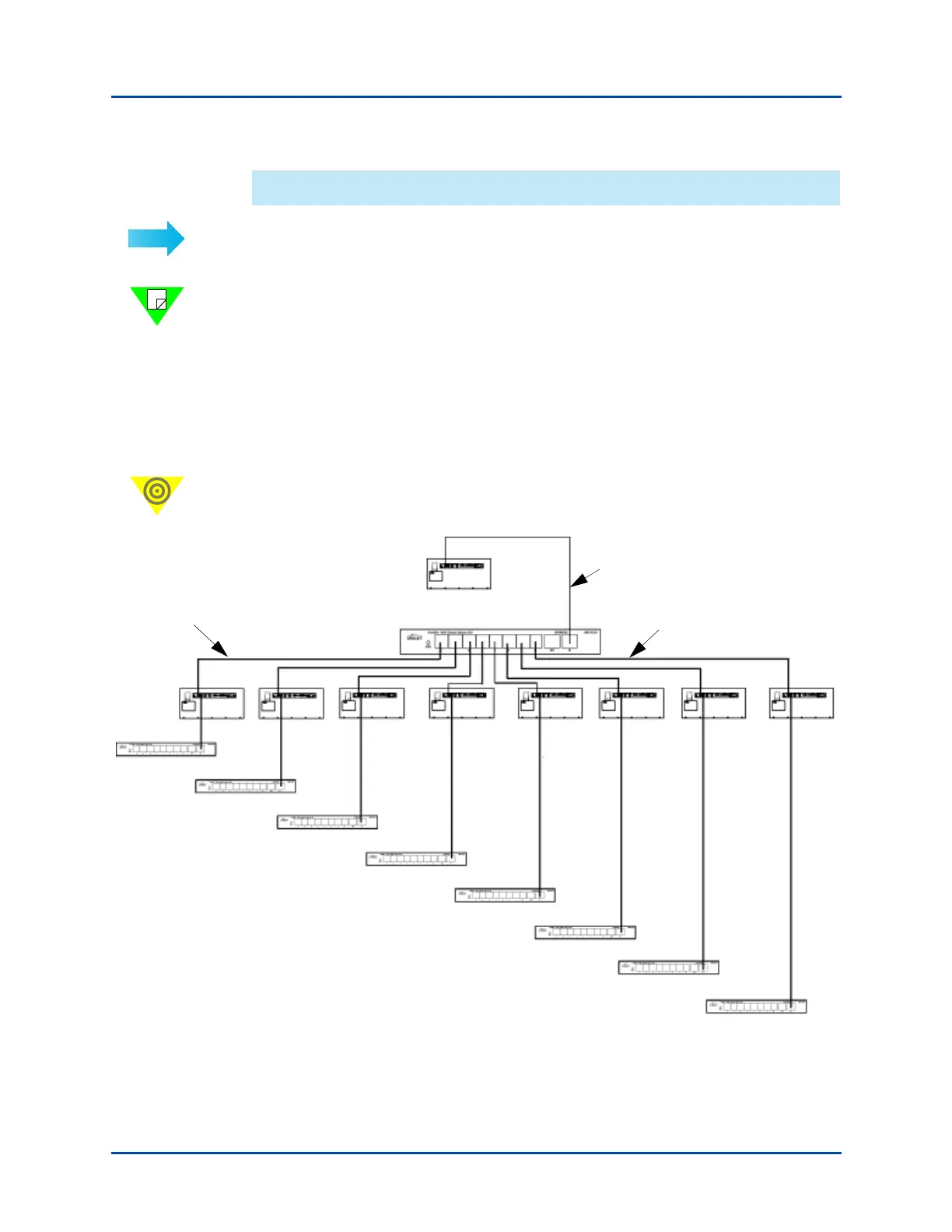
To set up a hierarchical connection:
Note: Refer to “Multi-chassis Extension Unit Terminology” on page 98 for terminology
descriptions.
1 Connect the Primary Controller chassis to the Principle Extension Unit (see
Figure A-13).
2 Connect the Principle Extension Unit to eight Dependent Controller chassis.
3 Connect each Dependent Controller chassis to another Multi-chassis Extension Unit.
You may repeat this procedure to obtain the required ports.
Important: Once the cable connections pass through another SmartBits chassis, the cable
measuring process starts over again.
Figure A-13. Example of Hierarchical Connection Configuration
3-foot cable
Each of these cables can be
any variable under 47 feet
(50 - 3 = 47)
The cable length
measuring
process starts over
when exiting the
chassis.
Artisan Technology Group - Quality Instrumentation ... Guaranteed | (888) 88-SOURCE | www.artisantg.com



 To Next Page