Vibration measurement E:5
Measuring point configuration, ISO 10816
Measuring points for ISO 10816, EVAM and FFT with
symptoms are normally set up in Condmaster and then
downloaded to Leonova.
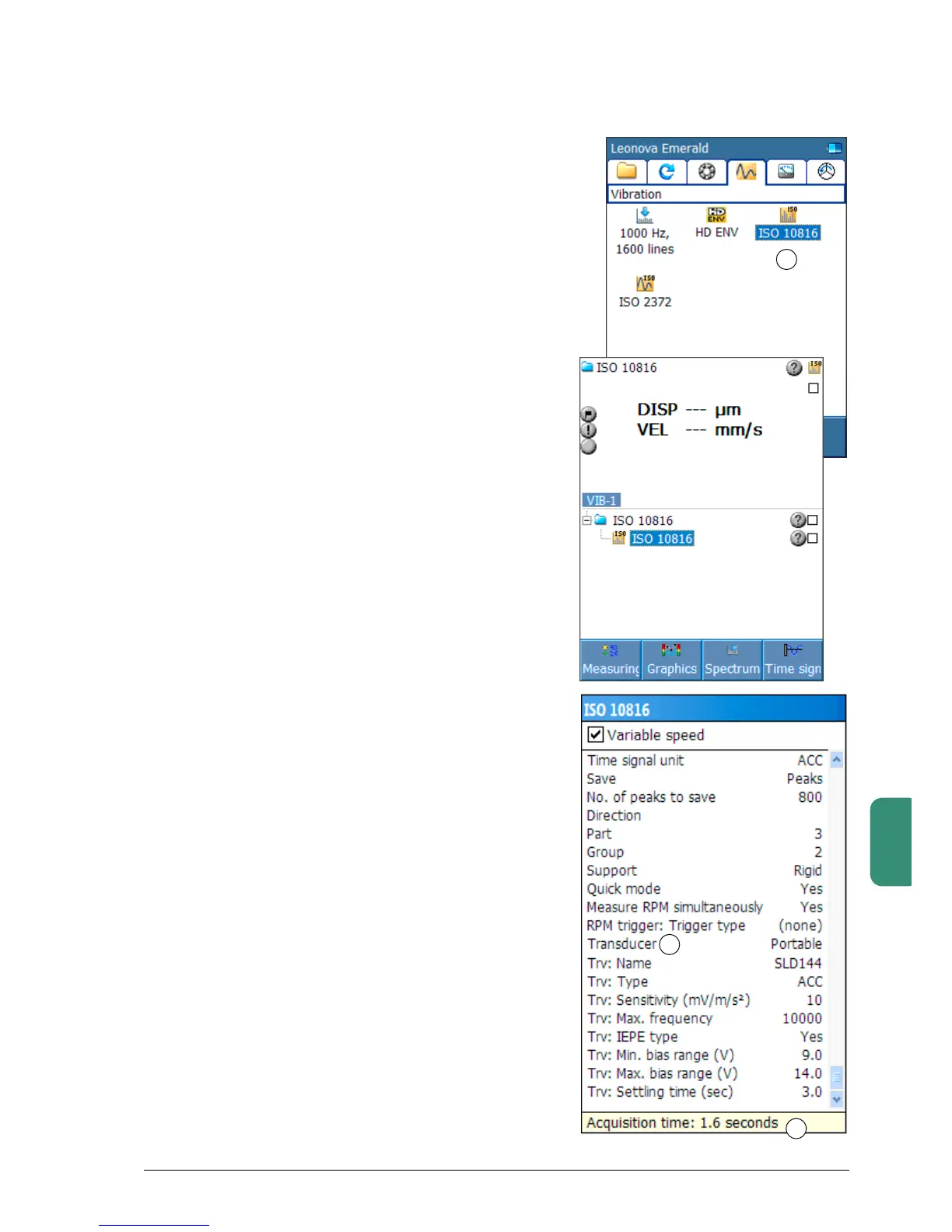
However, it is possible to open the Leonova default file
inthevibrationwindow(1)andconfigureallmeasuring
parameters. Please note that most of the settings
become locked once the measurement has been made.
Fault symptoms cannot be attached to the measuring
point in Leonova but can be added after the measuring
point has been uploaded to Condmaster.
Select ‘ISO10816’ with the arrow keys and open with
ENTER. Open ‘Measuring point data’ with SHIFT+F3.
Mark the lines in the configuration window one by one
withUP/DOWN.OpenthemwithENTER.
Before starting vibration measurements, make sure
that the vibration transducer you are using with your
Leonova is properly selected.
Default vibration transducers for the vibration tech-
niques are set up via the transducer register. Default
transducer is the active transducer when ‘Portable’
transducer is selected under ‘Measuring point data’. To
select a default transducer, see Chapter A page 13.
The transducer data become editable after you switch
‘Transducer’(2)from‘Portable’to‘Remote’.Provided
you know the transducer’s frequency range and its
upper and lower bias range, you can input the data
here.
The nominal sensitivity of a vibration transducer
SLD144S is 10.0 mV/m/s
2
. The actual sensitivity of the
individual transducer is written on its calibration card.
This data should always be input in the transducer
register. When several transducers are in use, they
should be marked to assure that the readings are
calibrated.
Theacquisitiontime(3)isautomaticallyupdatedwhen
the parameters that affect the time changes.
1
2
3


 To Next Page