User defined transducers
Other types than vibration transducers can be
used, e.g. amp clamp, pressure and flow sensors,
that connects to the VIB input. These are set up in
the transducer register as ‘User defined’ transduc-
ers.
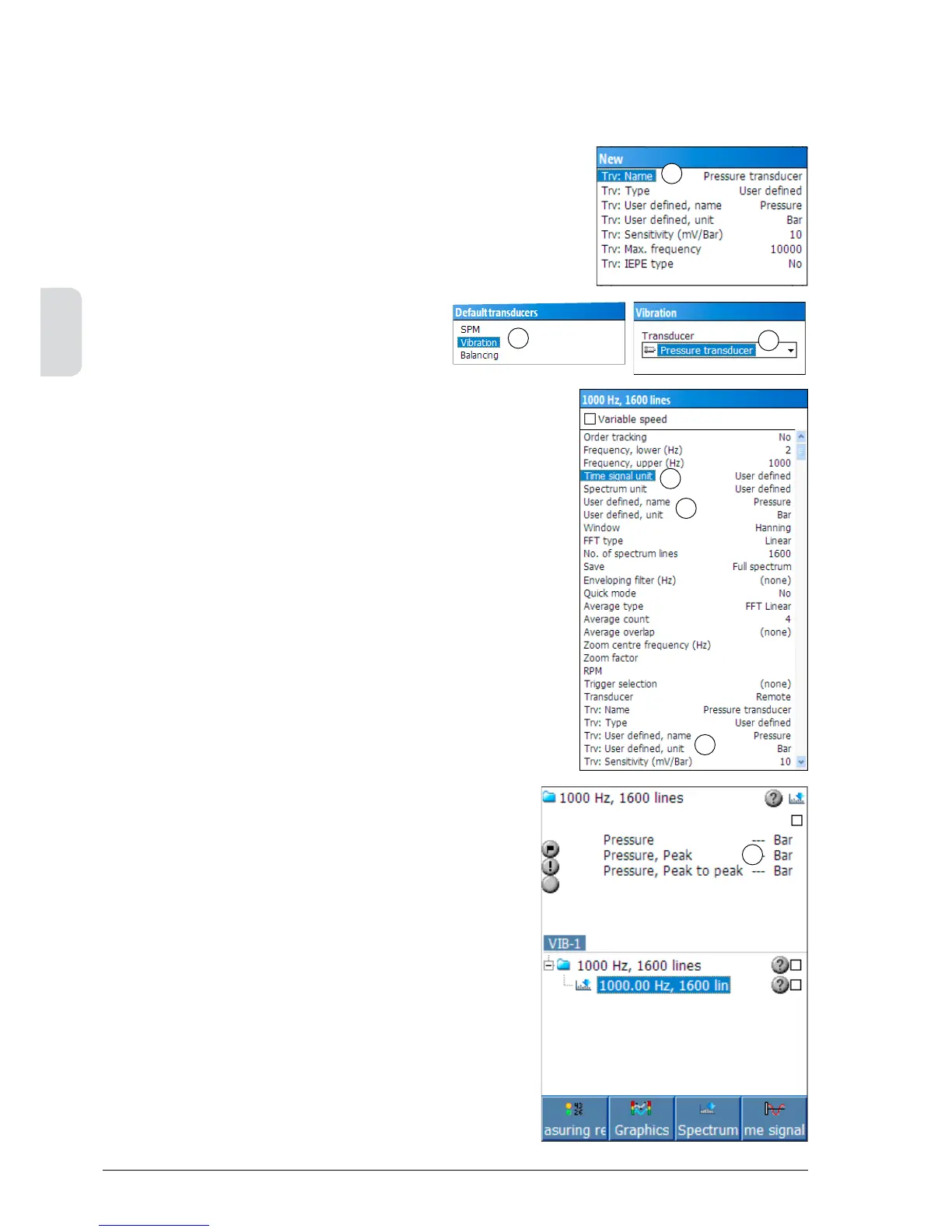
To register a user defined transducer, open ‘Set-
tings’ with SHIFT+F3. Select ‘Transducers’ to open
the register (1).
Select ‘New’ with the F1 key, then input the fol-
lowing data:
Name: A descriptive name.
It will be shown on the list
of transducers.
Type: Select ‘User defined’.
User defined, name: The measured parameter.
User defined, unit: The measured unit.
Sensitivity: The transducer’s nominal
sensitivity in mV / measured
unit.
IEPE type: Select ‘No’.
Press F1 to save the settings and close with the
BACK key.
To select the ‘User defined’ transducer’ as default
transducer, press F4 and select ‘Vibration’ (2).
Press ENTER and select ‘Pressure transducer’, as
in the example (3).
For EVAM assignments, both ‘Time signal unit’
and ‘Spectrum unit’ have to be set to “User de-
fined” (4).
Note! When ‘Time signal unit’ is set to ‘User
defined’, the “User defined, name” and “User
defined, unit” must be exactly the same as the
corresponding parameters for the transducer in
order to be able to perform a measurement. In the
example beside, the name “Pressure” and the unit
“Bar” (5) are the same as for the transducer (6).
To edit the transducer data, press F3 to open the
transducer register.
When using a ‘User defined’ transducer the ‘RMS’,
‘Peak’ and ‘Peak to peak’ values are shown in the
result window ( 7). The graphs are displayed in the
selected units.
1
6
5
4
2
3
7



 To Next Page