E:14 Vibration measurement
To evaluate a spectrum, you need to know the RPM of
the shaft at the time of vibration measurement. Mark
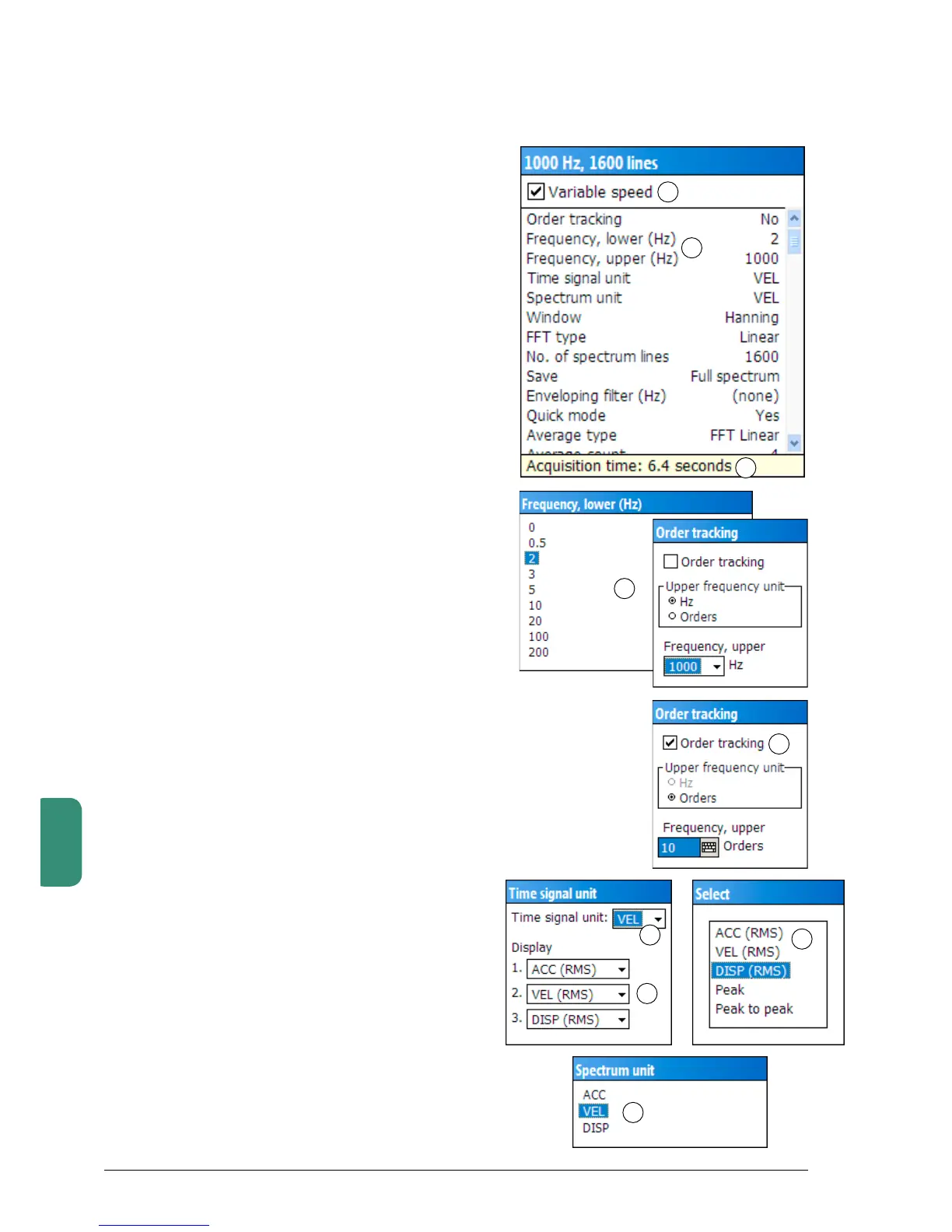
‘Variablespeed´(1).Thisforcesaspeedmeasurement
before you can measure the vibration.
With ‘Measuring point data’ you can edit the meas-
uring parameters. Open with SHIFT+F3 and mark the
lines in the configuration window one by one with the
UP/DOWNkeys.OpenthemwithF1,‘Edit’.
The transducer setting ‘Portable’ selects the default
transducer. ‘Time signal unit’ is the unit for the time
signal, while ‘Spectrum unit’ is the measuring unit for
thespectrum(e.g.VELforavelocityspectrum).
Theacquisitiontime(2)isautomaticallyupdated
when the parameters that affect the time changes.
Frequency range
Thefrequencyrange(3)isdefinedbyselectinga
lowerandanupperlimit(4).Botharemenuselected.
Whenusingtheoptionalfunction‘Ordertracking’(5)
the upper frequency is set in orders.
Please note that correct measurement demands a
transducer that is linear over the stated frequency
range.
Abnormally high displacement values can occur when
selecting a lower frequency limit that is outside of the
transducer’s range.
You can exceed the upper frequency range of the
transducer when measuring an envelope spectrum.
Time signal unit
As time signal unit you can select VEL, ACC or DISP
(6).
The‘Display’setting(7)effectsthepresentationof
measuringresultsdisplayedintheresultfield(upper
partoftheLeonovadisplay).Selectdisplayunitsfor
the three result lines. You can choose ACC, VEL and
DISPasRMS,PeakorPeaktopeak(8).
Spectrum unit
Asspectrumunit(9)youcanselectVEL,ACCorDISP.
Normally you would choose a velocity spectrum, i. e.
VEL.
Defining the assignment
1
9
7
3
4
5
6
8
2



 To Next Page