Vibration measurement E:27
To start measurement, open an existing measure-
ment under ‘File’ or make a new EVAM assign-
ment. Assignments can be set up in Condmaster
for downloading in measuring rounds.
Select the EVAM technique and press ENTER
to make a new assignment. Press SHIFT+F3 to
open ‘Measuring point data’.
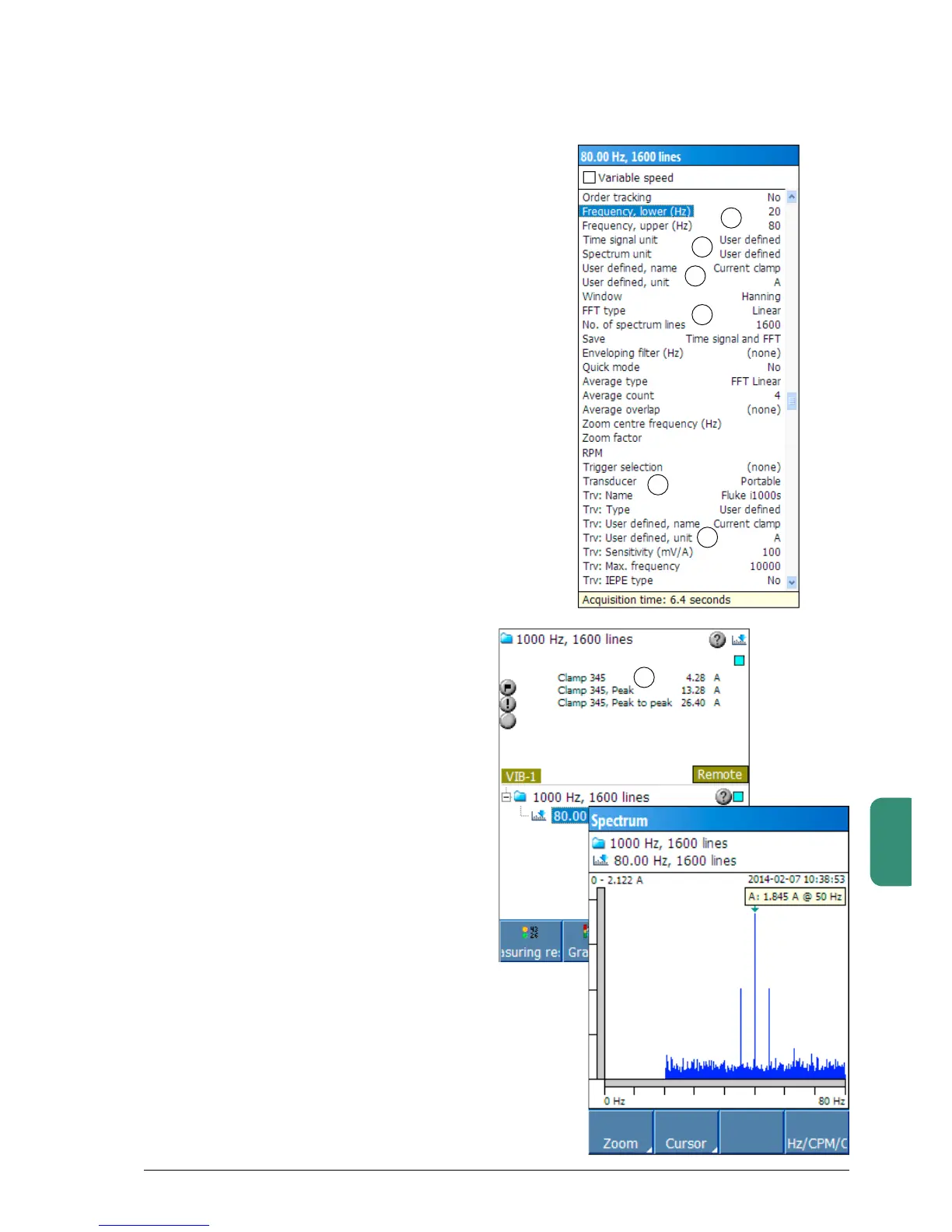
Set ‘Frequency, lower’ to 20 Hz and ‘Frequency,
upper’to80Hz(commonareaformotorcurrent
analysis)(1).PressF1‘Edit’tochangethevalues.
PressF1‘OK’tosavethesetting.
‘Time signal unit’ and ‘ Spectrum unit’ must be
setto‘Userdefined’(2)
Input‘Userdefined,name’and‘Userdefined,
unit’ (3).NB. The name and unit must be
exactly the same as the name and unit set in
the transducer register. You will find the name
andunitinthelowerpartofthewindow(4).
Recommended settings for the spectrum param-
eters(5)areHanning‘Window’,Linear‘FFTtype’,
1600 ‘Spectrum lines’, ‘Average count’ 4 and
‘Save’ time signal and FFT.
The transducer setting ‘Portable’ selects the
default transducer. The transducer data become
editableafteryouswitch‘Transducer’(6)from
‘Portable’ to ‘Remote’.
Save and close the settings window with F4.
Press the M/S key and then F1 to start the
measurement.
After measuring, Leonova will display the meas-
uring results in ampere, peak and peak-to-peak
values (7).You can choose spectrum type,
zoom functions, time signal and other graphical
functions with the funktion keys. See ‘Spectrum
functions’ in part B of this manual.
Tosavethemeasuringresult,pressMENUand
select ‘Save measurement’. The measurement
can be saved as a result file or as a file with
default settings.
After the file or measuring round is uploaded
to Condmaster, measuring results available for
analysisaretimesignal(inampere)andspectrum
(y-axisisalwaysampere).
1
3
4
6
2
5
7



 To Next Page