P340 flexiprobe Operation Manual 5
Keypad
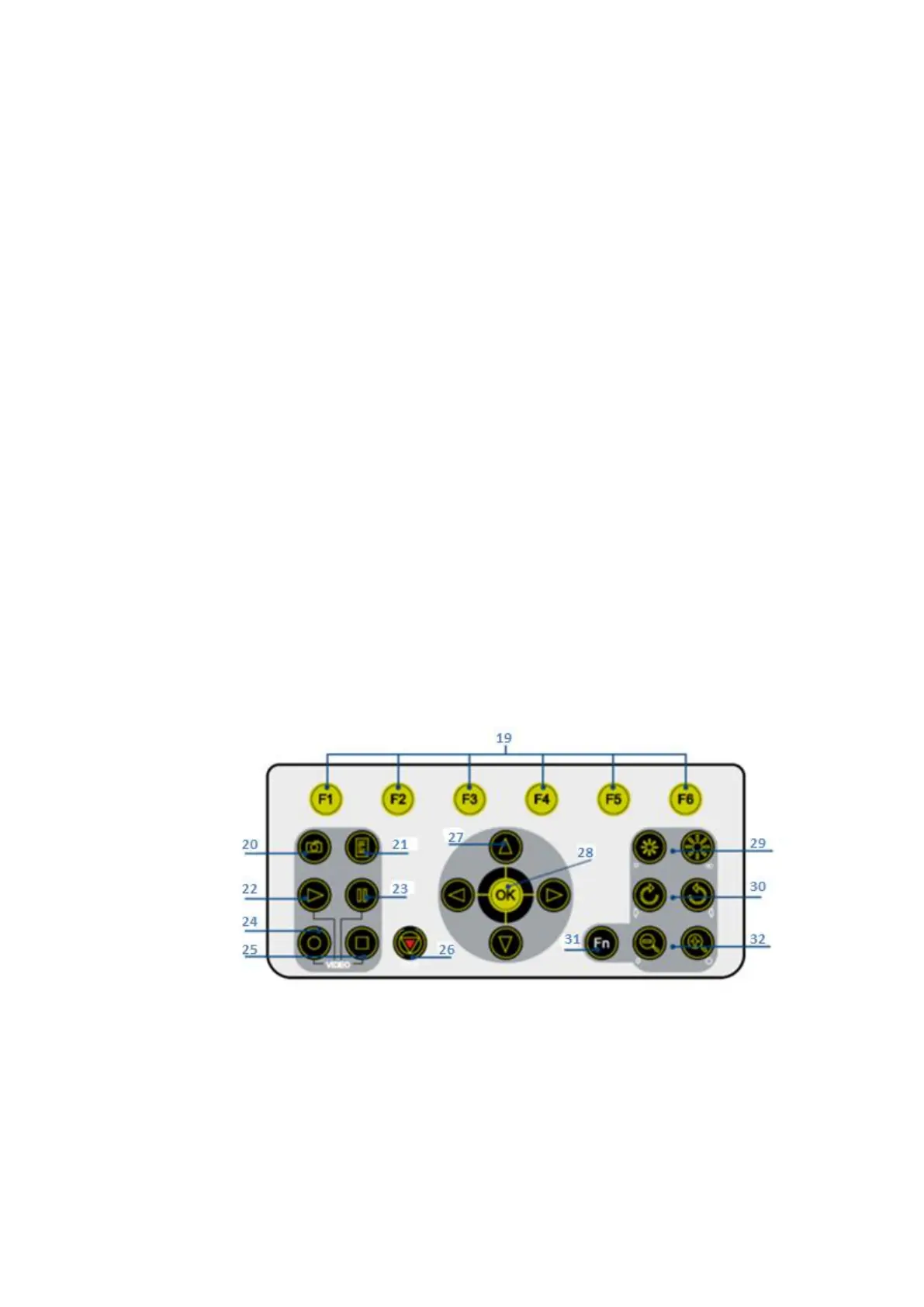
See Figure 2.4
19. Function keys: Use to select menu items or activate short cuts.
20. Camera key: Press to take screen captures.
21. Text key: Press to access the Onscreen-Text and Report menu.
22. Play: Enters the card browser menu. Starts or continues video playback of selected file.
23. Pause: Press to pause or restart video playback or recording.
24. Record: Press to begin a new video recording.
25. Stop: Press to stop video playback or recording.
26. Crawler stop key: Not functional on this model.
27. Arrow keys: Use for navigation and system parameters.
28. OK: Press to select or confirm choices in the menu system.
29. LED brightness/camera focus keys: not functional on this model.
30. Rotate/pan keys: Press to rotate the camera view. Fn + Rotate to pan left or right.
Simultaneous press will re-center the view.
31. Function key (Fn): Press and hold in combination with other keys to activate alternate
functions.
32. Zoom/Iris keys: Press to zoom in or out of the camera’s subject. Fn + Zoom to modify the Iris.
(Iris not functional on this model). Simultaneous press will reset the zoom to unity.
Figure 2.4: Controller Keypad



 To Next Page