P340 flexiprobe Operation Manual 50
9.1 Introducing JOBS
The P340 controller automatically organizes inspection data into JOBS folders making it very easy to
review and store videos, photos and observation.
By entering the client’s name, its address and a start and finish
reference for your survey, all your jobs will be uniquely and logically
stored in your memory storage device.
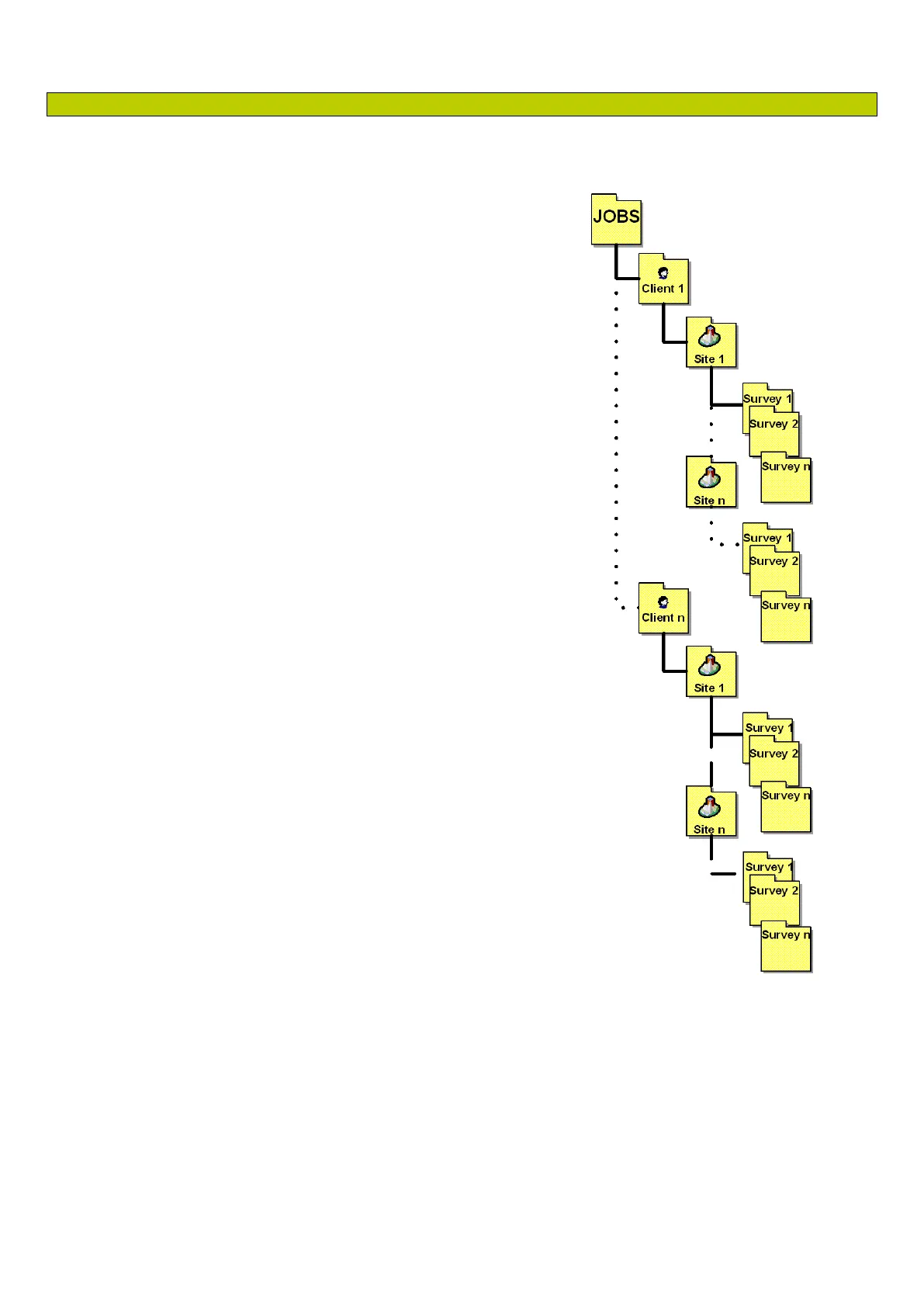
The Jobs folder is organized by client, site then survey.
For each inspection “job” the P340 will create and use 3 folders:
The top folder is the Client folder; named after the client’s
name, and contains your client data in a XML system file.
The Site folder; is named after the site’s address, and
contains the client’s site data in a XML system file.
The Survey folder is where all your survey files are stored.
This is named after your survey start and finish references
plus a date and time stamp:
start reference_finish reference_yymmdd_hhmm
MH1_MH2_110129_1225 for example, is a survey
between MH1 and MH2 conducted on 29 January
2011 at 12:25
Each Client may contain multiple Sites. Each Site may contain
multiple Surveys.
NOTE: The JOBS hierarchical structure and the files locations are
critical to be able to add new sites to existing clients or new surveys
to existing sites and more in general to be able to review your
inspection files or import your data into your PC. Do not move or
rename files/folders unless you know what you are doing.
Photo and video files will all be stored in the active Job’s survey
folder.
You can choose to have all your video and photo files named
according to the date the inspection is taking place, your client’s
name, the site’s address, of the survey’s start and finish references.
For example:
30NOV_xxx.
J. Smith_xxx.
Elk Rd_xxx.
MH001_MH002_xxx.
where xxx is a numeric counter. See Section 5.8 for more details.
Figure 9.1: JOBS folders structure


 To Next Page