Stonex R20 – User Manual 32
created, the default job will be the job named 'Default'.
Set Station:
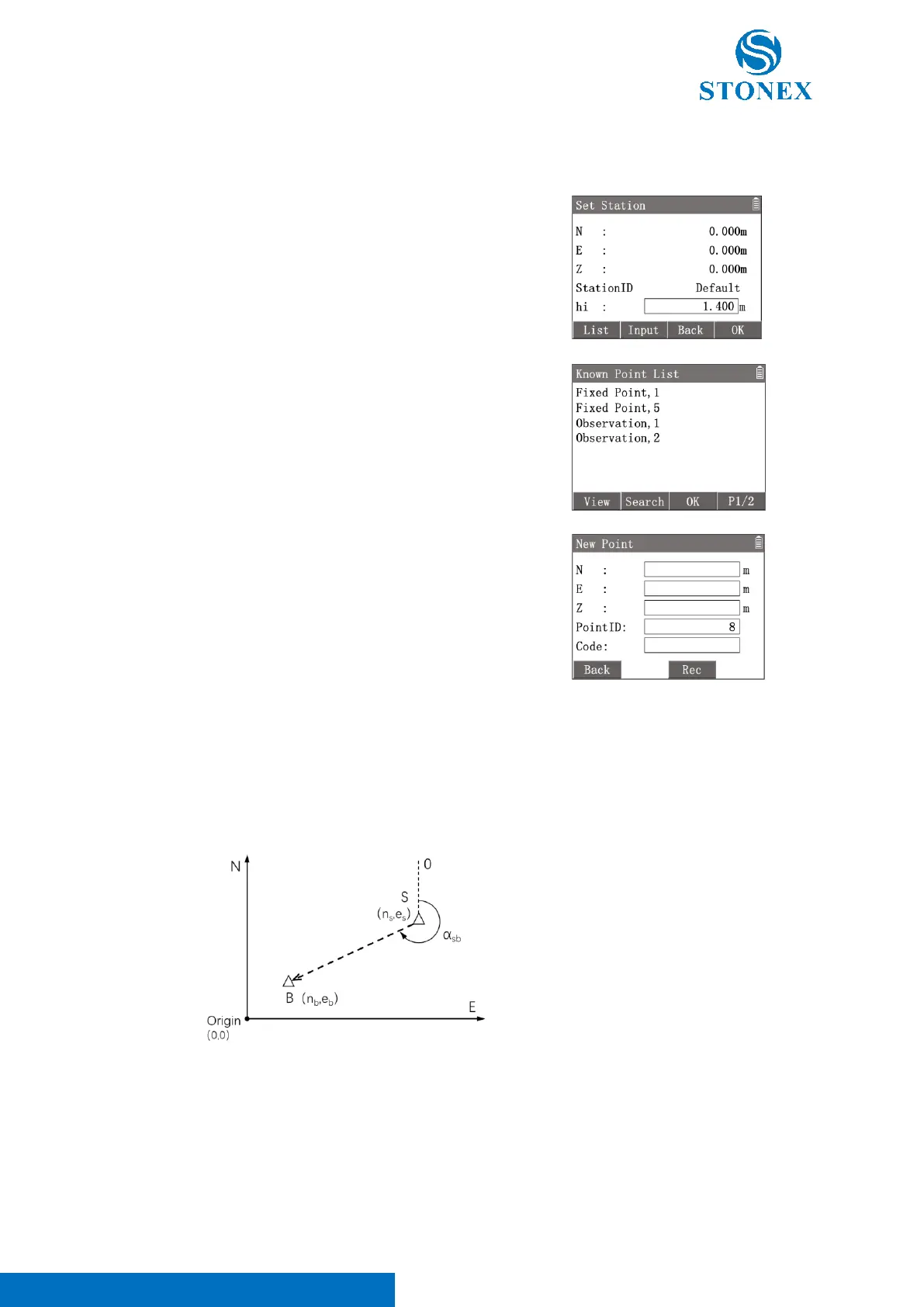
The station coordinates can be read from the instrument memory or set by manual input.
1. In {Surveying} press [2] 〈2.Set Station〉to enter {Set
Station}. The workspace displays current station’s information.
2. Input 〈hi〉(instrument height).
[F1]【List】: Enter {Known Point List} to select a known point as the
station.
[F2]【Input】: Enter {New Point} to create a station point by manual
input.
[F3]【Back】: Back to previous interface.
[F4]【OK】: Set the station.
The applications’ measurements, coordinates, and calculations are related to the current station coordinates, which
should contain at least the plane coordinate (N, E) and, if required for the job, the height (Z).
If the application is started without setting station, the instrument defaults to the last setup station as the current
station.
Set Orientation:
With the orientation, the horizontal direction angle can be set by manual input or set by known point coordinates.
S: Station
(n
s
, e
s
): Station coordinates
B: Backsight point
(n
b
, e
b
): Known coordinates
α
sb
: HA of S-B direction
Angle Orientation:
Set orientation by directly inputting an orientation HA of the direction from current station to the backsight point.



 To Next Page