Stonex R20 – User Manual 38
7. Applications
7.1. Offset
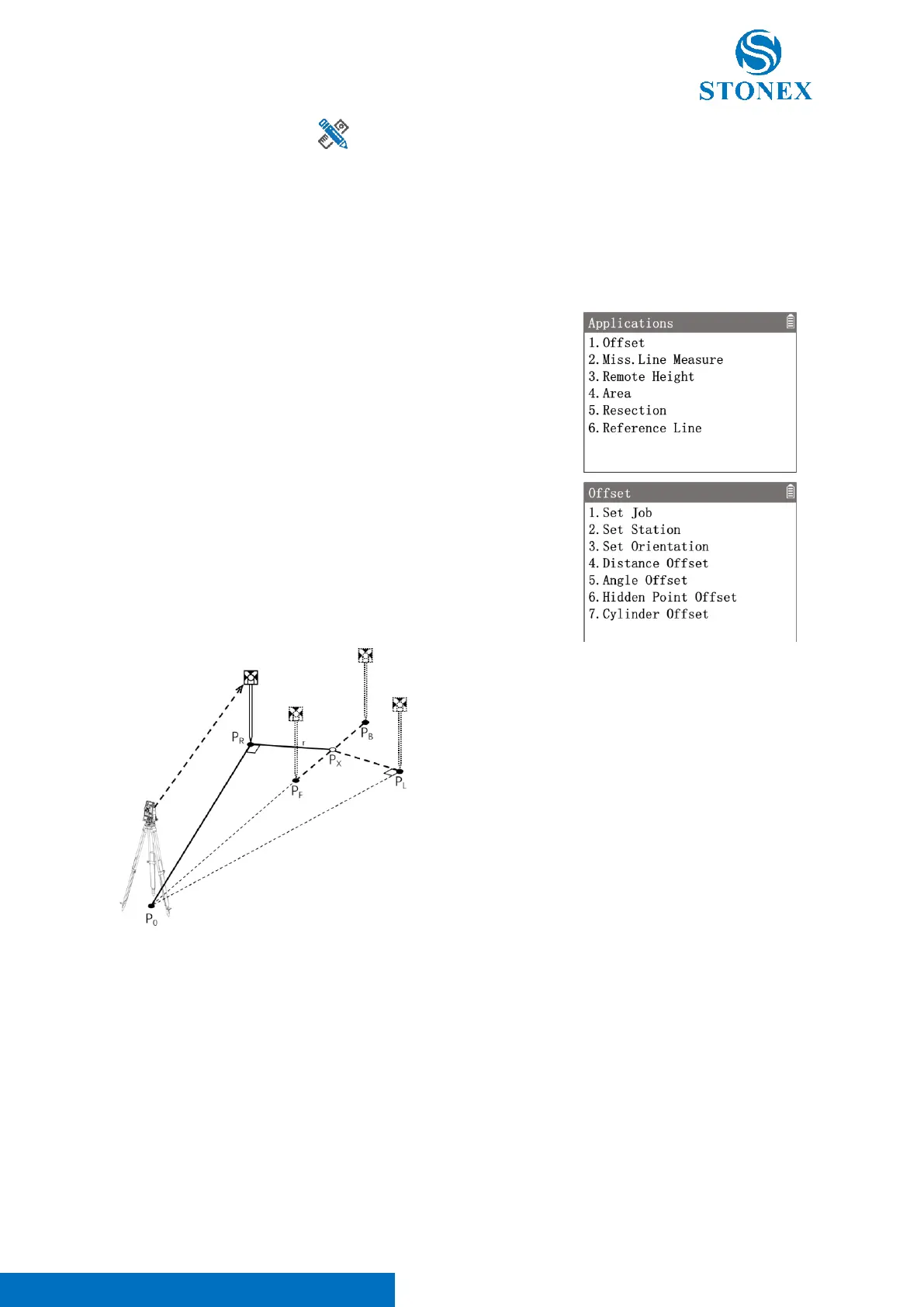
In some measurement tasks,it is not easy to set up the reflector prism directly, or it is not possible to aim the target
point directly. The offset application can work out the target point by measureing some related offset points which
can be measured easily.
1. In the measurement interface, press [M] to enter {Main Menu}.
2. Use the navigation keys to select 〈3.Apps〉and press [ENT], or
simply press the numeric key [3] to enter {Applications}.
3. Press [1] to enter {Offset}.
4. Perform pre-settings.
P
0
: Station
P
X
: Target point
P
R
: Measurement point (right)
P
L
: Measurement point (left)
P
F
: Measurement point (front)
P
B
: Measurement point (back)
r: Offset distance
Distance Offset:
Distance offset program requires that the measurement point and the target point are equal in height, and the
offset disrtance is known. It is usually used when the target point is not in view.



 To Next Page