Stonex R20 – User Manual 63
9.5. Date and Time Setting
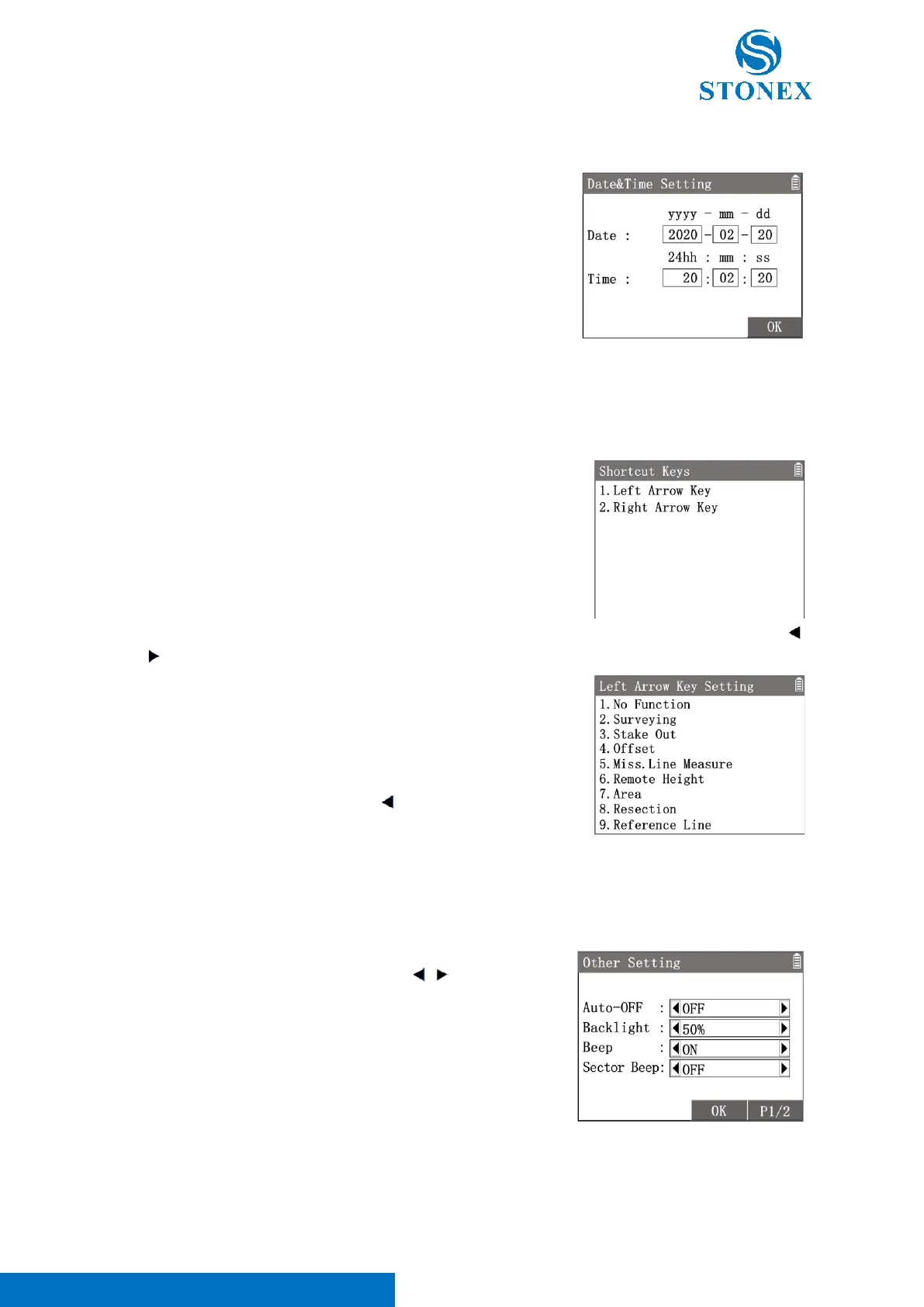
1. In {Setting}press [5]〈5.Date and Time〉to enter {Date&Time
Setting}. Set the data and time
2. Use [▲] [▼] to highlight a item then input a new value.
3. Press [F4]【OK】to confirm the settings.
1. In {Setting}press [6]〈6.Shortcut Keys〉to enter {Shortcur Keys}.
2. Use [▲] [▼] to highlight a item then press [ENT] to enter the setting.
There are two shortcut keys whose functions can be defined by users. Two shortcut keys are the arrow keys [ ]
and [ ]. A key’s function can be set as a one-click access application pre-defined. Eight applications can be selected.
For Example:
1. In {Shortcur Keys} press[1]〈1.Left Arrow Key〉 enter {Left
Arrow Key Setting}.
2. Press [7]〈7.Area〉to set the left shortcut key function as the
application Area.
3. In the measurement interface, press [ ] can directly enter {Area
Calculate}.
1. In {Setting} press [7]〈7.Other〉to enter {Other Setting}.
2. Use [▲] [▼] to highlight a item then use [ ] [ ] to toggle the
options available.
3. Press [F3]【OK】to confirm the settings.



 To Next Page