Stonex R20 – User Manual 33
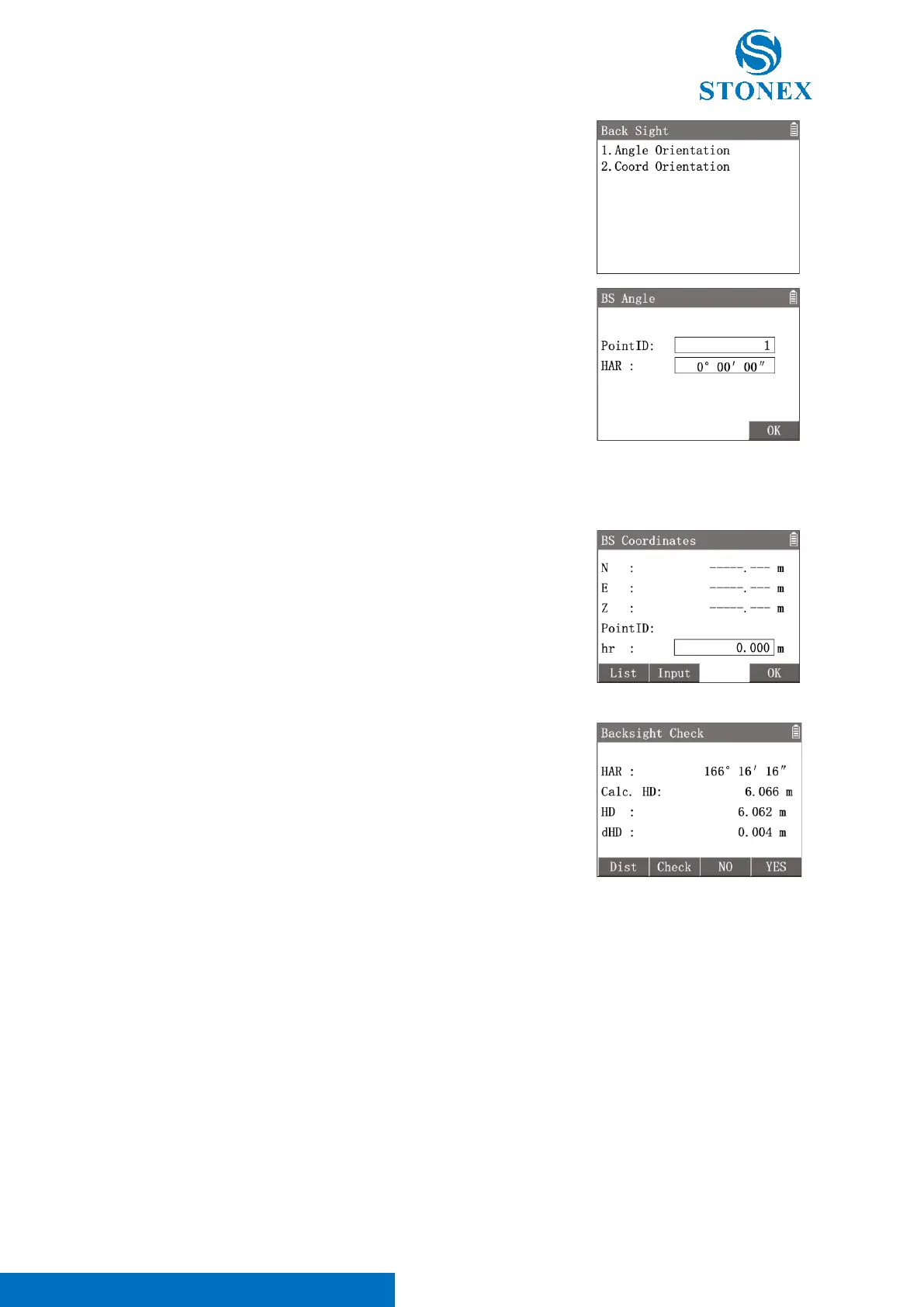
1. In {Surveying} press [3] 〈3.Set Orientation〉 to enter {Back
Sight}.
2. Press [1]〈Angle Orientation〉 to enter {BS Angle}.
3. Input the 〈PointID〉 and 〈HA〉 value then Press [F4]
【OK】.
4. Aim at the backsight point and press[ENT]〈YES〉to set the
orientation.
Coordinates Orientation:
Set orientation by known point’s coordinates. The coordinates can be read from the instrument memory or set by
manual input.
1. In {Surveying} press [3] 〈3.Set Orientation〉 to enter {Back
Sight}.
2. Press [2]〈Coord Orientation〉 to enter {BS Coordinates}.
[F1]【List】: Enter {Known Point List} to select a known point as the
backsight point.
[F2]【Input】: Enter {New Point} to create a known point by manual
input.
3. Input〈hr〉(prism height) then press [F4]【OK】.
4. Aim at the backsight point and press[ENT]〈YES〉to set the
orientation.
5. Enter {Backsight Check}. Workspace display the HA and calculated
HD.
6. Press [F1]【Dist】to trigger the measurement. Check the measured
HD deviation,press[F4]【OK】 to set the orientation.
〈HAR〉: HA to the backsight point.
〈Calc. HD〉: Calculated HD to backsight point.
〈HD〉: Measured HD to backsight point.
〈dHD〉:The deviation between 〈Calc. HD〉 and 〈HD〉.
[F2]【Check】:View the backsight coordinates.
[F3]【NO】: Ignore current setting result and back to {BS Coordiantes}.
[F3]【YES】: Set the orientation.
6.1. Surveying
Application to measure a point and record the data.



 To Next Page