Stonex R20 – User Manual 65
10. System Information
1. In the measurement interface, press [M] to enter {Main
Menu}.
2. Use the navigation keys to select 〈6.System〉and press
[ENT], or simply press the numeric key [6] to enter {System
Statiostic}.
10.1. Instrument Information
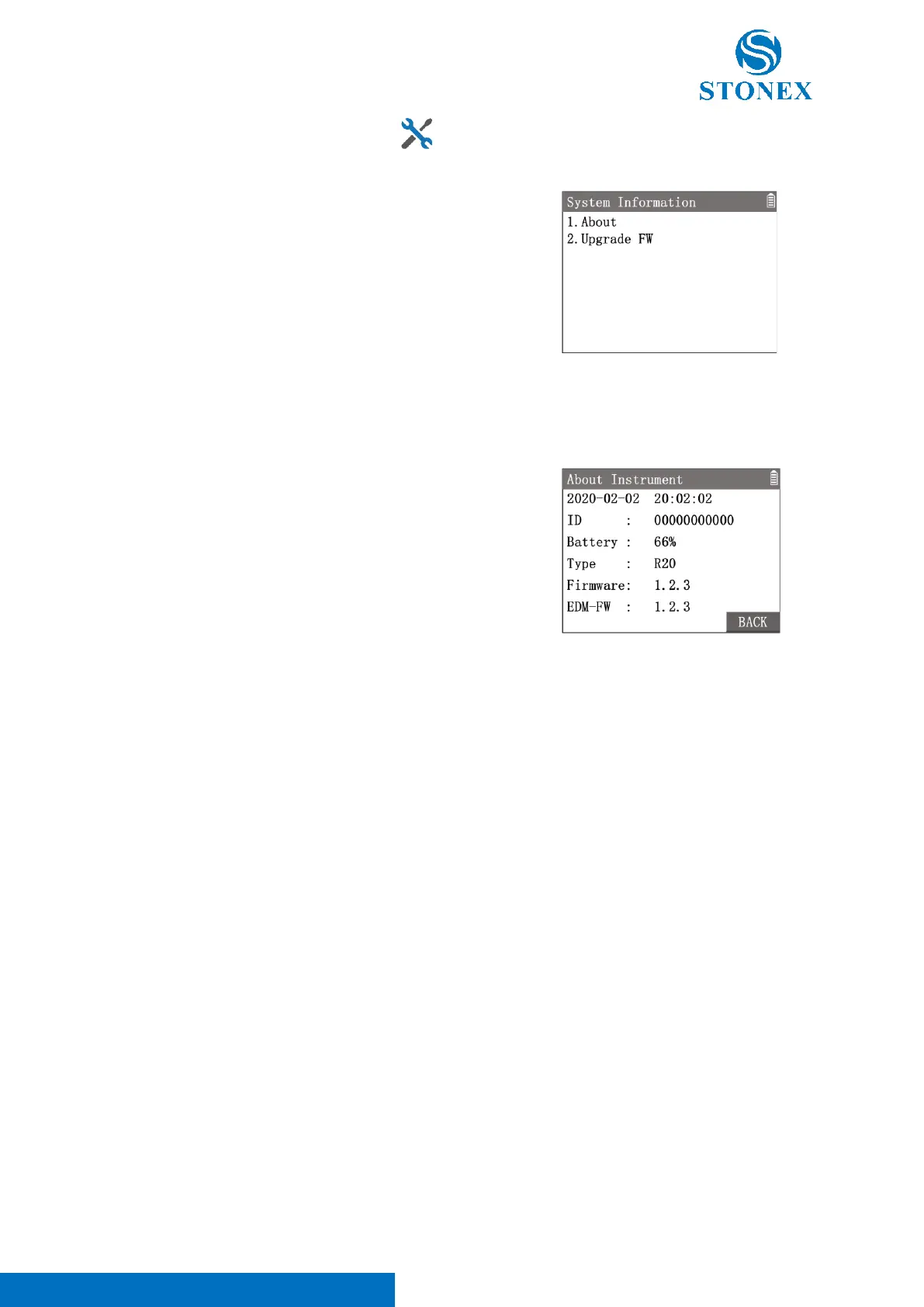
In {System Information} press [1] 〈 1.About 〉 enter {About
Instrument}.
Workspace displays the important information of the instrument and
system.
The first line will show the current date and time of the instrument, which will need to be set if there are
inaccuracies.
Refer to
Date and Time Setting.
〈ID〉: Each instrument will have a unique 10-digit serial number.
〈ID〉should be the same as the serial number on the product label.
〈Battery〉: The remaining battery capacity in reference percent value.
Due to various environmental conditions and different working modes, the remaining battery capacity is only
a reference value and cannot accurately indicate the remaining operating time of the instrument.
〈Type〉: The type of the instrument.
〈Firmware〉: The current firmware version number of the instrument.
〈EDM-FW〉: The current firmware version number of the EDM.
10.2. System Upgrade
The instrument can add applications or enhance performance by updating its firmware. The laterest version of
firmware is always recommended.



 To Next Page