Stonex R20 – User Manual 46
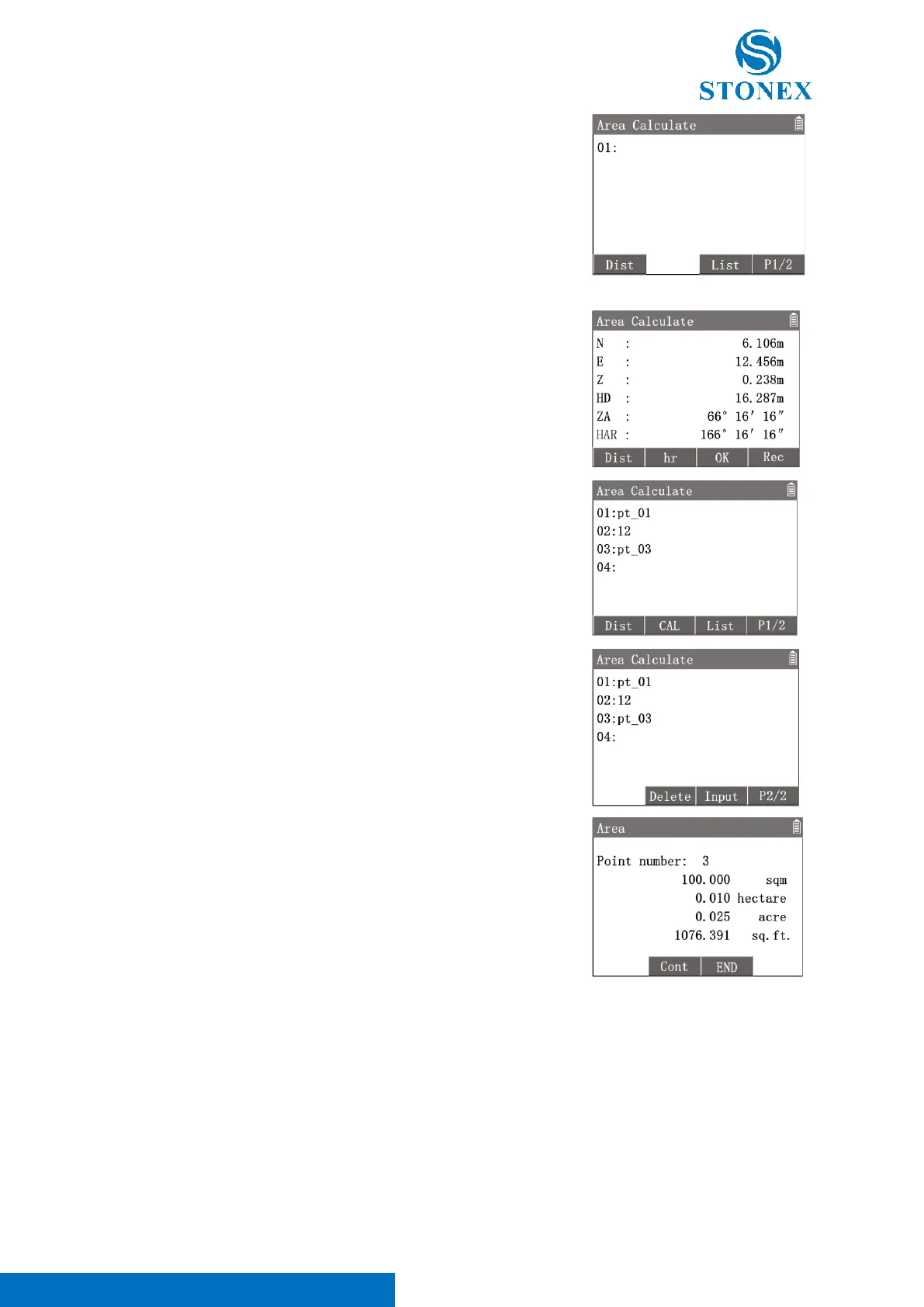
[F3]【List】: Enter {Known Point List} to select a known point as the target
point.
[F4]【P1/2】: To 2
nd
page of softkeys.
2
nd
page of softkey [F2]【Input】: Enter {New Point} to create a target
point by manual input.
Any target point can be created by one of the tree methods.
Press [F1]【Dist】 to measure a target point.
Aim at the target point then press [F1]【Dist】to measure it. Press [F4]
【Rec】to record the coordinates then press[F3]【OK】 back to the point
list interface. The point serial number will plus 1 automatically.
After measuring or inputting some target points, the list will display all the
point records.
Press [▲]to highlight the last point record, then press [F4]【P1/2】to 2
nd
page of softkeys, [F2]【Delete】will be available to delete the last point.
When the point records in the list are 3 or more, [F2]【CAL】 will be
available.
After getting all the target points,
Press [F2]【CAL】to calculate and display the area result.
[F2]【Cont】: back to the point list and continue to add more points.
[F3]【END】: Exit the program.
7.5. Resection
This application is used to determine the station (instrument) coordinates by measuring and backcalculating some
known points. The calculation requires between 2 and 5 known points.



 To Next Page