Stonex R20 – User Manual 67
11. Data Transfer and Formats
11.1. Bluetooth
The instrument is equipped with Bluetooth 5.0.
The instrument can be used as a Bluetooth slave device to communicate with Bluetooth-enabled mobile phones,
pad, notebooks and other master devices for wireless data exchange and operation control.
From version 5.1.xxx of Cube-a it is possible to manage the R20 total station.
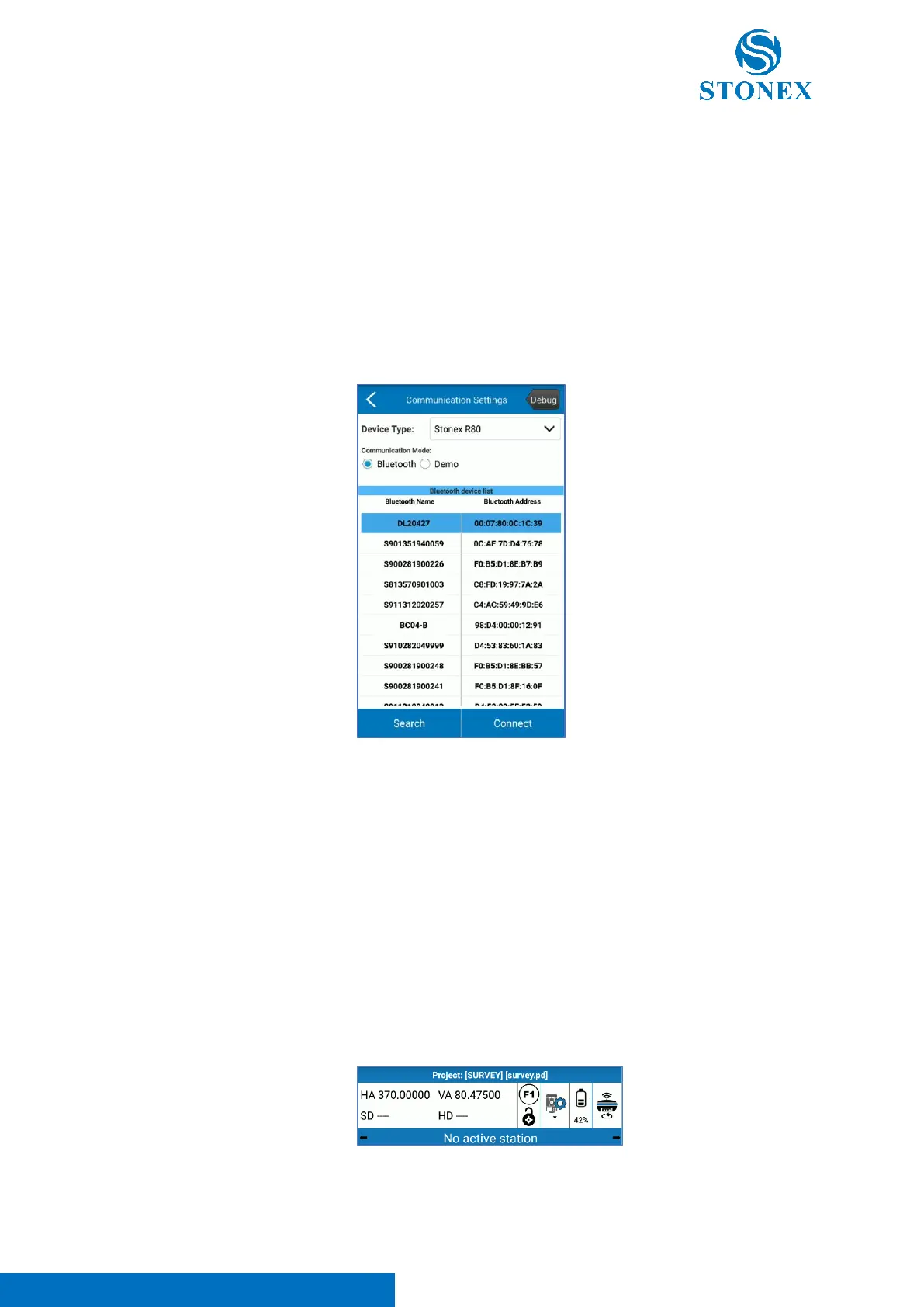
On cube-a click Device -> Total Station Communication, there will be the page shown in next figure.
Select R20 as Device Type.
Select Bluetooth communication mode in the communication settings interface, and then click Search, you will see
the page shown below. If you already have a Bluetooth device in the list that you want to connect to, you can click
Stop to stop searching, and select the name of the Bluetooth device to connect to the Device, click Connect. When
the Matching dialog box appears, please click “pair” and it could be connected successfully.
NOTE: to successfully connect the total station and the controller check if:
• Bluetooth is ON on the total station (refer to Other Settings)
• You have levelled the total station
• You have selected the correct model on cube-a
• You are in the measure page on the total station.
• You will have confirmation that the connection has been successful if the angles’ values are shown in the
bar status.



 To Next Page