EasyManua.ls Logo

STONEX X300 - 3.3.1 Status LEDs; Interpreting Status LED Combinations

STONEX X300
81 pages
Print Icon
To Next Page IconTo Next Page
To Previous Page IconTo Previous Page
Loading...
22
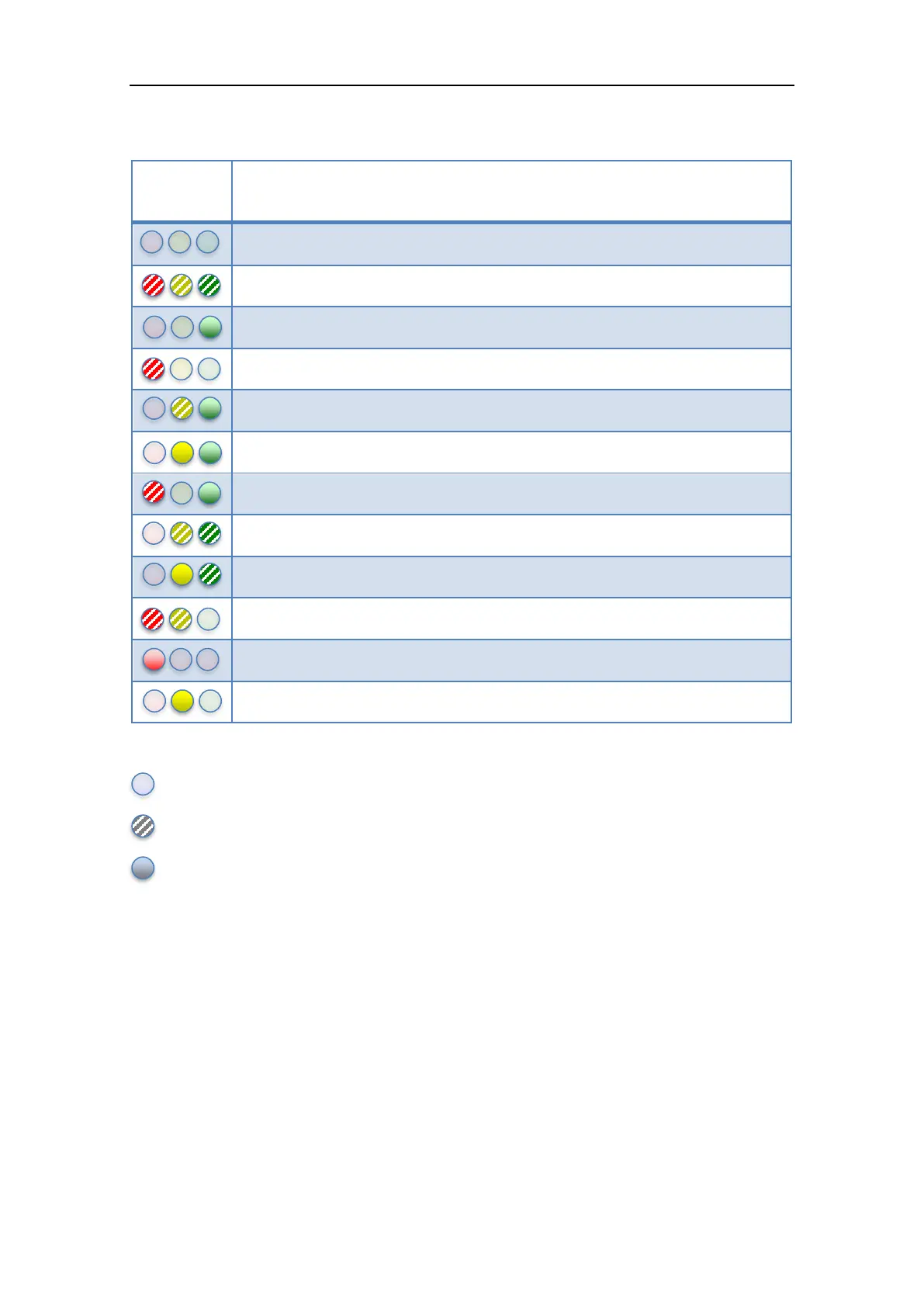
3.3.1 Status LEDs
LEDs
status
Description
X300 is powered off
The system is initializing. This state appears few seconds after power on
The system is ready and waiting for user input
System error. Use the controller to check the failure on Status section.
Scan initialization
X300 is busy working on something (performing a scan, for example)
X300 is storing data
Scan successfully completed
A new system controller firmware is uploading
An indeterminate state. Something gone wrong
Low battery. Please change the battery before continuing to work
Internal temperature is above warning threshold
Table 5: Status LEDs
Off
Blinking
Solid light

Table of Contents

Related product manuals