23
3.3.2 GPS LEDs
Starting from firmware v. 0.5.48, external GNSS receivers can be connected to the X300 using
the GPS port of the scanner (see par. 1.3).
When a supported and configured receiver is connected to the X300 with X300 GPS kit
4
accessory, the scanner is able to track the position of the receiver.
The GPS coordinates are automatically stored in the scanner raw data and will be used by Stonex
Reconstructor software to geolocalize the scanner position.
The default coordinate reference system is: WGS84/UTM.
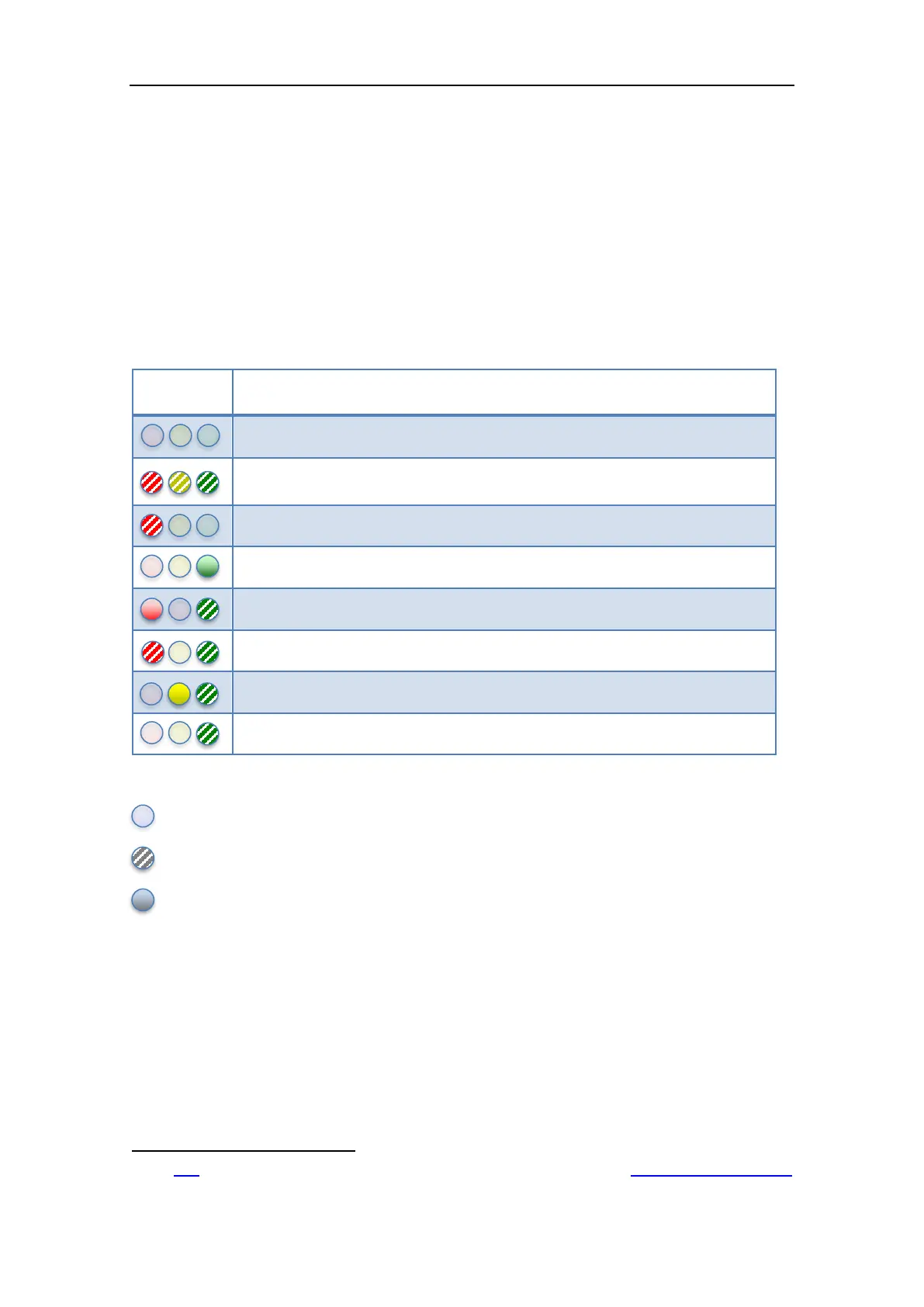
The following table describes the status of the GPS LEDs.
X300 is powered off or no GPS data available
The system is initializing
This state appears few seconds after power on
Some GPS related error. Use the GPS controller to check the failure
GPS data incoming but do not contains valid point information
GPS data incoming. Point quality is Autonomous
GPS data incoming. Point quality is Float
GPS data incoming. Point quality is DGPS
GPS data incoming. Point quality is RTK
Table 6: GPS LEDs
Off
Blinking
Solid light
4
Click
here for further information about the “X300 GPS kit” or visit the Stonex website: www.stonexpositioning.com



 To Next Page