86 EN
A telephone connected to the Sidne™ console can be operated via tablet
or voice commands. (See
“Setting Up the Console” for information on
connecting a phone to the Sidne™ system.)
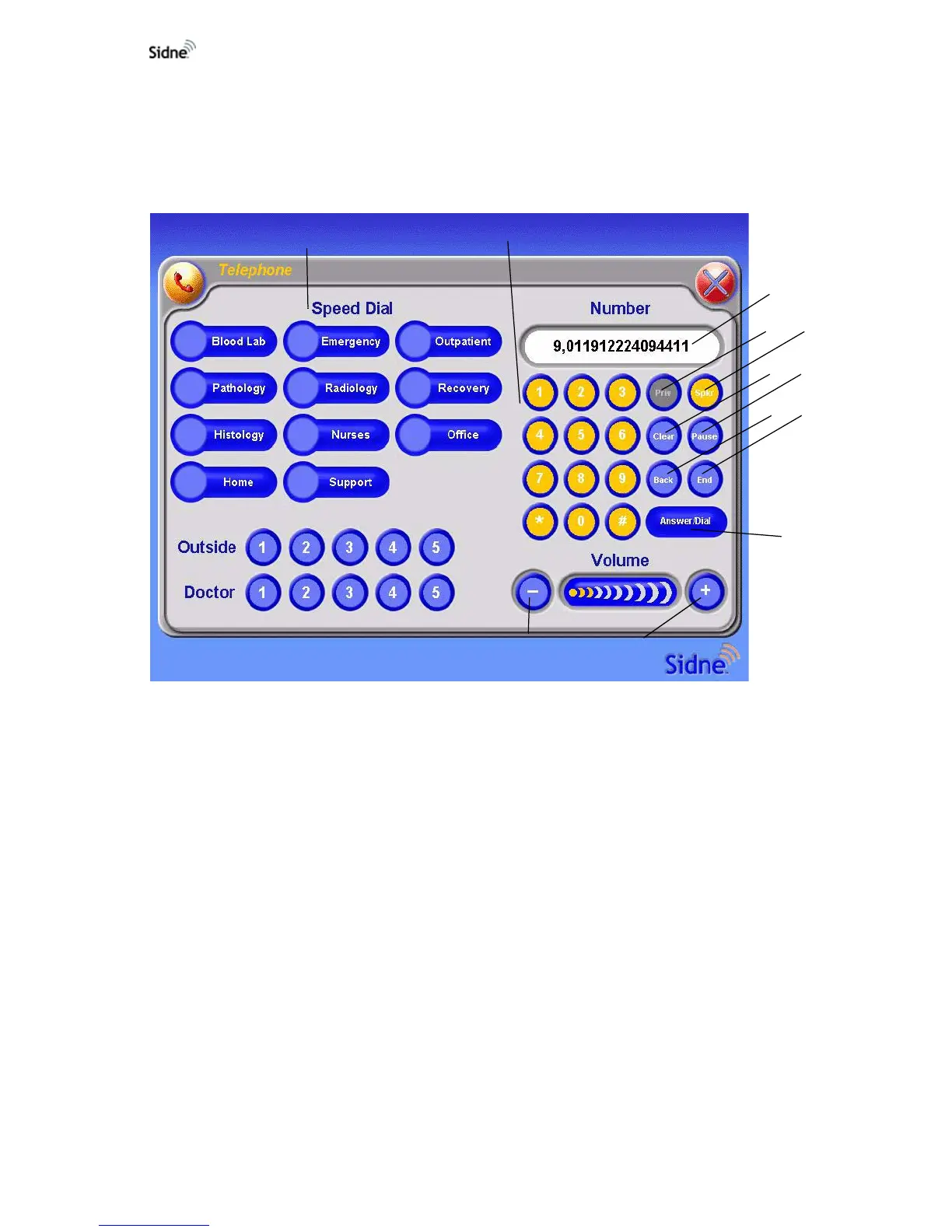
Tablet Commands Menu
Figure 4: The tablet commands menu for the telephone
1. Speed Dial Buttons: Select a phone number previously
programmed by the user.
2. Number Buttons
3. Number Screen: Displays the selected numbers.
4. Private: Deactivates the speaker phone, restricting audio signals
to the telephone receiver.
5. Speaker: Activates the speaker phone.
6. Clear: Clears all numbers from the number screen.
7. Pause: Inserts a pause between numbers.
8. Back: Erases the last digit selected.
9. End: Hangs up the phone.
10. Answer / Dial: Picks up the phone; dials the number selected on
the number screen.
11. Volume +: Increases the volume.
12. Volume -: Decreases the volume.
2
6
11
12
1
3
4
5
7
8
9
10












 To Next Page