Chapter 3 Maintaining the Sun Fire Servers 3-21
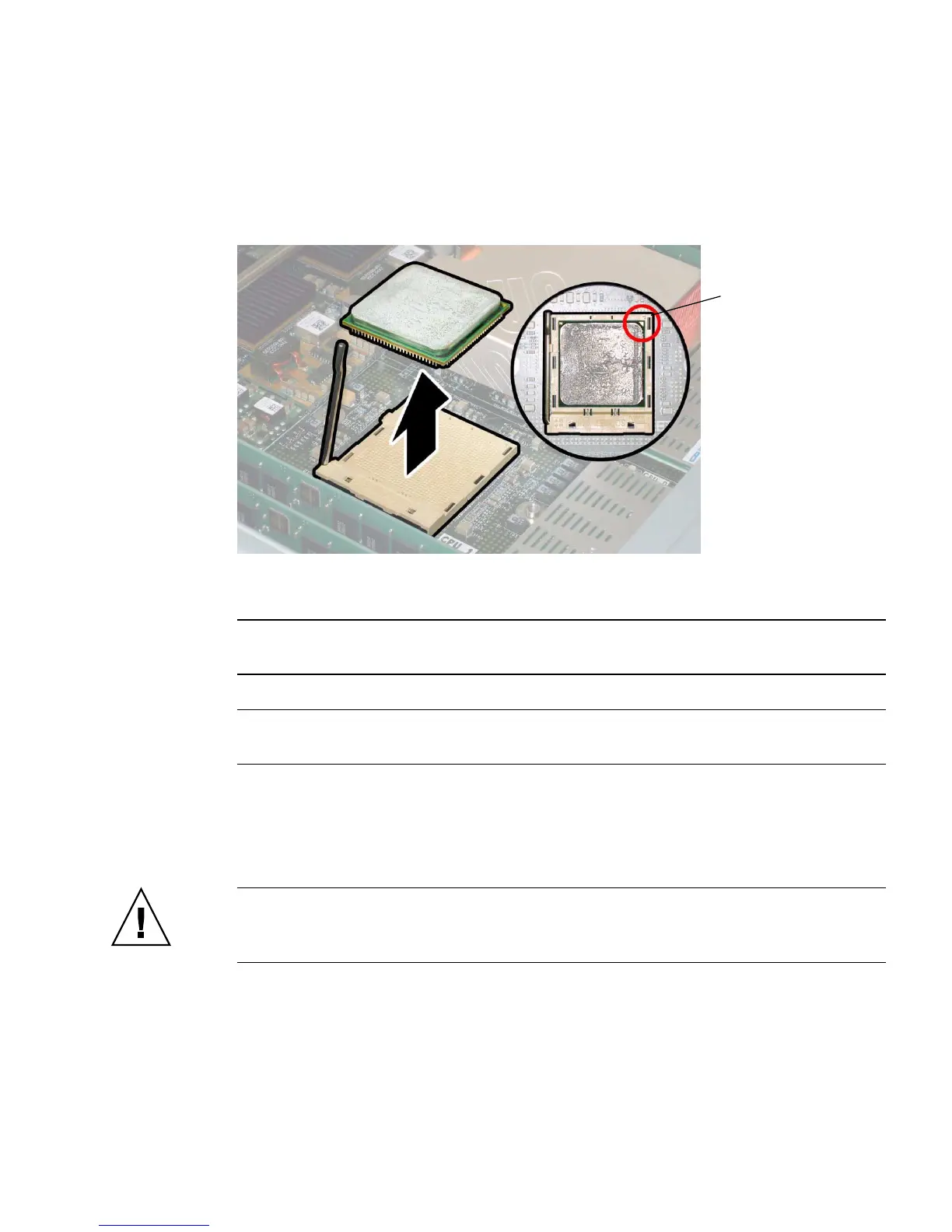
e. Lift the CPU out of the socket, leaving the lever in the vertical, open position.
See
FIGURE 3-14.
FIGURE 3-14 Removing the CPU From the Socket
6. Install the new CPU, or reinstall the existing CPU.
Note – Mixing CPU speeds or mixing dual-core CPUs with single-core CPUs is not
supported. Use two identical CPUs in your server.
Note – Align the triangle that is printed on one corner of the CPU with the tiny
triangle that is imprinted on the CPU socket, as shown in the red circle in FIGURE 3-14.
a. Ensure that the CPU socket release lever is in the fully open, vertical
position.
b. If re-using the existing heatsink, clean and regrease it.
Caution – New heatsinks have a layer of thermal grease applied at the factory.
Adding additional thermal grease can damage the system. Follow this step only if
you are re-using a previously installed heatsink.
c. Use an alcohol pad to clean all the old thermal grease from the component
surface. Also, clean the dust from the heatsink fins.
Alignment
triangles














 To Next Page