3-52 Sun Fire X4100/X4100 M2 and X4200/X4200 M2 Servers Service Manual • August 2009
Use the following procedure to remove and replace the GRASP board.
1. Power off the server as described in
Section 3.4 on page 3-4.
2. If the server is in a rack, slide it far enough from the rack so that you can
remove the main cover. If you cannot safely view and access the component,
remove the server from the rack.
3. Remove the main cover as described in
Section 3.5 on page 3-6 or Section 3.8 on
page 3-10.
Caution – There is a power status LED (CR1) on the GRASP board that indicates
whether 3.3V standby power is reaching the GRASP board. The GRASP board is not
hot-swappable and should never be removed while this LED is lit.
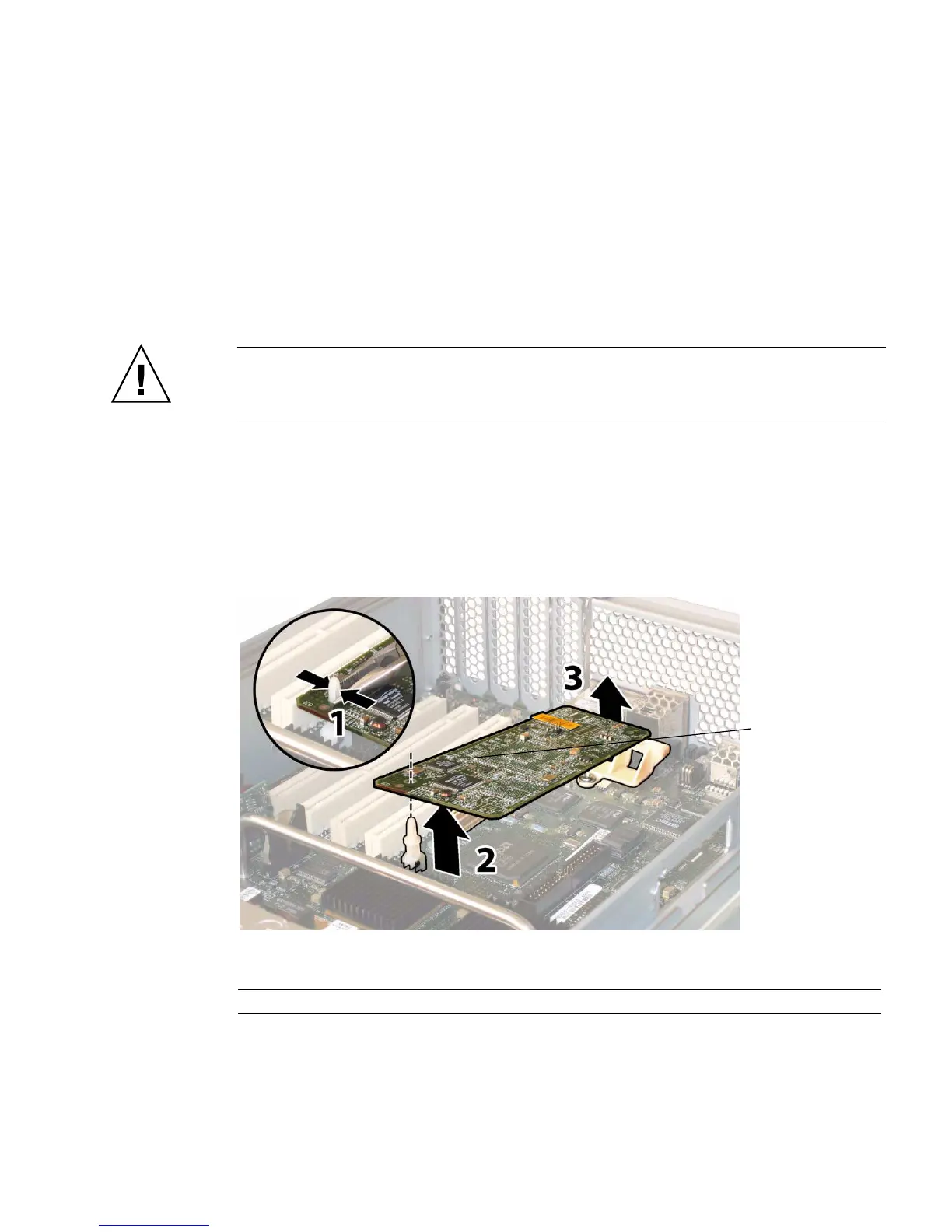
4. Squeeze the plastic standoff that protrudes through the GRASP board to press
the standoff’s locking tabs. See
FIGURE 3-43.
If you have difficulty pressing the locking tabs with your fingers, you can use a
pair of long-nosed pliers.
FIGURE 3-43 Removing the GRASP Board
5. Raise the corner of the GRASP board until it is clear of the locking tab.
Figure Legend
1 Power status LED CR1
1














 To Next Page