Basic
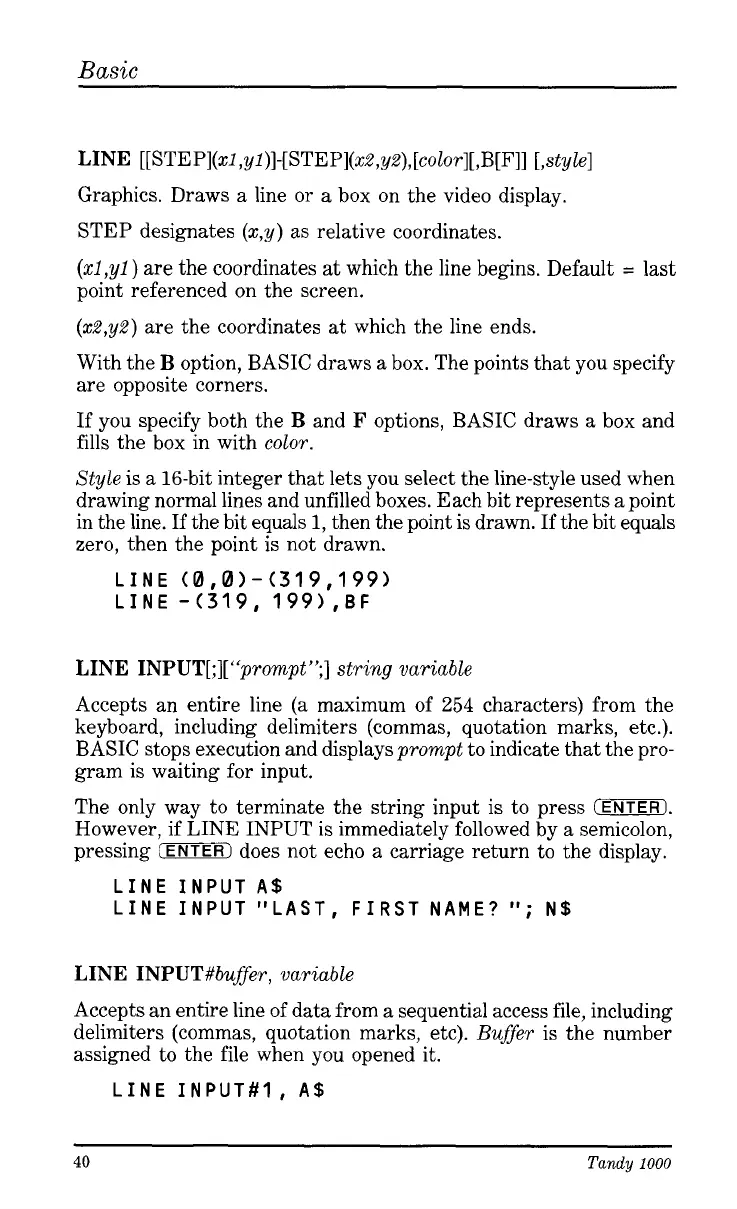
LINE
[[
STE
Pl(x2
,yl)]-[ STEP](xZ,yZ),[color][ ,B[F]] [,style]
Graphics. Draws
a
line or
a
box on the video display.
STEP designates
(x,
y)
as
relative coordinates.
(x1,yl)
are the coordinates
at
which the line begins. Default
=
last
point referenced
on
the screen.
(x2,yZ)
are the coordinates
at
which the line ends.
With the
B
option, BASIC draws
a
box. The points that you specify
are opposite corners.
If
you specify both the
B
and
F
options, BASIC draws
a
box and
fills the box in with color.
Style is
a
16-bit integer that lets you select the line-style used when
drawing normal lines and unfilled boxes. Each bit represents
a
point
in the line.
If
the bit equals
1,
then the point is drawn. If the bit equals
zero, then the point is not drawn.
LINE
(0,0)-(319,199)
LINE
-(319,
1991,BF
LINE INPUT[;][ “prompt
”;]
string variable
Accepts an entire line (a maximum of
254
characters) from the
keyboard, including delimiters (commas, quotation marks, etc.).
BASIC stops execution and displays prompt to indicate that the pro-
gram is waiting for input.
The only way to terminate the string input is to press
IENTERI.
However, if LINE INPUT is immediately followed by
a
semicolon,
pressing
(ENTER)
does not echo
a
carriage return to the display.
LINE INPUTA$
LINE INPUT “LAST, FIRST NAME?
‘I;
N$
LINE INPUT#buffeer, variable
Accepts an entire line of data from
a
sequential access file, including
delimiters (commas, quotation marks, etc). Buffer is the number
assigned to the file when you opened it.
LINE INPUT#l,
A$
40
Tandy
1000




 To Next Page