6. TERMINAL FILE PROGRAMMING
EO3-11106
6.19 Department Table Programming
6-102
(continued from the previous page)
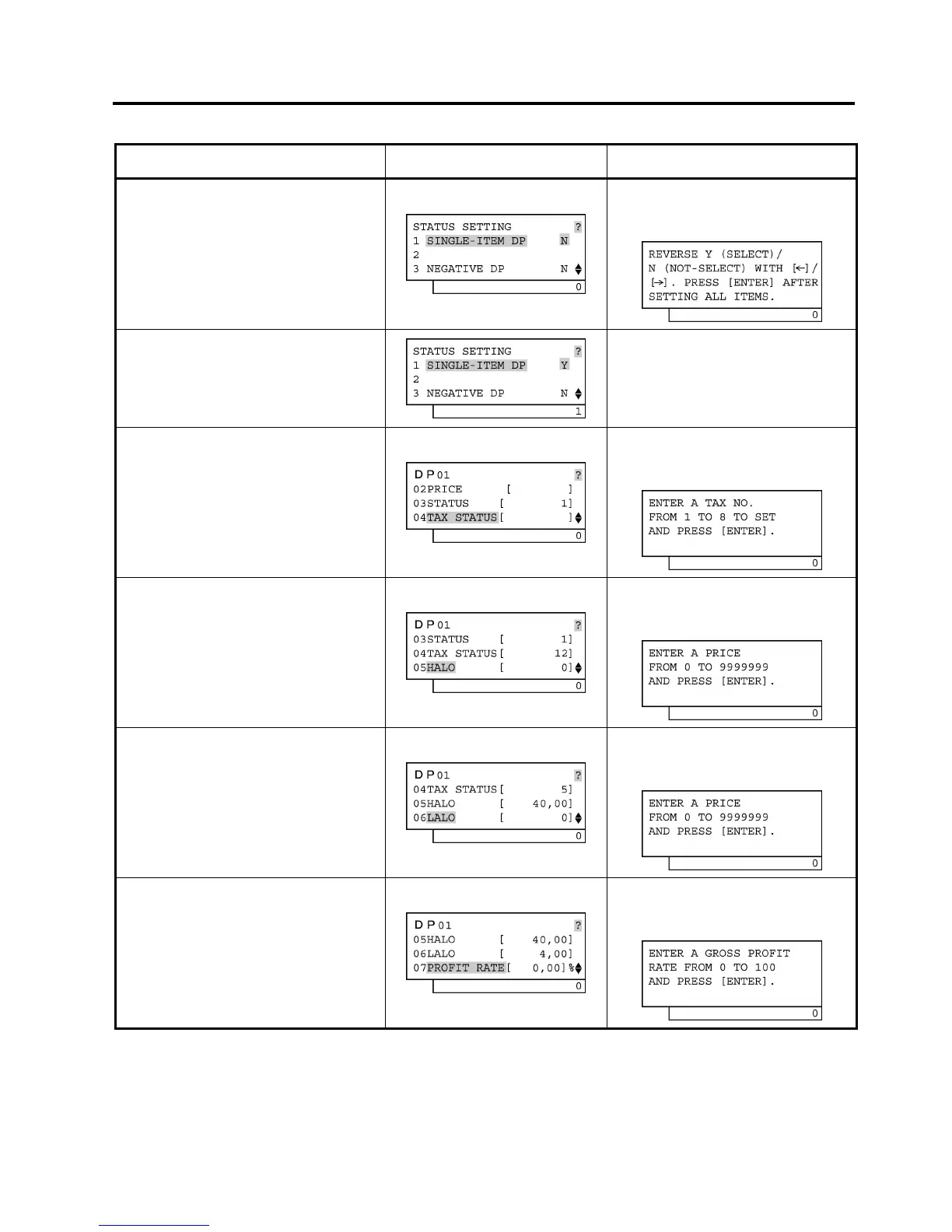
Operation LCD Display Remarks
Move the cursor on to a desired status
setting with the [↓] or [↑] key.
The [?] key depression results in that the
following guidance message appears on the
LCD display.
Depress the [→] key then the [Enter]
key.
(The status of SINGLE-ITEM DP is
selected.)
The [→] key depression results in that the
status is changed from N to Y.
Input 12, then depress the [Enter] key.
(VAT/Add-on tax statuses 1 and 2 are
set.)
The [?] key depression results in that the
following guidance message appears on the
LCD display.
Input 4000, then depress the [Enter]
key.
(High amount limit €40,00 is set.)
The [?] key depression results in that the
following guidance message appears on the
LCD display.
Input 400, then depress the [Enter]
key.
(Low amount limit €4,00 is set.)
The [?] key depression results in that the
following guidance message appears on the
LCD display.
Input 10, then depress the [Enter] key.
(Gross Profit Rate 10% is set.)
The [?] key depression results in that the
following guidance message appears on the
LCD display.
(continued on the next page)


 To Next Page
 Loading...







