2 Overview and Controls
This section provides information about front panel and rear panel. When you install
this series DVR for the first time, please refer to this part first.
2.1 Front Panel
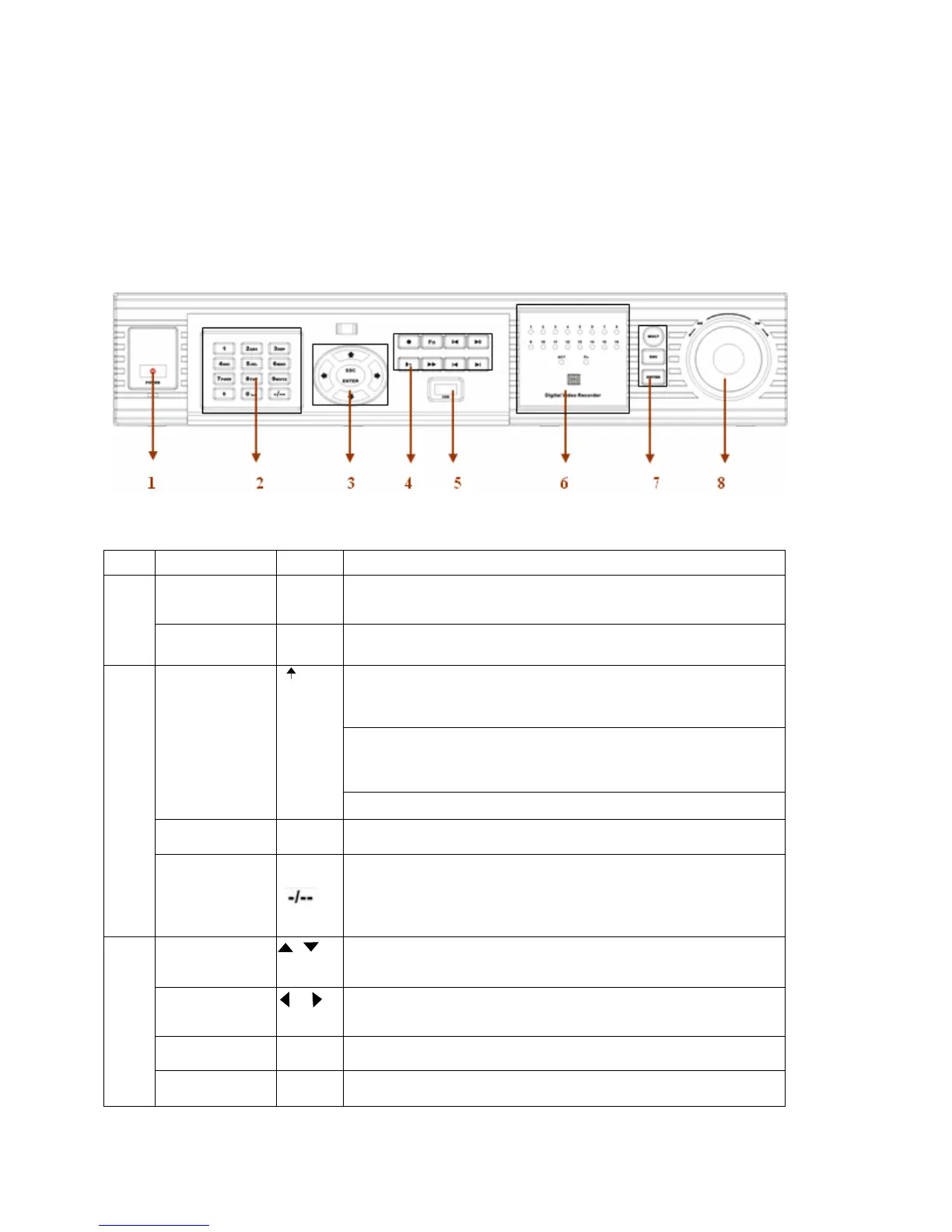
This series DVR has two different front panels. You can refer to Figure 2-1 and
Figure 2-2.
Figure 2-1
S/N Name Icon Function
Power button POWER Power button, press this button for three seconds to shut down DVR.
1
Power indication
light
Power indication light
In preview interface(no other menu), press this button for three seconds,
y
can switch between
TV/VGA output(HD1 series DVR has three modesLTV/VGA/60Hz LCD)
In textbox, click this button to switch between numeral,
English(Small/Capitalized),donation, Chinese
and etc.
Shift
Open/close tour
numeral keys 0-9 0-9 Input password, switch channel and input numeral.
2
Input numeral
more
than10
When you need to input numeral more than 9. You can follow the
steps below, click the first key number and then the next.
For example, input 123, click numeral 1 and then 2 and click
3(continuously).
Up/down
、
Activate current control, modify setup, increase/decrease numeral,
assistant function such as PTZ menu.
Left/right
、
shift current activated control,
When playback, click these buttons to control playback bar.
ESC ESC Close upper interface or controls.
3
Enter ENTER confirm operation
14



 To Next Page