Aligna
®
4D User Manual
69 / 84
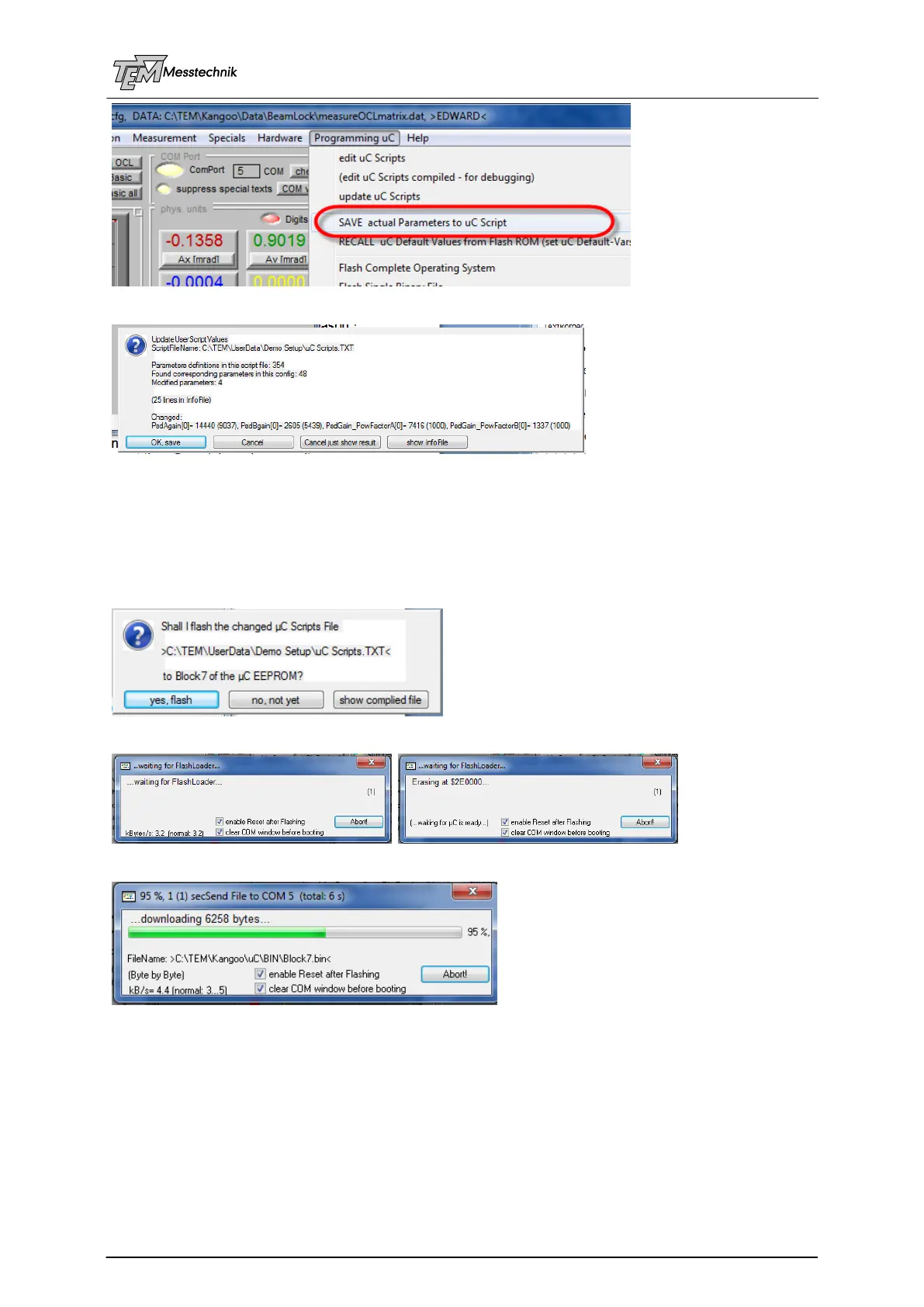
All changed parameters will be prompted:
If very many parameters are changed, not all are listed. However, you can observe the com-
plete list by button "show InfoFile".
Usually you will confirm: "OK, save". Now the changes parameter values will be updated in the
"uC Scripts" file.
Now the actual parameters are saved to the scripts file (located in the TEM / UserData folder
in the PC), and you are asked, if you want to flash the data permanently to the uC:
If you confirm, the FlashLoader is started, EEPROM block #7 will be erased
and block #7 (containing all individual parameters) is flashed to the EEPROM.
Then the uC reboots with the new values. Now it can work autarky from the PC.
10.4.3 Defining the Hardware-Specific Parameters
For some convenience, the script file can be automatically pre-processed, before it is sent to
the µC FlashROM. This pre-compilation can be controlled by "compiler directives" (starting
with a dot "."), and "compiler flags", for example ".Beams= 2". Therefore, the pre-compiler
can set many parameters automatically without the need of editing all related parameters
manually. (For example: The number of beams defines the number of motors, detectors, etc.



 To Next Page