Aligna
®
4D User Manual
83 / 84
14.1.3 Fixing the cable handles
It is important to connect the cable handles properly to avoid loosening due to vibrations or
unwanted pulling the cables.
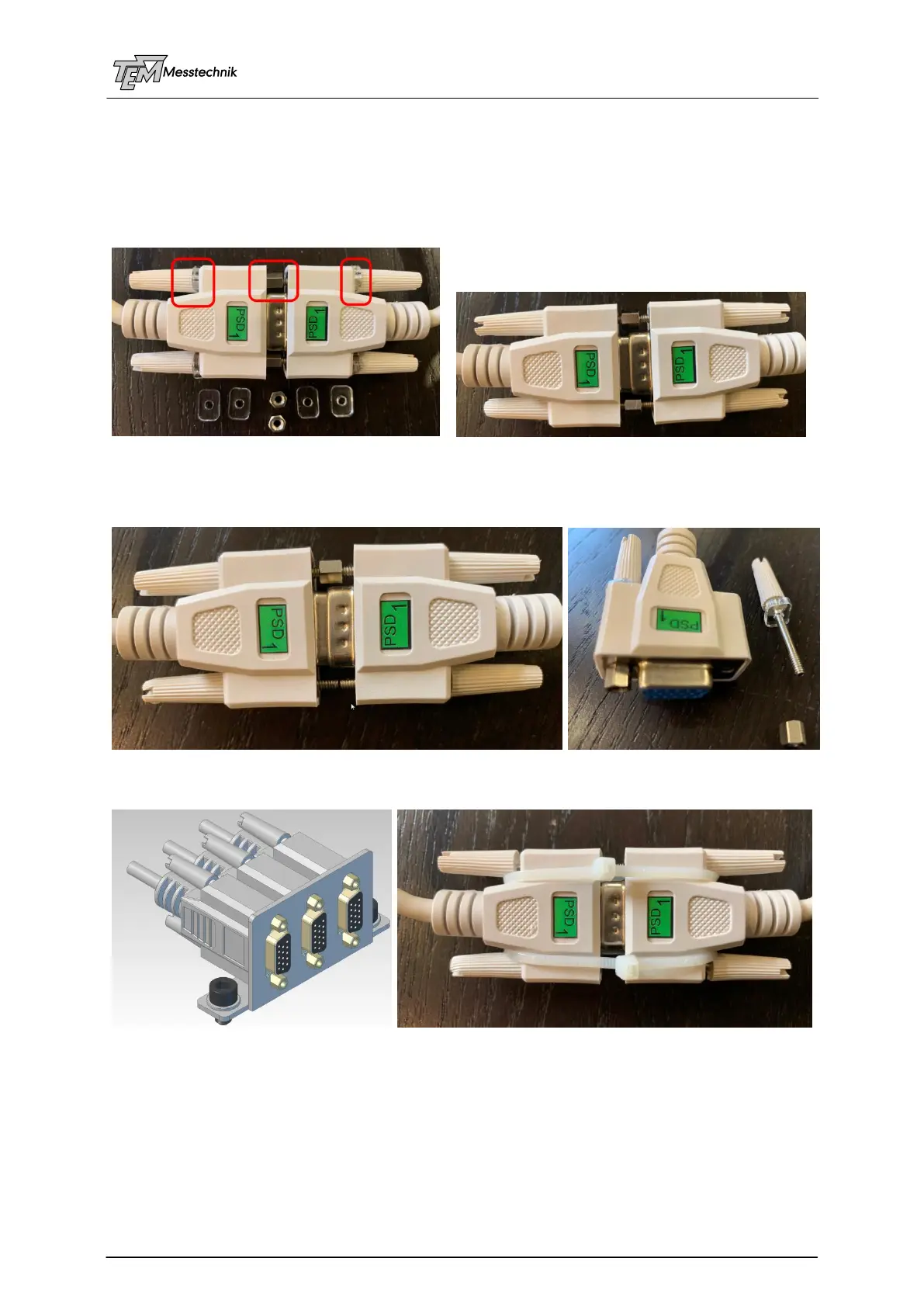
With the cables, you get delivered fitting UNC 4-40 hex-bolts (which are usual with computer
cables), and acrylic spacers. You should remove the knurled screw heads by simple screwing
out, and screw the acrylic spacers between knurled screw heads and connector handle.)
left: Connected HD 15 cables with spacers and hex-bolts, right: WITHOUT spacers: no good contact !!!
You can see the reason here: The screws are foreseen for connection into a device, not cable-to-cable. So the
screws are too long, they touch each other and avoid a proper traction force. If you insert the acrylic spacers (or any
other fitting spacers, like a stack of washers) the cables are fixed safely.
The bolts and spacers are also used to fix the handle-pairs to a mounting metal angle.
Alternatively, you can also use a pair of simple wire straps for fixing:



 To Next Page