Receiver and File Maintenance
NET-G3A Operator’s Manual
4-2
Downloading Data Files to a
Computer
1. Connect your receiver and computer. See “Connecting the
Receiver and a Computer” on page 2-15 for information about
this procedure.
PC-CDU automatically appears with the Connection
Parameters dialog box open. If this dialog box is not open, then
click FileFile Manager on the PC-CDU main page.
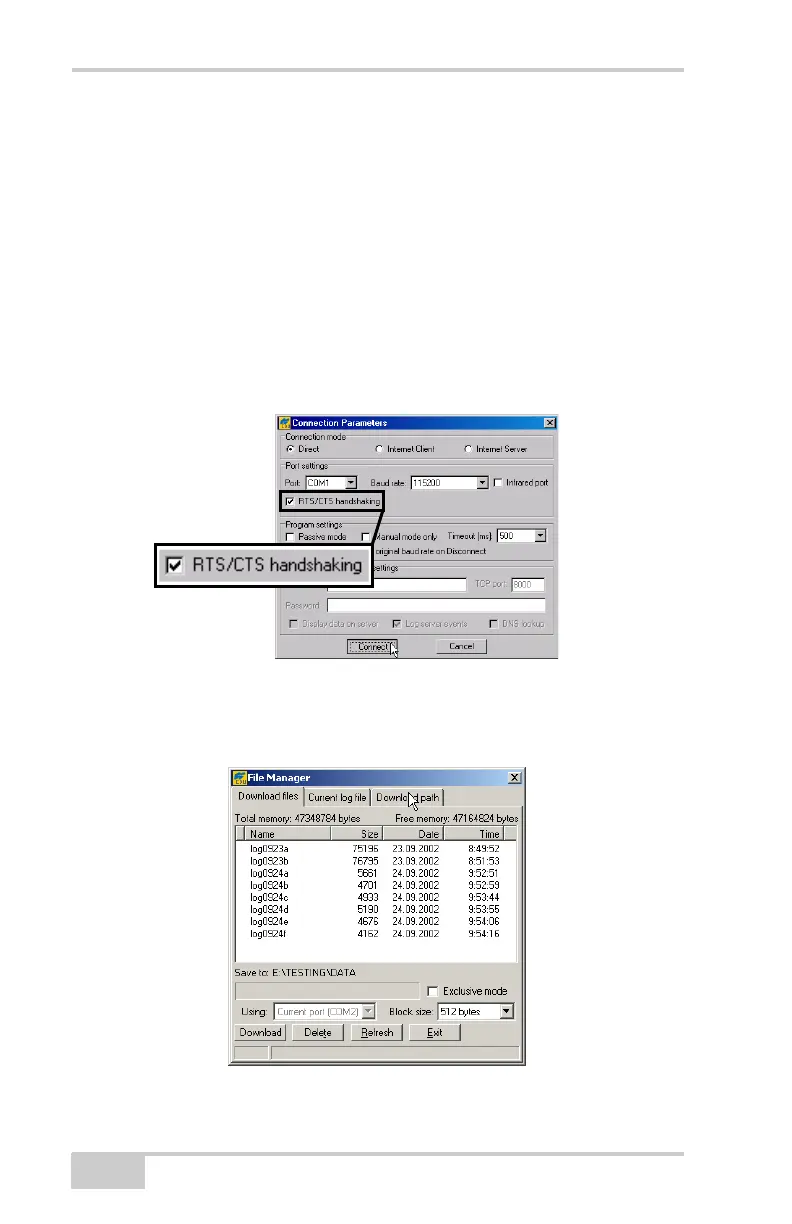
2. On the Connection Parameters dialog box, enable RTS/CTS
handshaking and then click Connect (Figure 4-1 on page 4-2).
Figure 4-1. Connection Parameters – RTS/CTS Handshaking
3. Click FileFile Manager, and then click the Download path
tab on the File Manager dialog box (Figure 4-2).
Figure 4-2. Find Files to Download
Net-G3A_OM_Book.book Page 2 Thursday, May 14, 2009 8:49 AM



 To Next Page