16
1.BEFORE USING FAX
1.DESCRIPTION OF EACH COMPONENT (Cont.)
1
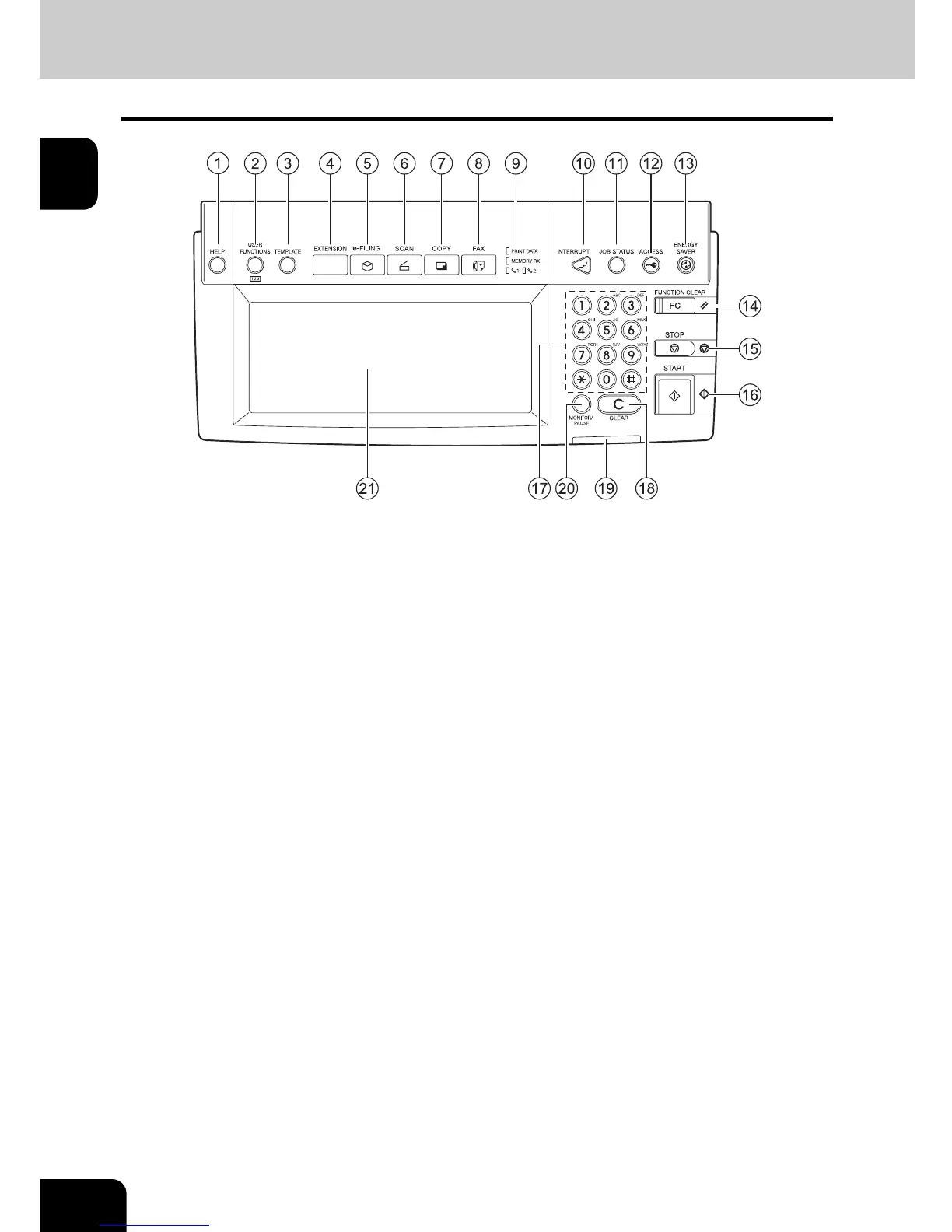
Control Panel
1 : [HELP] button
When pressing this button, appropriate operation procedures are displayed.
2 : [USER FUNCTIONS] button
Use this button when setting the address book locations, department codes and changing the default
settings.
3 : [TEMPLATE] button
Use this button to store and recall the various settings which are frequently used for copy, Fax, and scan
functions.
4 : [EXTENSION] button
This is the button to extend functions in the future. It is invalid at present.
5 : [e-FILING] button
Use this button to access the saved image data.
6 : [SCAN] button
Press this button to use the scanning function.
7 : [COPY] button
Press this button to use the copy function.
8 : [FAX] button
Press this button to use the Fax function.
9 : PRINT DATA/MEMORY RX/Line 1, 2
If these lamps light, they show the following status.
PRINT DATA: E-mail, Internet Fax or data to be printed is being received
MEMORY RX: Fax is being received
Line 1, 2: Currently used telephone line(s)



 To Next Page
 Loading...




