42
2.SENDING A FAX
5.SPECIFYING THE REMOTE FAX (Cont.)
2
Searching by ID Number
When selecting the remote Faxes registered in the address and group by searching by the ID number
immediately displays the screen including the searched-for ID number.
1
Place the original(s).
- "Setting Originals" Page 29
2
Press the [FAX] button on the control
panel.
3
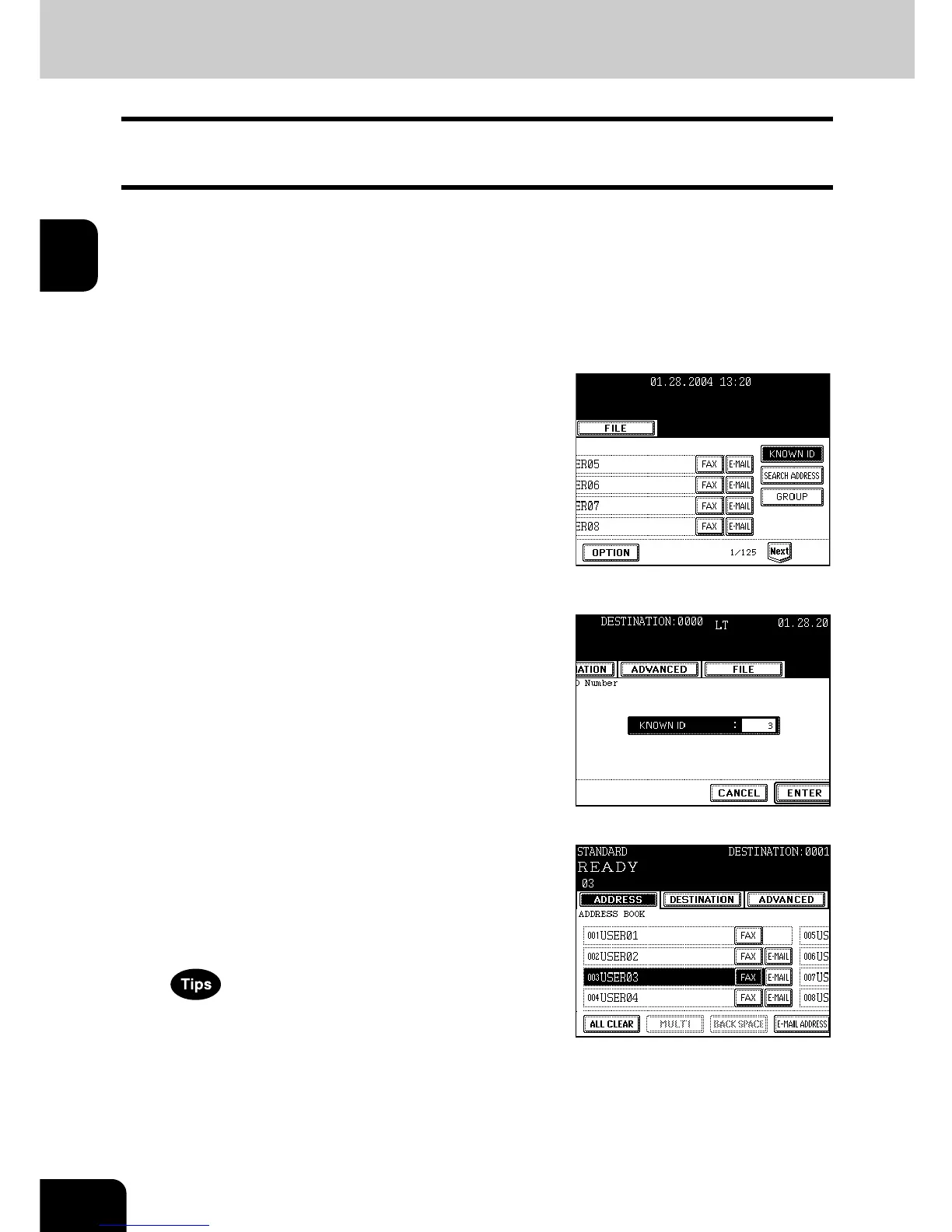
Press the [ADDRESS] button to enter the
address menu, then the [KNOWN ID]
button.
4
Key in the desired ID number, and press
the [ENTER] button.
- You can key in the number within the range of 1 to 1000.
5
Press the button for the remote Fax that
you want to send to.
- Each screen displays 8 destinations.
To view destinations not displayed on the screen, press the [Prev]
or [Next] button to switch the screens.
- To continue searching by ID number, press the [KNOWN ID]
button.
- To continue searching by address ("Searching by Address
(Search Address)" Page 43), press the [SEARCH ADDRESS]
button.
6
Press the [START] button.



 To Next Page
 Loading...




