Printed in the Federal Republic of Germany TR-Electronic GmbH 2008, All Rights Reserved
06/27/2017 TR - ECE - BA - DGB - 0073 - 07 Page 149 of 155
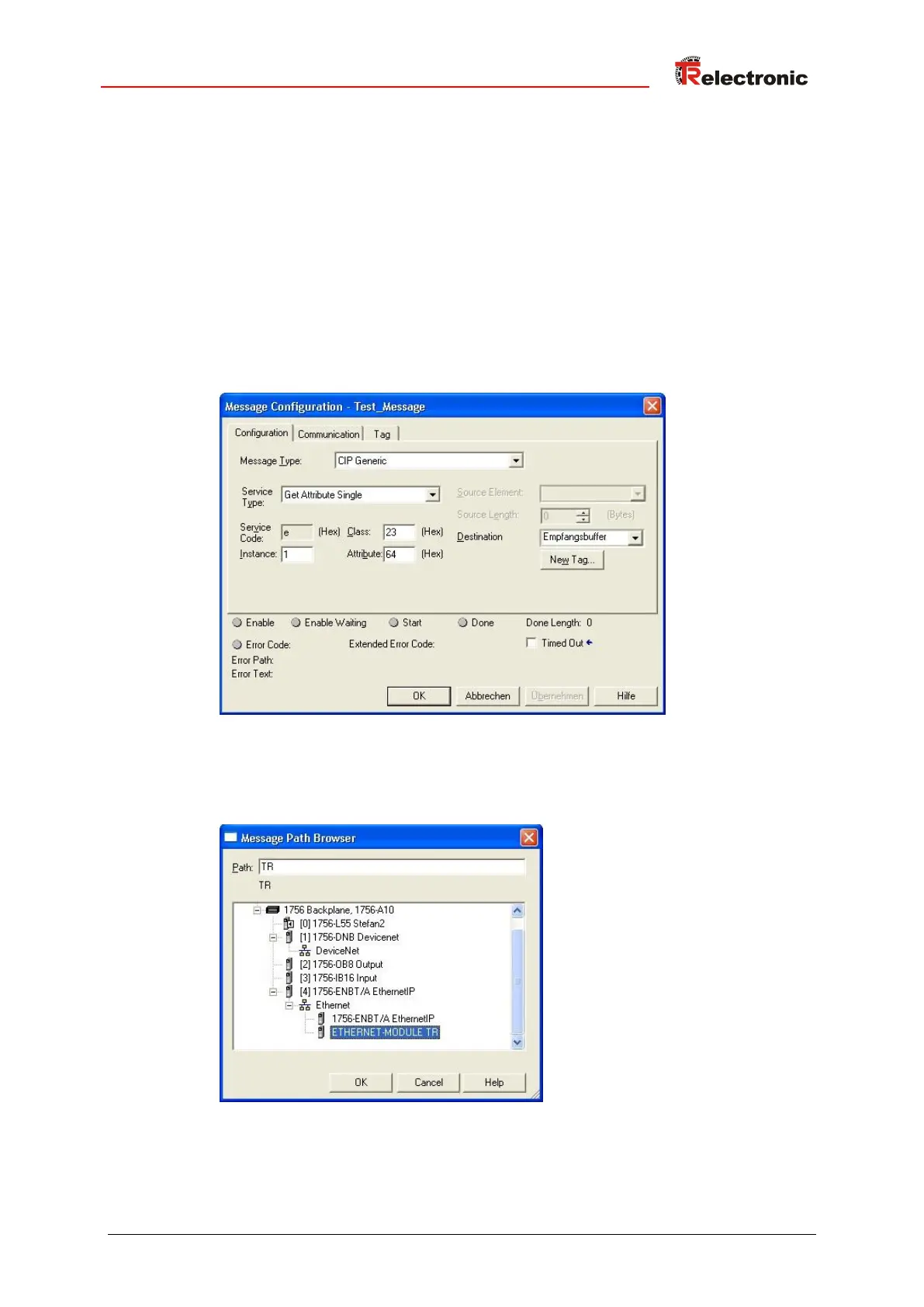
5. Configure the message in the Message Configuration dialog box -->
Configuration tab as follows. Following example reads the position value, attribute
0x64 Position Value, from the Position Sensor Object 0x23:
● Message_Type: CIP Generic
● Service Type: desired service, here e.g. Get Attribute Single to read a
single attribute.
● Service Code: 0x0E is the code for the Get Attribute Single service
● Instance: 1 = Position Sensor Object instance
● Class: 23 = Position Sensor Object
● Attribute: 64 = Position value
● Destination: created variable for the receive data
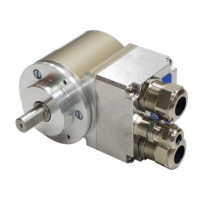
6. Bind the configured message with the created module in the Message
Configuration dialog box --> Communication tab:










 To Next Page