78
Loss of battery charge may be caused by ambient tem-
perature, ignition OFF current draw, corroded terminals,
self discharge, frequent start/stops, and short engine run
times. Frequent winch usage, snowplowing, extended
low RPM operation, short trips, and high amperage
accessory usage are also reasons for battery discharge.
Maintenance Charging
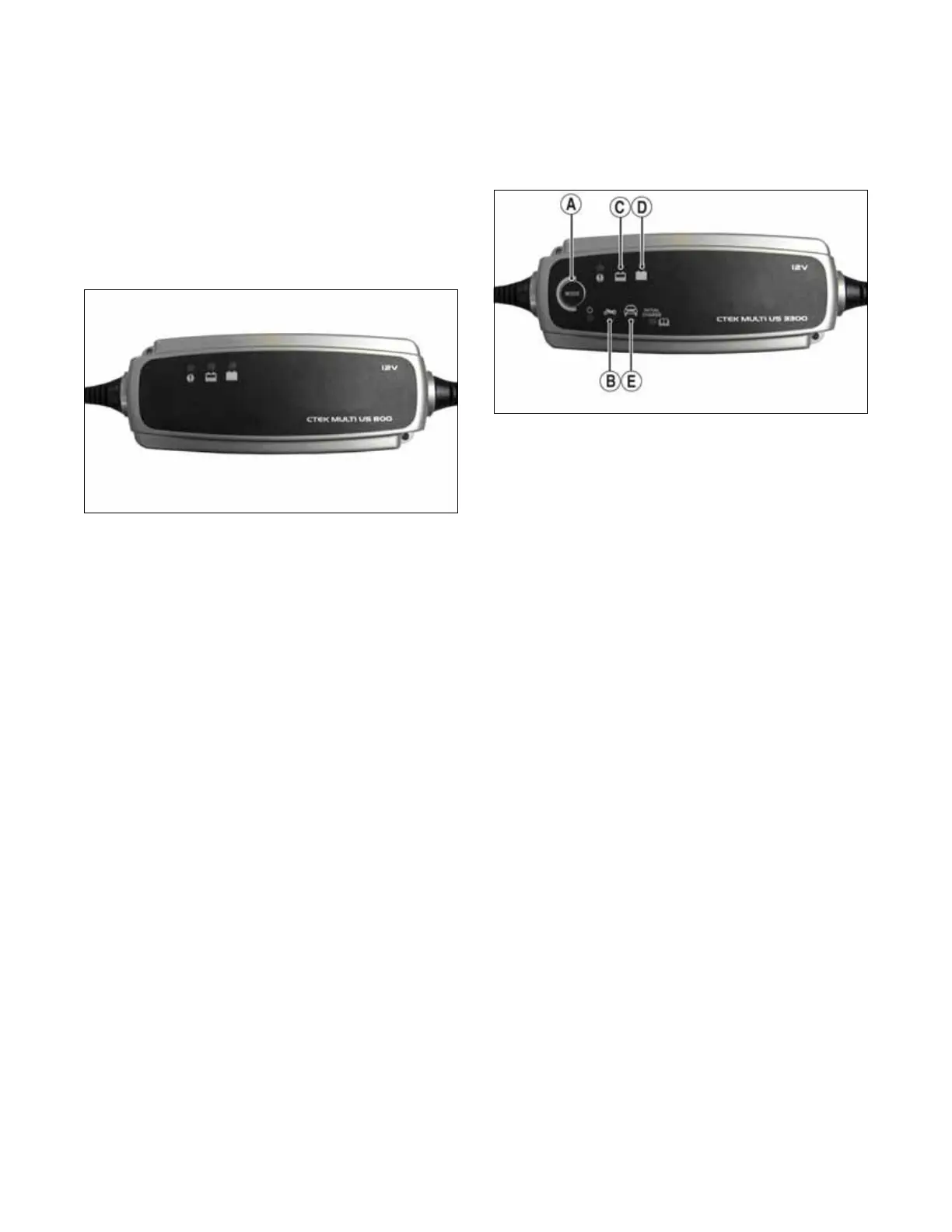
NOTE: It is recommended to use the CTEK Multi
US 800 or the CTEK Multi US 3300 for battery main-
tenance charging. Maintenance charging is required
on all batteries not used for more than two weeks or
as required by battery drain.
800E
1. When charging a battery in the vehicle, be sure the
ignition switch is in the OFF position.
2. Clean the battery terminals with a solution of baking
soda and water.
NOTE: The sealing strip should NOT be removed
and NO fluid should be added.
3. Be sure the charger and battery are in a well-venti-
lated area. Be sure the charger is unplugged from the
110-volt electrical outlet.
4. Connect the red terminal lead from the charger to the
positive terminal of the battery; then connect the
black terminal lead of the charger to the negative ter-
minal of the battery.
NOTE: Optional battery charging adapters are
available from your authorized dealer to connect
directly to your vehicle from the recommended char-
gers to simplify the maintenance charging process.
Check with your authorized dealer for proper instal-
lation of these charging adapter connectors.
5. Plug the battery charger into a 110-volt electrical
outlet.
6. If using the CTEK Multi US 800, there are no fur-
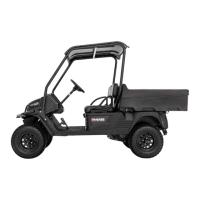
ther buttons to push. If using the CTEK Multi US
3300, press the Mode button (A) at the left of the
charger until the Maintenance Charge Icon (B) at
the bottom illuminates. The Normal Charge Indica-
tor (C) should illuminate on the upper portion of the
battery charger.
NOTE: The maintainer/charger will charge the bat-
tery to 95% capacity at which time the Maintenance
Charge Indicator (D) will illuminate and the main-
tainer/charger will change to pulse/float maintenance.
If the battery falls below 12.9 DC volts, the charger
will automatically start again at the first step of the
charge sequence.
3300A
NOTE: Not using a battery charger with the proper
float maintenance will damage the battery if con-
nected over extended periods.
Charging
NOTE: It is recommended to use the CTEK Multi
US 800 or the CTEK Multi US 3300 for battery main-
tenance charging.
1. Be sure the battery and terminals have been cleaned
with a baking soda and water solution.
NOTE: The sealing strip should NOT be removed
and NO fluid should be added.
2. Be sure the charger and battery are in a well-venti-
lated area. Be sure the charger is unplugged from the
110-volt electrical outlet.
3. Connect the red terminal lead from the charger to the
positive terminal of the battery; then connect the
black terminal lead of the charger to the negative ter-
minal of the battery.
4. Plug the charger into a 110-volt electrical outlet.
5. By pushing the Mode button (A) on the left side of
the charger, select the Normal Charge Icon (E). The
Normal Charge Indicator (C) should illuminate on
the upper left portion of the charger.
6. The battery will charge to 95% of its capacity at
which time the Maintenance Charge Indicator (D)
will illuminate.
NOTE: For optimal charge and performance, leave
the charger connected to the battery for a minimum 1
hour after the Maintenance Charge Indicator (D) illu-
minates. If the battery becomes hot to the touch, stop
charging. Resume after it has cooled.
7. Once the battery has reached full charge, unplug the
charger from the 110-volt electrical outlet.
NOTE: If, after charging, the battery does not per-
form to operator expectations, bring the battery to an
authorized dealer for further troubleshooting.



 To Next Page