INSTRUMENTS
53
Trip Meters
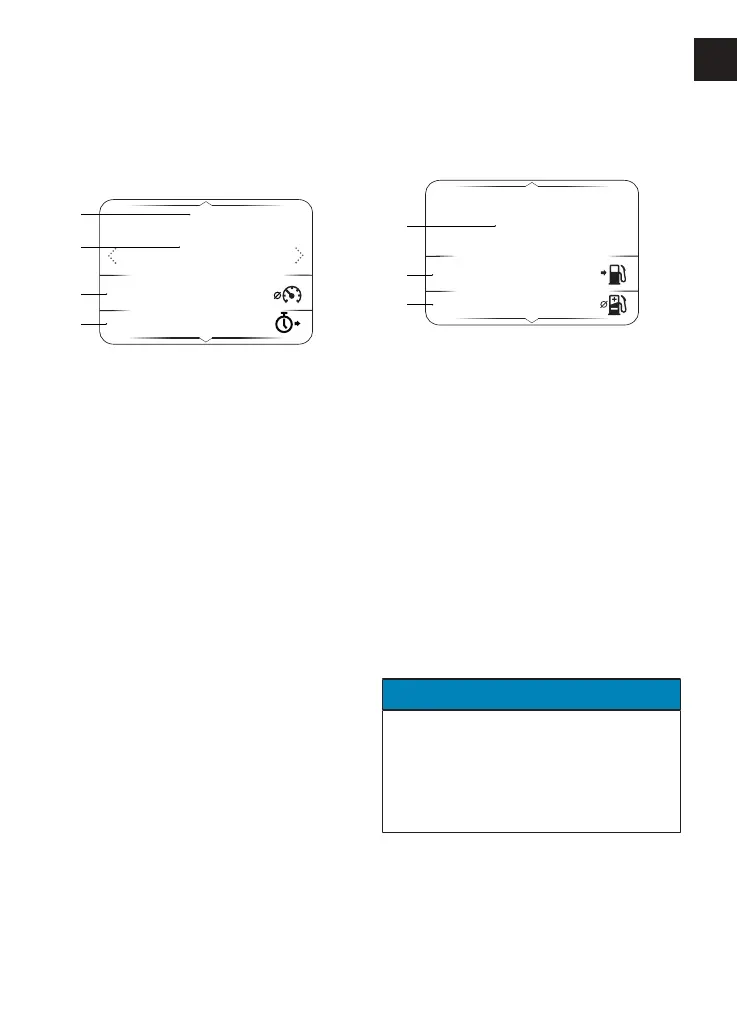
There are two trip meters that can be
accessed and reset in the information
tray.
TRIP 1
mi
29
35.0
09.25
mph
1
2
3
4
1. Trip meter 1 or 2
2. Duration of trip
3. Average speed
4. Time taken to complete trip
To view and clear a specific trip meter:
▼ Press the Left/Right button until the
required trip meter is shown.
▼ Press and hold the Select button to
manually reset the selected trip
meter.
For more information on trip meters, see
page64.
Fuel Status
The Fuel Status display shows fuel
consumption information.
FUEL STATUS
mpg
35.5
186
069
mi
1
2
3
mpg
1. Instantaneous fuel consumption
2. Range to empty
3. Average fuel consumption
Instantaneous Fuel Consumption
An indication of the fuel consumption at
an instant in time. If the motorcycle is
stationary, '-.--' will be shown.
Range to Empty
This is an indication of the predicted
distance that can be travelled on the
remaining fuel in the tank.
Average Fuel Consumption
This is an indication of the average fuel
consumption. After being reset, '0.0' will
be shown until 0.1 miles/km has been
covered.
NOTICE
After refuelling, the fuel gauge and
range to empty information will be
updated only while riding the
motorcycle. Depending on the riding
style, updating could take up to five
minutes.










 To Next Page