GENERAL INFORMATION
78
To adjust the brake lever:
▼ Push the brake lever forward and
turn the adjuster wheel to align one
of the numbered positions with the
arrow mark on the lever holder.
▼ The distance from the handlebar grip
to the released brake lever is
shortest when set to number five
and longest when set to number one.
Clutch Lever
The clutch lever has a fixed span. It is
not adjustable.
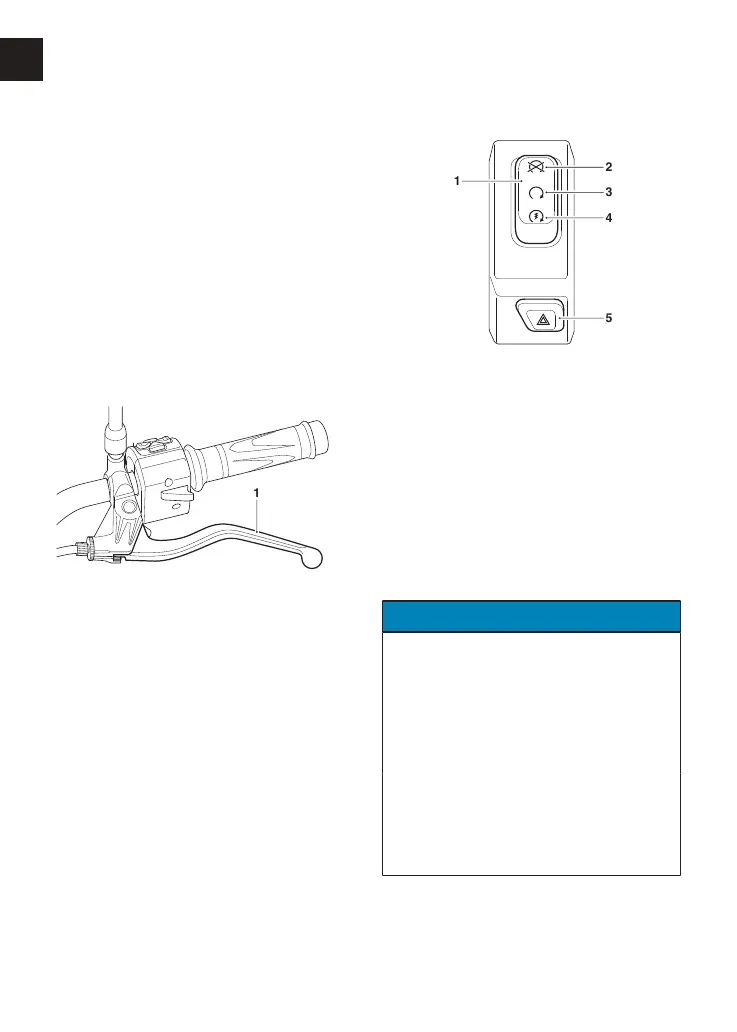
1. Clutch lever (Trident shown)
Right Handlebar Switches
1. Engine start/stop switch
2. STOP position
3. RUN position
4. START position
5. Hazard warning light button
STOP Position
The STOP position is for emergency use.
If an emergency arises which requires
the engine to be stopped, move the
engine start/stop switch to the STOP
position.
NOTICE
Although the engine stop switch stops
the engine, it does not turn off all the
electrical circuits and may cause
difficulty in restarting the engine due
to a discharged battery. Ordinarily,
only the ignition switch should be
used to stop the engine.
Do not leave the ignition switch in the
ON position unless the engine is
running as this may cause damage to
electrical components and will
discharge the battery.









 To Next Page