DocNo.FM0410issueM‐1Page21
14.INTERCOMUNITTESTMODE
TheintercomunitTestModeallowsallinputdevicestobetestedonaper‐flatbasiswithoutputtingacallonthesystem.
OnceinTestModetheintercomwillbeepaseachdeviceisactivated,thesystemprinterwilllogeachtestwiththeflat
number,devicetype,
timeanddate.
TheintercommustbeinaquiescentstatetoentertheTestMode,i.e.notinprivacymode,nomessagewaiting,noalarm
callinprogressandnotawaitingExtracarecancellation.
TO ENTER TEST MODE
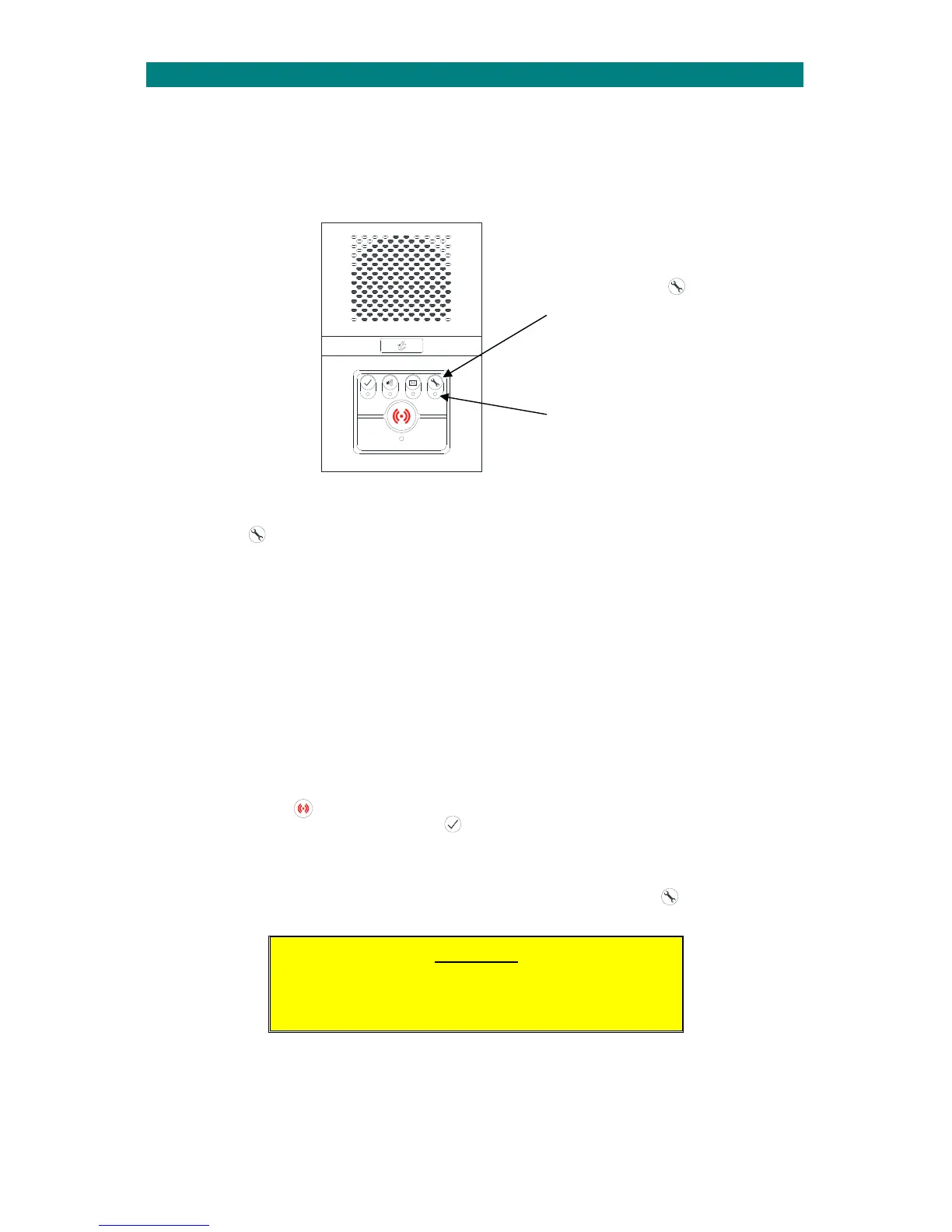
Pressandholdthebuttonforabout5secondsuntiltheintercombeepsonce‐thenreleasewithin2seconds orthe
TestModewillnotbeenabled.
WhentheintercomisintestmodethewhiteLEDwillflashanda7toneascendingscalewillplayonce.
Uponactivationofeachdevicetheintercomwillbeeptwiceconfirmingthatthecontrollerhasreceivedthetestalarm.
Eachtestalarmisprintedand/orrecordedintheManager’sPanel“EventLog”.
OnceinTestModecertainconditionshavebeensettocaterfortheactivationofPIR’sandradiodevices.Theseareas
follows;
Radiodevicesshouldbetestedfirst‐onceanyotherhardwireddevice(excludingthePIR)isactivatednofurtherradio
deviceswillbeloggedastested.
HardwiredPIR’sareonlyreportedevery30seconds‐thisistoallowmovementthroughtheaccommodationtogettothe
nextdevicewithoutre‐triggeringthePIR.
WhenaceilingpullcordisactivatedallpullcordreassuranceLED’swillbeilluminatedfor2seconds.
TO TURN THE ALARM BUTTON “GLOW” OFF
Instandbymodethealarmbuttonwillnormallyglowdimredandilluminatebrightredwhenanalarmcallismade.
Thestandbyglowcanbeturnedon/offbypressingthebutton.Notethealarmbuttonwillalwaysilluminatebrightred
whenanalarmcallismade–thiscannotbe
turned‐off.
TO EXIT TEST MODE
TheTestModedurationissetat10minutesoritcanbeterminatedatanytimebypressingthebuttononceagain.
Theintercomwillthenplay4descendingtones.
IMPORTANT
Only1intercomcanbeinTestModeatanyonetime.
TestModecannotbeenteredviaaRemoteIntercom.
PRESSANDHOLDTHEBUTTON
FORABOUT5SECONDSUNTILTHE
INTERCOMBEEPSONCETHEN
RELEASE....
7ASCENDINGTONESWILLSOUND
ANDTHELEDWILLFLASHWHITE
WHENTESTMODEISENABLED


 To Next Page