DocNo.FM0410issueM‐1Page34
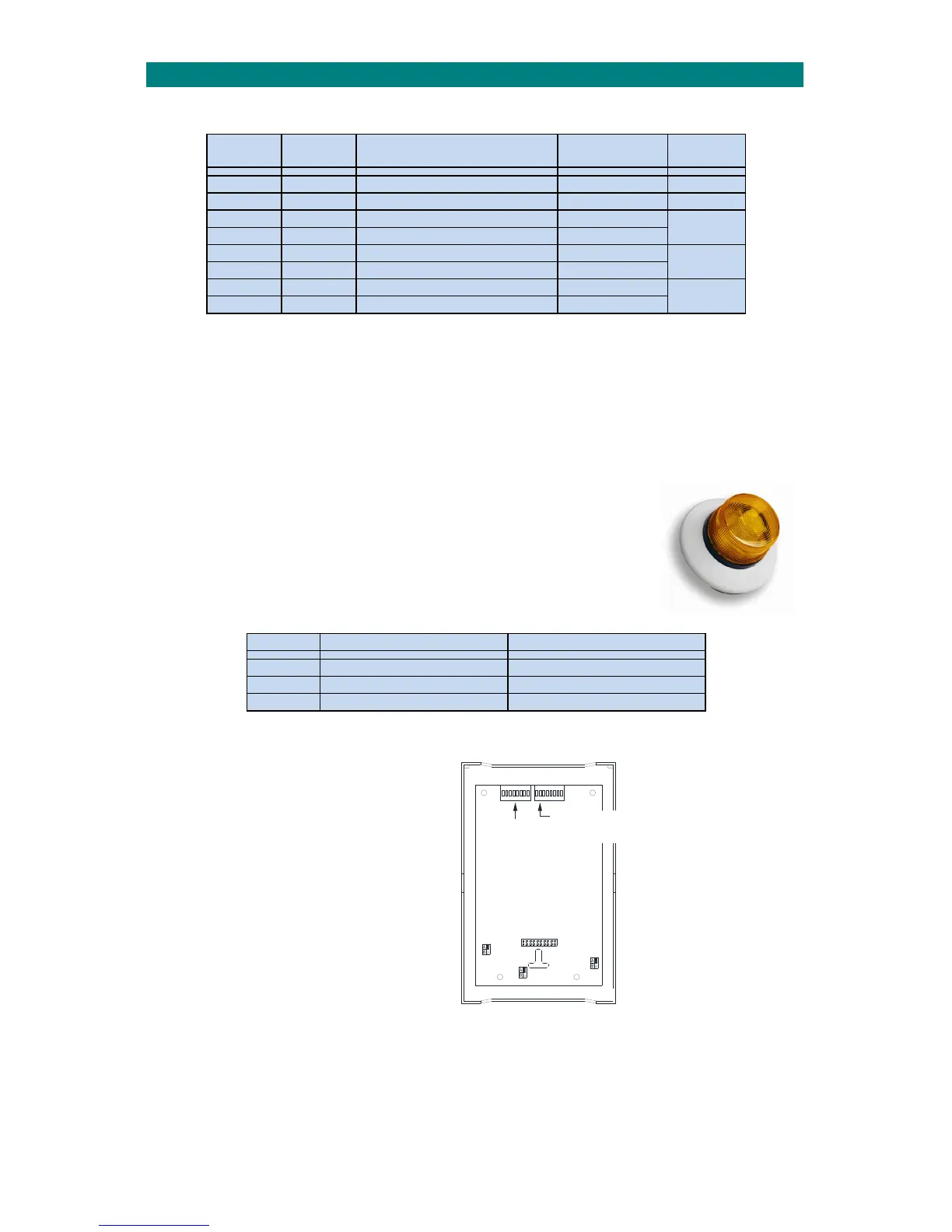
FIT LK1, LK2 & LK3 ALL IN POSITION 'A'
WHEN A DOOR ENTRY TELEPHONE
IS CONNECTED
SET
BINARY
ADDRESS
1
SET OPTIONS DIL SW2
ON WHEN A DOOR ENTRY
TELEPHONE I S CONNECTED
2345678
ON
12345678
ON
LK2
(ALL OTHERS OFF)
LK3
LK1
22.DOORENTRYTELEPHONEINSTALLATION
TERMINATION
Intercom
Terminal
Telephone
Terminal
Function WireColour Cable
N/A ENABLE dualhandsetenableoutput N/A N/A
N/A STROBE strobe‐veoutput N/A N/A
13 C1 audiotodoorsignal white/blue 1pair
CW1308
14 C2 audiotophonesignal blue/white
18 SDATA data white/green 1pair
CW1308
19 SCLK clock green/white
0V 0V 0Vsupplyreference white/orange 1pair
CW1308
15 10V 10VDCsupply&strobe+ve orange/white
Note,theAdventxtcontrollermustberesetforittodetectatelephonehandsethasbeenconnected.
DUAL HANDSETS
Normallyonlyonetelephonewillbeconnectedperchannel,ifaflatrequiresasecondhandsetthenbothtelephones
shouldbeZFT221DualHandsetmodels.Alternatively,dualhandsetinterfaceboards(P/No.A00438)mustbefittedinboth
ZFT220telephones.ThesecondhandsetMUSThavelinkLK3movedtoposition“B”(slave)‐itisnotpossibletohavemore
than2telephonesperflat.ForconnectiondetailsseeTynetecDrgNo.ZXT100sheet4.
Note:theRESETbuttonontheAdventxtcontrollermustbepressedforittodetectasecondhandsethasbeenconnected.
OPTIONAL HARD OF HEARING STROBE
Ahardofhearingstrobelight(P/No.ZSL041)canbeconnectedacrossthetelephone
“STROBE”(‐ve)and10V(strobe+ve)terminals.
Note;amaximumof2strobesperflatispermitted.
TELEPHONE LINK SETTINGS
LinksLK1&LK2shouldalwaysbesetinthe“SDATA”&“SCLK”positionsonAdventxtsystems.
LinkNo. LinkPosition“A” LinkPosition“B”
LK1 notfitted SDATA
LK2 notfitted SCLK
LK3 MASTER(normal) SLAVE(2ndhandsetonly)
LinkLK3mustbeinposition“A”(master)whenonlyonetelephoneisfittedperflat.
INTERCOM DIL SW & LINK SETTINGS
Whenadoorentrytelephoneisconnectedtoan
intercommakethefollowingsettings;
Setthe“Options”DILswitchnumber2“ON”
SetLinksLK1/LK2/LK3inposition“A”
Note:thecleancontactrelayoutputisnot
availablewhenatelephoneisconnected.
PROGRAMMING
TheSpeechTime,LockReleaseTime,PrivacyTime,No.ofRingCyclesandDoorOpenLEDmustallbeset/enabledinthe
“DoorEntrySetup”programming‐seetheAdventxtProgrammingManual(TynetecDocNo.FM0411).


 To Next Page