DocNo.FM0410issueM‐1Page37
23.COMBINEDINTERCOMINSTALLATION
HARD OF HEARING STROBES & VOLUME
Twohardofhearingstrobescanbeconnectedtoa combinedintercom.Anamberstrobe(P/No.ZSL041)canbeconnected
toindicateadoorentrycallandabluestrobe(P/No.ZSL046)canbeconnectedtoindicatewhenthewardeniscalling.
Note;amaximumof2strobesperflatispermitted.SeetheAdventxtwiringdiagramDrgNo.ZXT100sheet5.
ThevolumeofspeechatthecombinedintercomcanbeincreasedusingVR1.
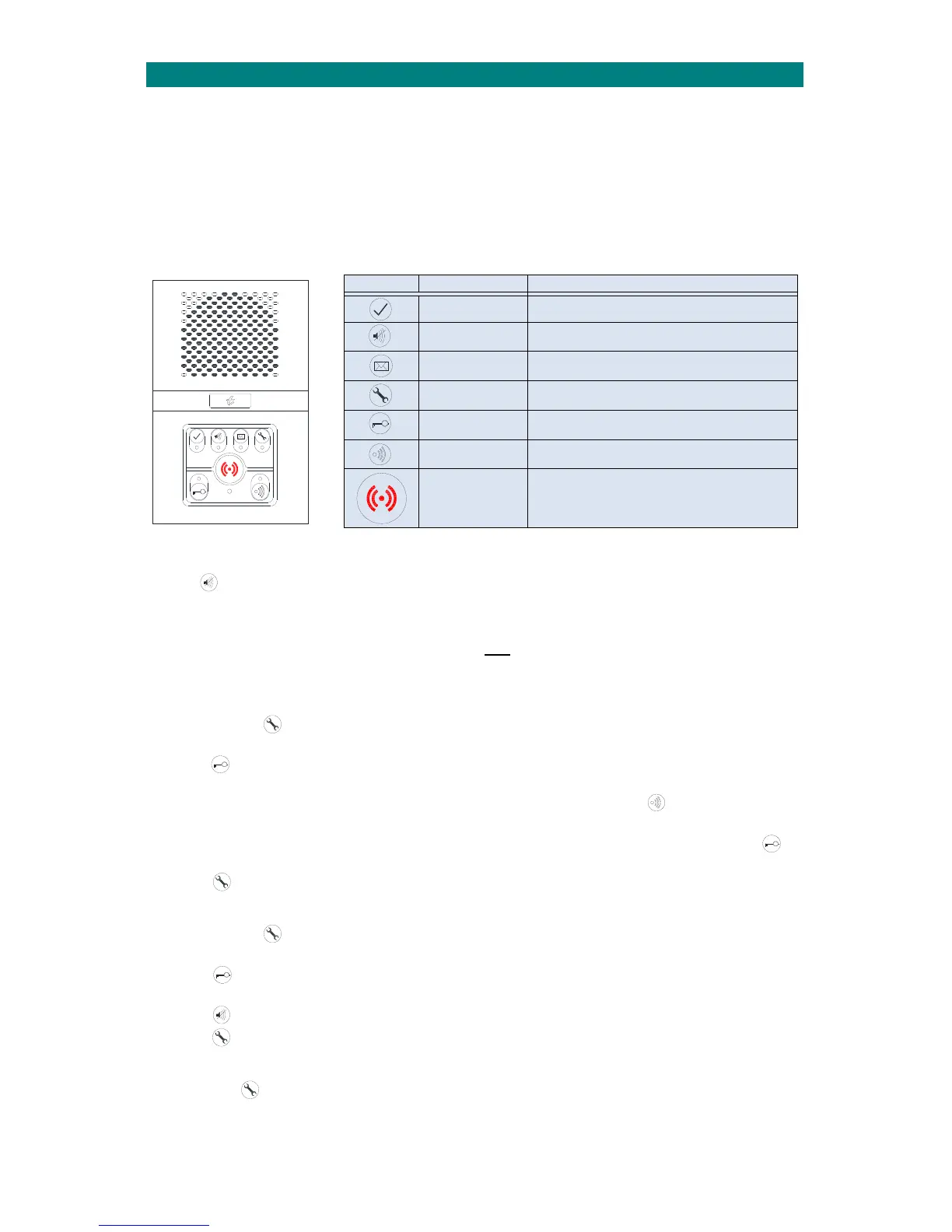
BUTTON FUNCTIONS AND LED COLOURS
TheLED’sonthefrontofthecombinedintercomunitindicatethefollowingmodes;
PRIVACY MODE
PressthePrivacybuttononcetoselectprivacymode,theLEDwillilluminateSTEADYAMBER.TheManagercannot
heartheresidentandtheresidentwillnotreceiveanydoorentrycallswhenprivacymodeisselected.PressthePrivacy
buttonagaintoturnprivacymodeoff.Privacycanoperateasasimpleon/offactionorwithatimedauto‐reset.
Theprivacyauto‐resettimemustbesetinthe“DoorEntrySetup”programming‐seetheAdventxtProgrammingManual
(TynetecDocNo.FM0411).Note:theprivacysettingappliestobothdoorentryandwardencallmode.
LEARNING THE OPTIONAL REMOTE CONTROL
TheAdventxtsystemmustbeoperationalbeforeattemptingtolearntheRemoteControl.
1.PressandholdtheTestModebutton for5secondsuntiltheunitbeepsonce,releasethebuttonandanupward
seriesoftoneswillplay,theLEDwillilluminate
STEADY WHITE.
2.PresstheLockReleasebuttononce,anupwardseriesoftoneswillplayandtheLEDilluminatesSTEADYGREEN.
Younowhave15secondstolearntheRemoteControl‐upto2Remotescanbelearnedpercombined intercom.
3.PresstheOPENbuttonon theRemoteControl,anupwardseriesoftoneswillplayandtheSpeak/Listenbutton
AMBERLEDwillflashonce.IftheRemoteisalreadyregisteredadownwardseriesoftones willbeheard.
4.LearnmodewillbeexitedafterthesecondRemoteislearned,orwhenthe15secondperiodtimes‐out,orifthe
Lockbuttonontheintercomispressed.Adownwardseriesoftoneswillbeheard.
5.PresstheTestModebuttononcetoexit.
DELETING THE REMOTE CONTROL
1.PressandholdtheTestModebutton for5secondsuntiltheunitbeepsonce,releasethebuttonandanupward
seriesoftoneswillplay,theLEDwillilluminateSTEADY WHITE.
2.PresstheLockReleasebuttononce,anupwardseriesoftoneswillplayandtheLEDilluminatesSTEADYGREEN.
Younowhave15secondstodeletetheRemoteControls.
3.PressthePrivacybuttononce,adownwardseriesoftoneswillplayandallRemoteControlsaredeleted.
4.PresstheTestModebuttononcetoexit.
REMOTE CONTROL BATTERY LOW WARNING
IftheTestModeLEDisFLASHING WHITE thenthebatteryintheRemoteControlneedsreplacing.
ThelowbatterywarningwillcontinueuntilthebatteryisreplacedandtheRemoteControlisused.
RemovethescrewfromtherearoftheremotecontrolcaseandreplacetheCR20323VLithiumcell.
Button Function LEDColour/Pattern
I’mOK FlashingGreen=I’mOKperiod
Privacy SteadyAmber=PrivacyModeselected
PlayMessage FlashingBlue=MessageWaiting
TestMode
White=unitinwardensTestMode
Flashing White=RemoteControlbatterylow
DoorOpen
SteadyGreen=DoorLockReleased
FlashingGreen=DoorLeftOpen
Talk(DoorEntry)
FlashingAmber=DoorEntry“SpeaktoDoor”mode
SteadyAmber=DoorEntry“ListentoDoor”mode
Alarm
DimRed=normaloperatingmode
SteadyBrightRed=AlarmCallinprogress
FlashingBrightRed=AwaitingExtracarecancellation


 To Next Page