DocNo.FM0410issueM‐1Page39
ADVENT XT CONTROLLER
ZXT100
ZXT330
ADVENT XT LINE SELECTOR
25.BTLINESELECTORINSTALLATION
TheBTLineSelector(P/No.ZXT330)canbeconnectedtothe
AdventxtcontrollerifaseconddedicatedBTlineoraGSM
cellularterminalisspecifiedforfailsafeoperation.
Iftheprimarylinefailsthesecondarylinewillautomaticallybe
selected,oncetheprimarylineisrestoredthesystemwill
automaticallyswitchback.
INSTALLATION
TheBTLineMonitorUnitishousedinawallmountedABSenclosure;85x170x35mm(HxWxD).
TERMINATION
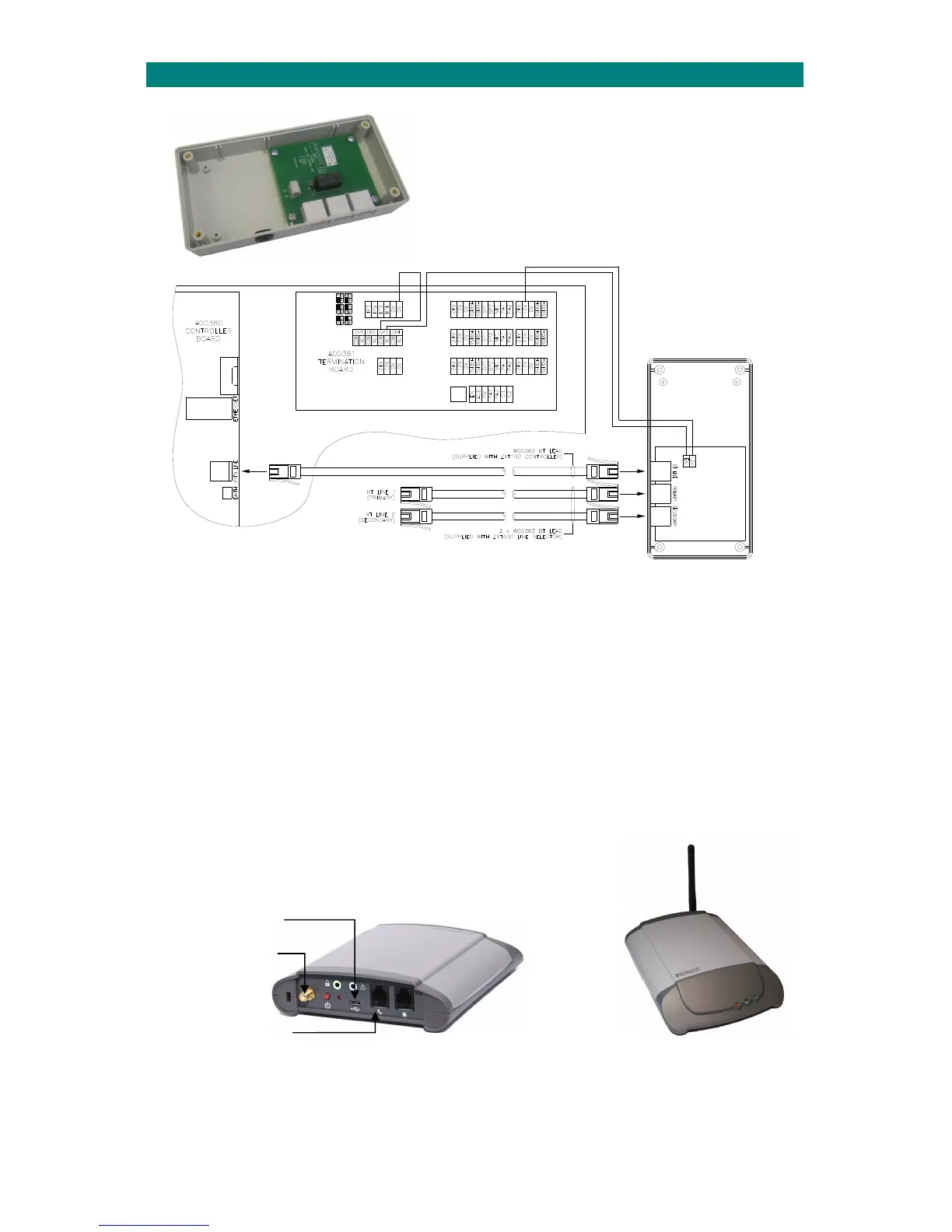
ConnecttheBTLINEsockettotheAdventxtcontrollerPSTNLINEsocketusingtheBTleadprovided.
Connectthe12V&ENterminalstotheAdventxtterminationboardOP3using 1pairCW1308cableasshownabove.
ThePRIMARYandSECONDARYsocketsareconnectedtothe2BTlinesusingtheBTleadsprovided.
IfaGSMCellularTerminalisbeingusedthenthisshouldbeconnectedtotheSECONDARYsocket–seebelow.
PROGRAMMING
The“SecondaryBTLine”mustbeenabled(01)inthe“RemoteOffsite”programming.
DTMFChannel003mustbedisabled(FF)in“DTMFChannels”programming.
IfyouareusingLocalOffsiteModethentheGSMLineEnablemustbeset(01)inthe“LocalOffsite”programming and
LocalOffsiteModemustalsobeenabledusingthetelephone;entercode5007followedbythekey.
SeetheAdventxtProgrammingManual(TynetecDocNo.FM0411).
GSM CELLULAR TERMINAL
TheGSMCellularTerminal(P/No.W02121)isconnectedtotheSECONDARYoutputofthe
BTLineSelectorusingtheBTleadandRJ11/BTadapter‐seebelow.
USBChargerSocket
AntennaSocket
TELSocket
PlugtheRJ11/BTadapterprovidedwiththeGSMmoduleintotheTELSocketthenconnecttoBTLineSelectorSECONDARY
SocketusingtheBTlead.
ConnecttheUSBChargerandantennaprovidedwiththeGSMmodulethenplugintoamainssupply.
RefertotheBurnsideTelecomTX‐2LRuserguideforsetupdetails.


 To Next Page