DocNo.FM0410issueM‐1Page25
NOTE
THE RS485 CABLE FROM THE
MANAGER'S DISPLAY PANEL
MUST BE ON ITS OWN CABLE RUN.
NOTE
THE RS485 CABLE FROM THE
MANAGER'S DISPLAY PANEL
MUST BE ON ITS OWN CABLE RUN.
18.MANAGER’SDISPLAYPANELINSTALLATION
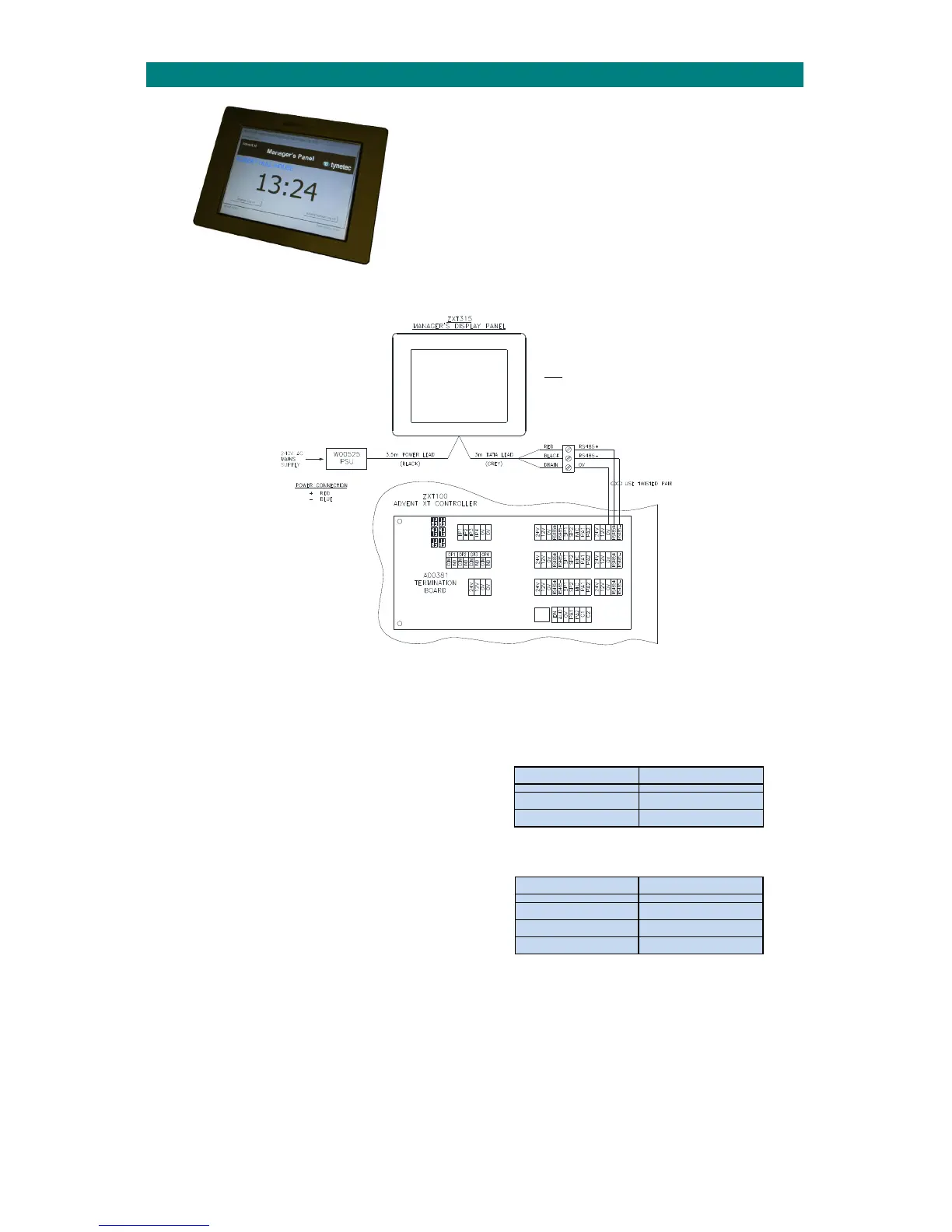
TheoptionalManager’sDisplayPanel(P/No.ZXT315)isawall
mounted10.4”touch‐screenmonitorusedtodisplayallsystem
activityandlogalleventswiththetimeanddate.
OnlyoneManager’sPanelcanbeconnectedpersystem.
FromNovember2014theManager’sPanelissuppliedwitha
batterybacked12V/2ADCPSUinaseparatemetalbox.
TheManager’sDisplayPanelcanonlybeusedwithAdventxtControllerfirmwareV2.03Conwards(tocheckyourfirmware
versionseeSection36).
INSTALLATION
TheManager’sDisplayPanelishousedinawallmountedABSenclosure;dimensions226x296x59mm(HxWxD).
TryandchoosealocationintheManagersOfficewithin3.5metrescablerunoftheseparateboxedpowersupply.
Fixthemountingbrackettothewallwiththe4fixingscrewsprovided(100mmcentres).Ensurecorrectorientationsothe
monitorhooksontothewallbracket.
POWER SUPPLY CONNECTION
TheManager’sPanelhasa3.5metrepowercablefactory
fittedforconnectiontothebatterybacked12VDCPSU.
ThePSUrequiresconnectiontoamainspowersupply.
PSUdimensions:205x240x85mm(HxWxD).Battery:12V3.4Ah.
RS485 DATA CONNECTION
TheManager’sPanelhasa3metredatacablefactoryfitted.
Ajunctionboxwithscrewterminalsisprovidedtoextendthis
connectiontotheAdventxtcontroller.Thedataconnection
mustbemadeusingaseparatetwistedpaircable.
Thedrainwireshouldbeconnectedtothesystem0V.
PROGRAMMING
TheManager’sDisplayPanelmustbeenabledinthe“GeneralSetup”programming‐seetheAdventxtProgramming
Manual(TynetecDocNo.FM0411).
1GB SD CARD
The1GBSDmemorycard,accessibleonthelowerrearfacealongsidethecableentrypoint,storesthedisplaysoftware
andeventlog.IfsoftwareupgradesbecomeavailableinthefutureanewSDcardwillbesupplied.Alwaysturnoffthe
mainssupplybeforeremoving/replacingthememorycard.
BlackPowerCable BoxedPSU
Red +12VDC
Blue 0V
GreyDataCable Adventxt
Red RS485+
Black RS485‐
DrainWire 0V


 To Next Page