DocNo.FM0410issueM‐1Page38
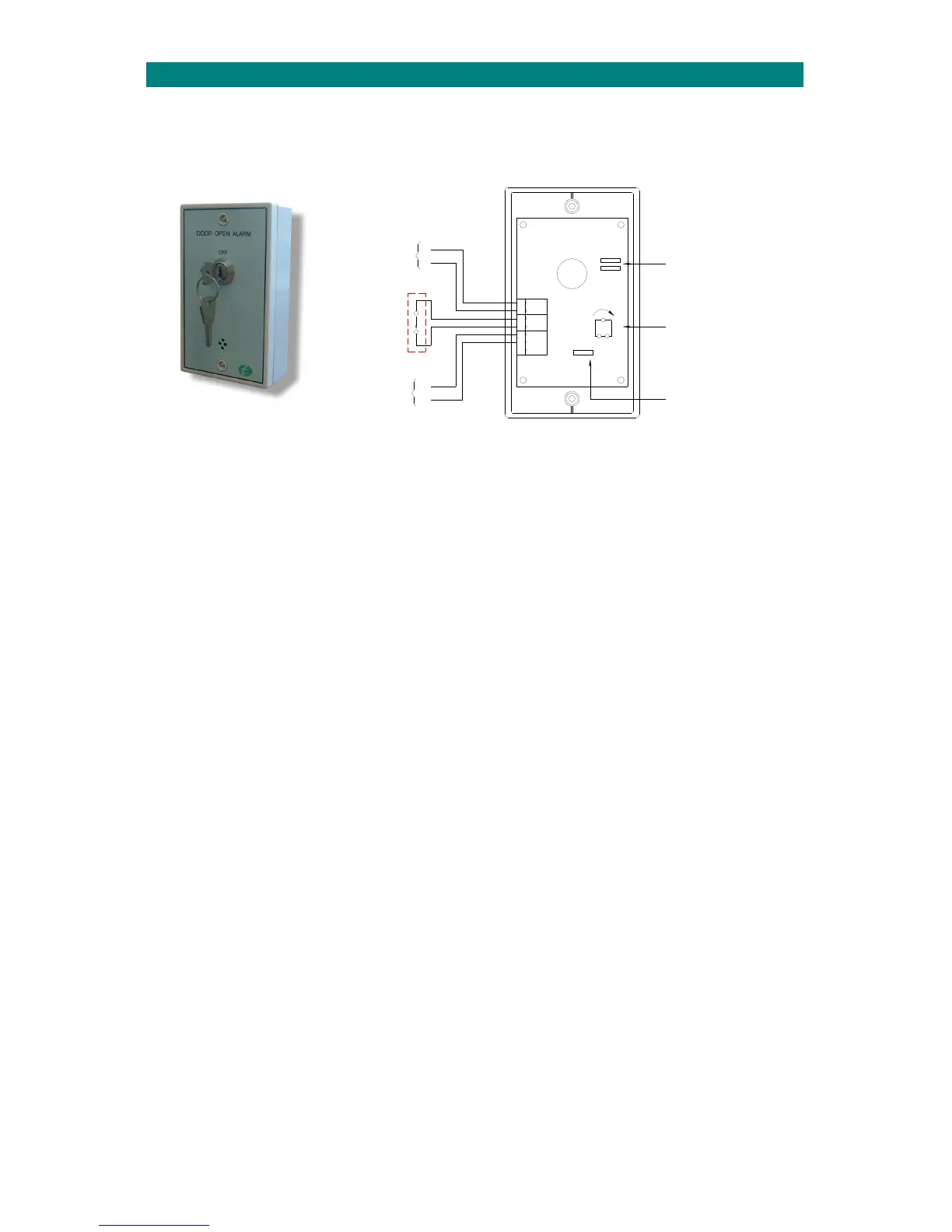
SET DELAY
VR1
LK3
RELAY O/PPOWER CONTACT
NONCCOMDOOR NC0V+V
LK2
LK1
CUT LK1 & FIT LK2
IF SUPPLY VOLTAGE IS
LESS THAN 12V DC.
MAX
ADJUST POT TO SET DELAY
BEFORE ALARM SOUNDS
(APPROX 1 SEC-5 MINS)
CUT LK3 TO ISOLATE BUZZER
NORMALLY
CLOSED
DOOR
CONTACT
1
2
INTERCOM
ADVENT xt
CONNECTED TO
20
0V
CONNECTED TO
ADVENT xt
INTERCOM
24.DOOROPENALARMINSTALLATION
TheDoorOpenAlarm(P/No.ZDA025)canbeconnectedtoanAdventxtsystemtoinitiateanalarmcallwhenan
EmergencyExitdoorisleftopen.
TheDoorOpenAlarmmustbeconnectedviaanAdventxtintercomunittoprovideanalarmlocationmessageand2way
speech.
INSTALLATION
FixtheDoorOpenAlarmalongsidethemonitoreddoorataheightwheretheisolationkeyswitch caneasilybereached.
TERMINATION
Connect1pairofwirestoastandardN/Cdoorcontact(availableseparatelyP/No.W01120)fittedonthemonitoreddoor.
Connect2pairsofwirestoadedicatedAdventxtintercom‐1pairpowerand1pairalarm.
Analarmcallwillbeactivatedifthedoorisle ftopenexceedingthepresettime.Adjustthe“SETDELAY”potfrom1second
to5minutesfordelaybeforealarm.
INTERCOM SETTINGS
TheAdventxtintercomwhichtheDoorOpenAlarmisconnectedtomusthavetheOptionsDILswitch4setONand
intrudermodemustbeenabledusingtheDECThandsetasdescribedbelow;
1.PresstheLINEkey
2.Waitforthe“Ready”promptintheearpiece
3.Enterthecode3007followedbythekey
4.Entertheintercomnumbertohaveintrudermodeenabledfollowedbythekey
5.PresstheLINEkeytocleartheconnection
SeetheAdventxtOperatorsManual(TynetecDocNo.FM0420)formoreintrudermoderelatedcodes.
PROGRAMMING
Acustomspeechmessageshouldbecreatedtoidentify thedoorlocation‐seetheAdventxtProgrammingManual
(TynetecDocNo.FM0411).


 To Next Page