UniPOS Fire Extinguishing Control Panel FS5200Е
Instruction Manual Page 51
Revision 7/06.12 of 63
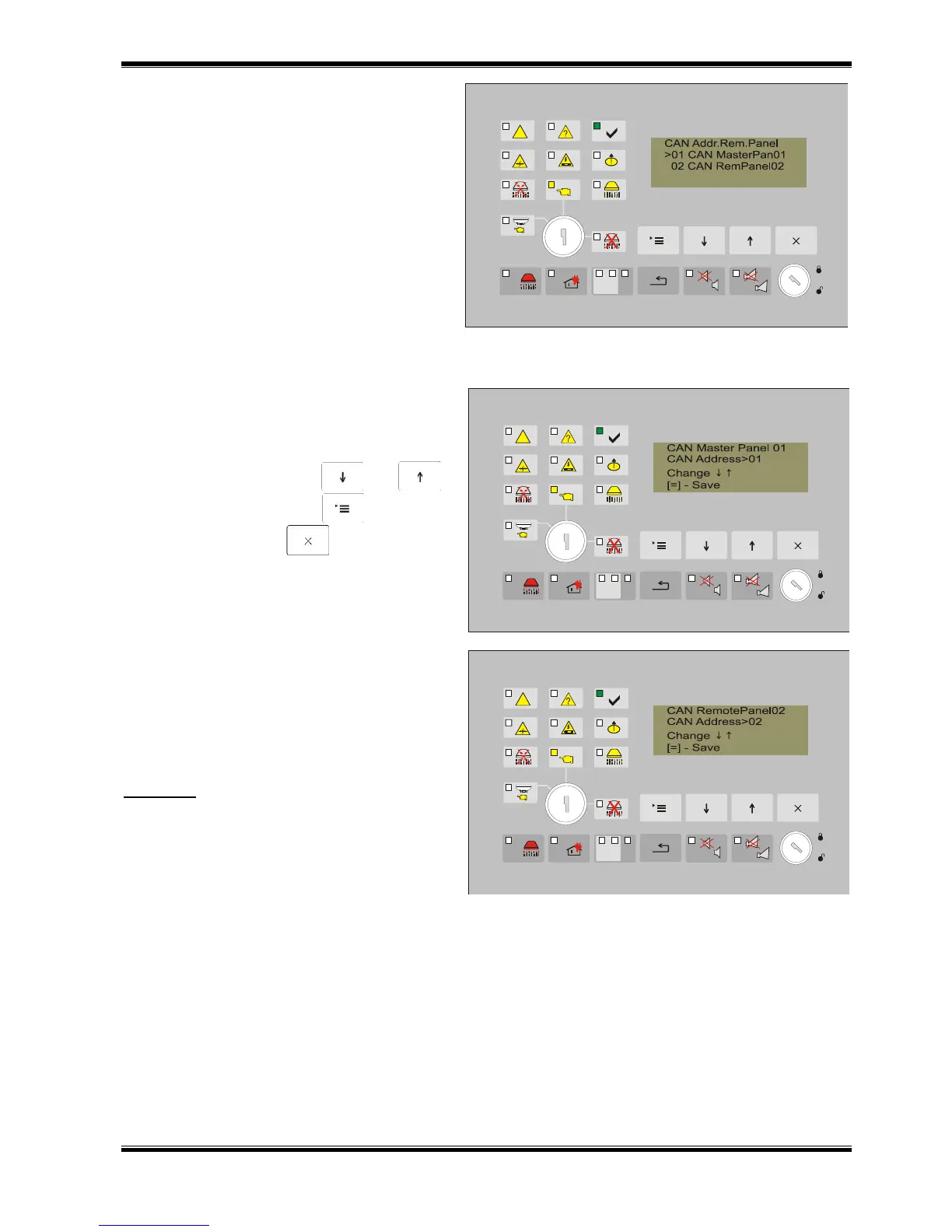
13.4.2.5. Inserting addresses of the Remote
Control Panels.
This option of the Menu permits entering the
addresses in the Remote Panels for
communication with FS5200E.
Мenu includes :
01 CAN Master Remote Panel 01;
02 CAN Remote Panel 02;
03 CAN Remote Panel 03;
04 CAN Remote Panel 04;
05 CAN Remote Panel 05;
06 CAN Remote Panel 06;
07 CAN Remote Panel 07;
08 CAN Remote Ranel 08;
In article 1 of the subordinate menu enter the
address of the ''Master“ panel. The panel is
required to be from series 7000.
Active buttons:
to change – buttons and ;
to save the change - button („Мenu”);
to exit - button („Exit”).
In articles 02÷08 from the Menu, insert by
analogical order the addresses of the other
control panels series 7000, comminicating
with the Extinguishing Panel.
The addresses of the Remote panels are to
be entered in ascending order. (RP1, RP2,
RP8 ...).
Important: If the number of the control panels
series 7000 is less than 8, then in the spaces
for addressing panels, which are not in use
save Address "00" (entered by default)


 To Next Page
 Loading...



