19
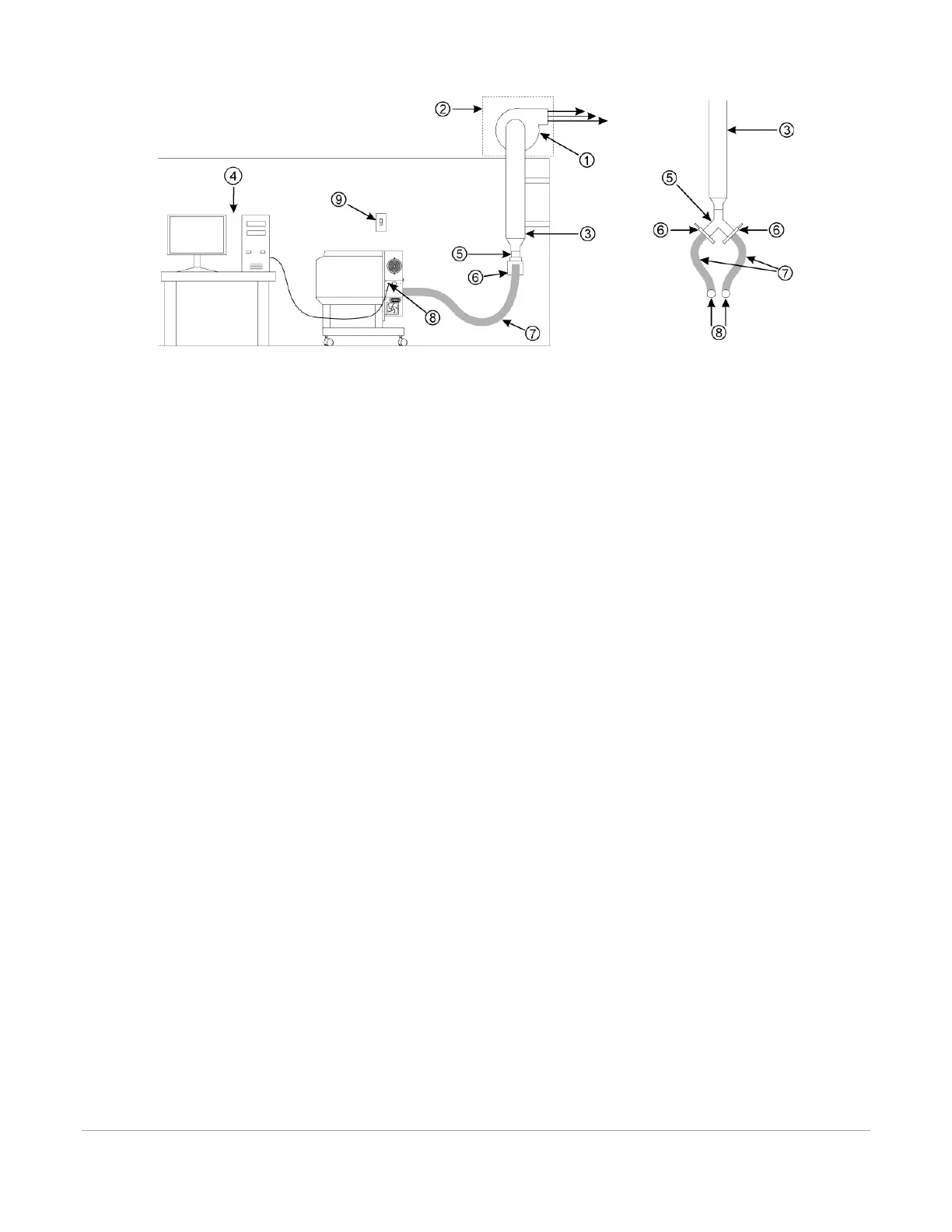
1. Exhaust blower mounted outside (user supplied)
2. Weatherproof shield (user supplied)
3. Rigid ducting matching the diameter of the blower inlet (user supplied)
4. Computer (user supplied)
5. Y-pipe (user supplied)
6. Shut-off or air-flow gate (user supplied)
7. Flexible, wire-reinforced, industrial-grade rubber hose (user supplied)
8. Connection to laser system
9. Exhaust On/Off switch (user supplied)
*Exhaust blower illustration may differ according to your region.
Step 2: Computer Requirements and Software Installation
Your computer is a critical component in the operation of your laser system. In fact, you cannot operate the
laser system if your computer is not connected, powered on, running Windows and running the Universal
Control Panel (UCP) software.
You can only run one laser system per computer. You will need to purchase a separate computer for each laser
system you own. You must operate the laser system using the computer that is directly attached to it via the
provided 6 ft (2 meters) USB cable. USB cables longer than 6 feet (2 meters) may cause the laser system to
malfunction.
Computer and Operating System Requirements
• Minimum Computer Requirements (User Supplied)
• 2.0 GHz processor (minimum)
• 32-bit or 64-bit version of Windows 7/10
• 2 GB of RAM (minimum)
• 40 GB hard drive (15 GB free space) (minimum)
• Available USB 2.0 Hi-Speed compliant port only
• Internet connection (optional)
Note: Some computer manufacturers’ USB ports do not comply with USB 2.0 Hi-Speed standards. This may
cause the laser system to exhibit erratic behavior. Confirm that your computer is USB 2.0 Hi-Speed



 To Next Page