2DA/2DB-1
1-4-2
General
Initialization
Drive, paper
feed, paper
conveying and
cooling system
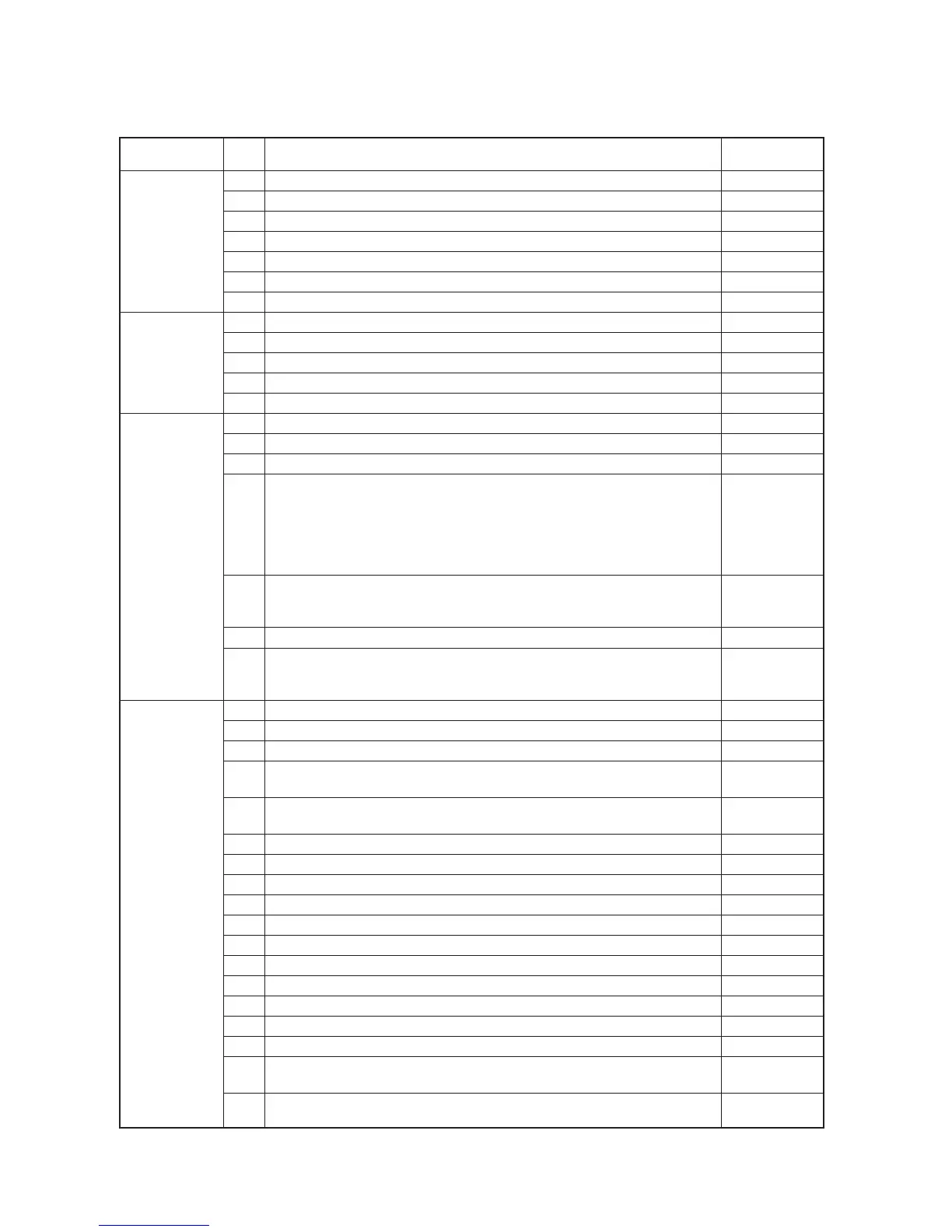
U000 Outputting an own-status report —
U001 Exiting the maintenance mode —
U002 Setting the factory default data —
U003 Setting the service telephone number
***************
U004 Displaying the machine number —
U005 Copying without paper —
U019 Displaying the ROM version —
U020 Initializing all data —
U021 Initializing memories —
U022 Initializing backup memory —
U026 Evacuation of backup data —
U027 Return of backup data —
U030 Checking motor operation —
U031 Checking switches for paper conveying —
U032 Checking clutch operation —
U034 Adjusting the print start timing
• Adjusting the leading edge registration 0.9/1.2/1.3/
1.3/1.3/1.0
• Adjusting the center line -1.0/0.4/-1.2
-1.2/-1.2/0.3
• Adjusting the trailing edge margin 0.0
U035 Setting folio size
• Length/Width 330
•Width 210
U051 Adjusting the amount of slack in the paper 20/0/0/-20/-20/0
U053 Performing fine adjustment of the motor speed 0.1/0/-0.5/0.1/
-0.1/-0.3/-0.3/
-1.3/-1.5
U060 Adjusting the scanner input properties 12
U061 Turning the exposure lamp on —
U063 Adjusting the shading position 0
U065 Adjusting the scanner magnification
• Main scanning direction/auxiliary scanning direction 0/-10
U066 Adjusting the leading edge registration for scanning an original on the 7/0
contact glass
U067 Adjusting the center line for scanning an original on the contact glass -4/0
U068 Adjusting the scanning position for originals from the DP 0
U070 Adjusting the DP magnification 0/0
U071 Adjusting the DP scanning timing 0/0/0/0
U072 Adjusting the DP center line 0/0/0
U073 Checking scanner operation —
U074 Adjusting the DP input light luminosity 0
U076 Executing DP automatic adjustment —
U087 Turning the DP scanning position adjust mode on/off —
U089 Outputting a MIP-PG pattern —
U092 Adjusting the scanner automatically —
U093 Setting the exposure density gradient
•Text and photo/text/photo/text in fax mode/photo in fax mode 0/0/0/2/3
U099 Checking the original size detection —
* Initial setting for executing maintenance item U020
Section
Item
Maintenance item contents
Initial
No. setting*
(2) Maintenance modes item list
Optical



 To Next Page