50
CHAPTER 4 - KEYPAD (HMI) OPERATION
4.2.4 Parameter
Viewing and
Programming
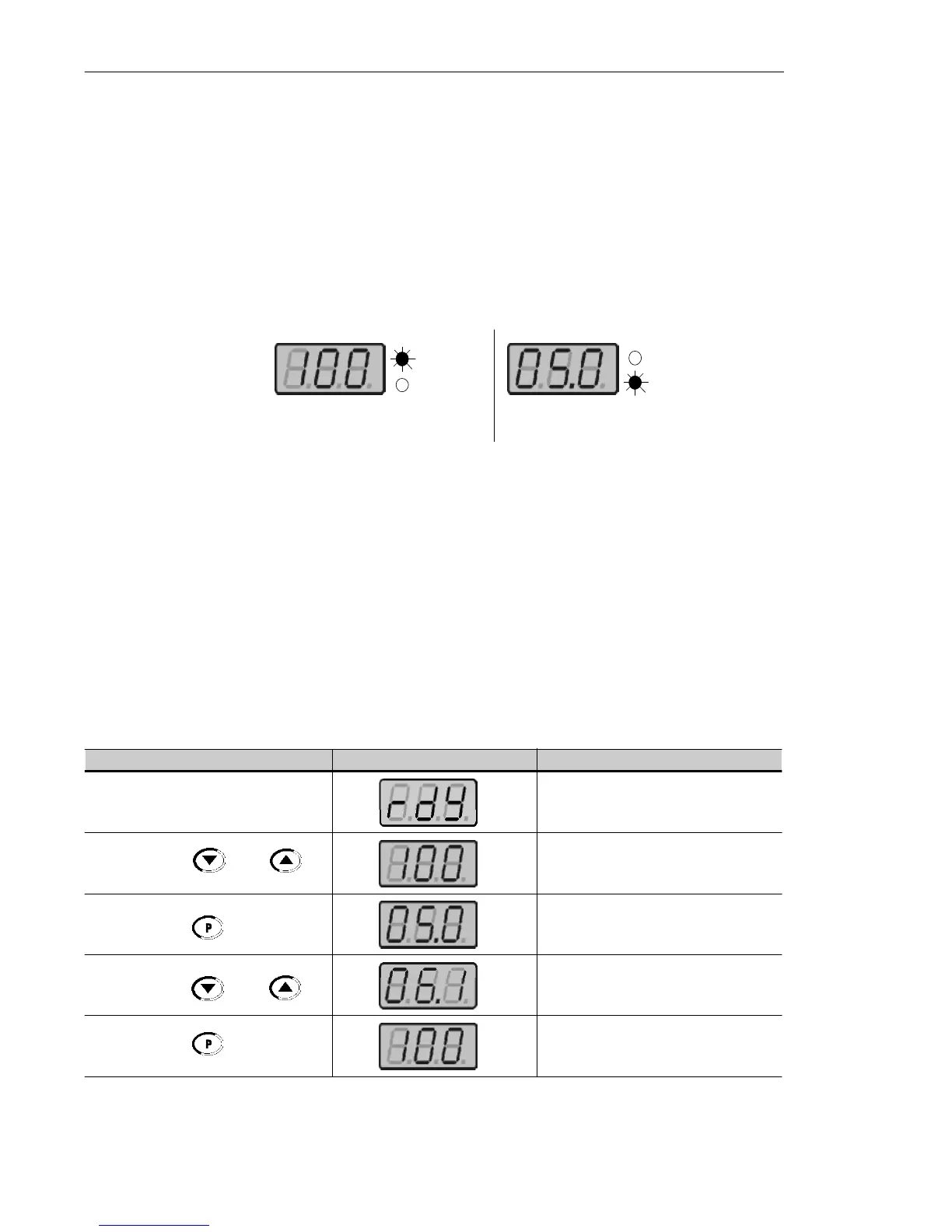
All inverter settings are made through parameters.
Parameters and their contents are shown on the Display through the
LED´s " Parameter" and "Value". The identification is made between
parameter number and its value.
Example (P100):
Each parameter is associated with a numerical value (parameter
value), that corresponds to the selected option among the available
ones for this parameter.
The parameter values define the inverter programming or the value of
a variable (e.g.: current, frequency, voltage). For inverter programming
you should change the parameter content(s).
To allow the reprogramming of any parameter value it is required to
set P000 = 5. Otherwise you can only read the parameter values,
but not reprogram them. For more details, see P000 description in
Chapter 6.
Parameter
Value
100 = Parameter Number
Parameter
Value
5.0 = Parameter Content
ACTION HMI DISPLAY DESCRIPTION
Turn ON the inverter
Use the keys and
Press the key
Use the keys and
Press the key
Inverter is ready to be started
Select the desired parameter
Numerical value associated with the
parameter
(4)
Set the new desired value
(1) (4)
(1) (2) (3)
4.2.3 Read-Only
Variables
Parameters from P002 to P008 are reserved for the display of read-
only variables.
When the inverter is powered up, the display will indicate the value of
the Parameter P002 (output frequency value).



 To Next Page