Basic Configuration DRS5116
Wren
2003. 09. 06 (v 1.0)
79
<TIP>
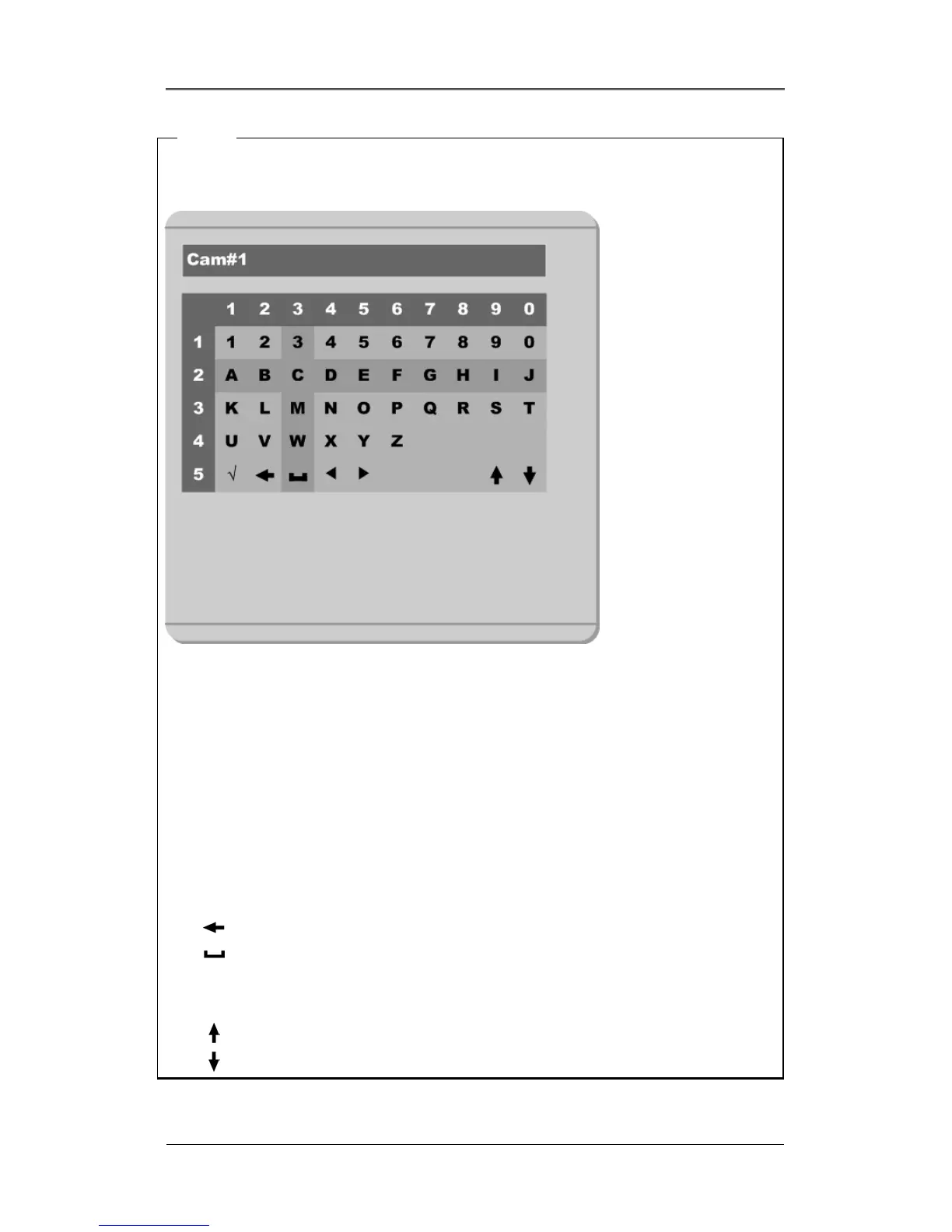
When assigning a name to a channel, the following dialogue box will appear. This box is also used
later in the system, but the method is always the same.
- To select a letter, use the [ARROW]/(◄◄ and ►► ) buttons or the number buttons, “0” to “9” on the
DRS5116 front panel. When using the [ARROW] buttons, use the [PLAY]/ (►) button to select each
choice.
- The intersection between the horizontal and the vertical bar is the selected choice.
- Press the (►) button to confirm the selected value.
- Or enter the related numbers in order of horizontal/vertical. (For example, in order to select “C”, press
the [3] and [2] buttons)
- After setting all values, press the [Exit] button.
- Function Keys
9 : Enter
: Back Space & Delete
: Space
◄ : Left
► : Right
: Previous Code Page
: Next Code Page
Status



 To Next Page