Remote Operation
5-8 M370046-01
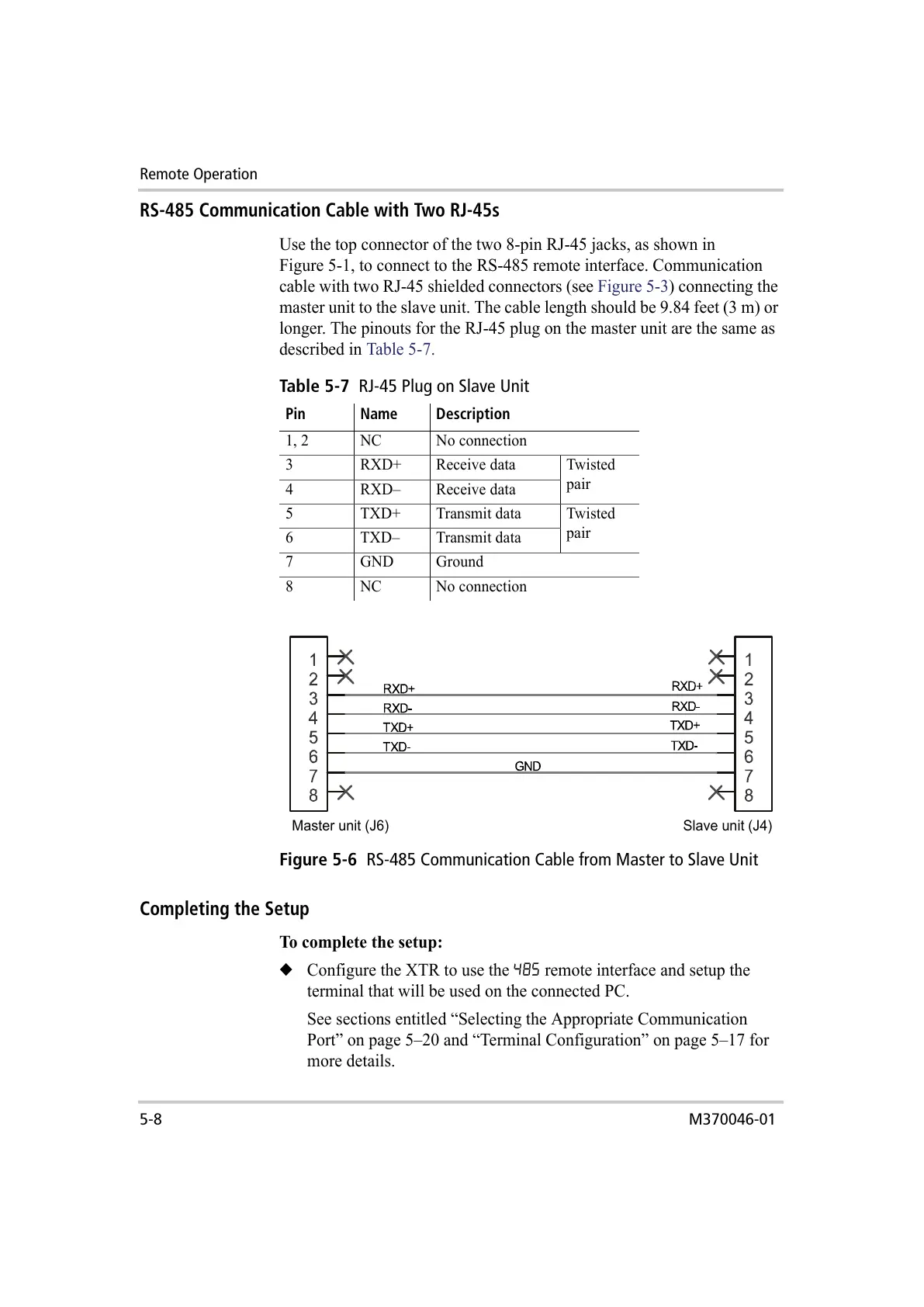
RS-485 Communication Cable with Two RJ-45s
Use the top connector of the two 8-pin RJ-45 jacks, as shown in
Figure 5-1, to connect to the RS-485 remote interface. Communication
cable with two RJ-45 shielded connectors (see Figure 5-3) connecting the
master unit to the slave unit. The cable length should be 9.84 feet (3 m) or
longer. The pinouts for the RJ-45 plug on the master unit are the same as
described in Table 5-7.
Completing the Setup
To complete the setup:
◆ Configure the XTR to use the 485 remote interface and setup the
terminal that will be used on the connected PC.
See sections entitled “Selecting the Appropriate Communication
Port” on page 5–20 and “Terminal Configuration” on page 5–17 for
more details.
Table 5-7
RJ-45 Plug on Slave Unit
Pin Name Description
1, 2 NC No connection
3 RXD+ Receive data Twisted
pair
4 RXD– Receive data
5 TXD+ Transmit data Twisted
pair
6 TXD– Transmit data
7 GND Ground
8 NC No connection
Figure 5-6
RS-485 Communication Cable from Master to Slave Unit
Master unit (J6) Slave unit (J4)



 To Next Page
 Loading...

