24
WWW.AEM
-
TEST.COM
customercare@aem-test.com | Version # : 2.2
TestPro CV100
User Manual
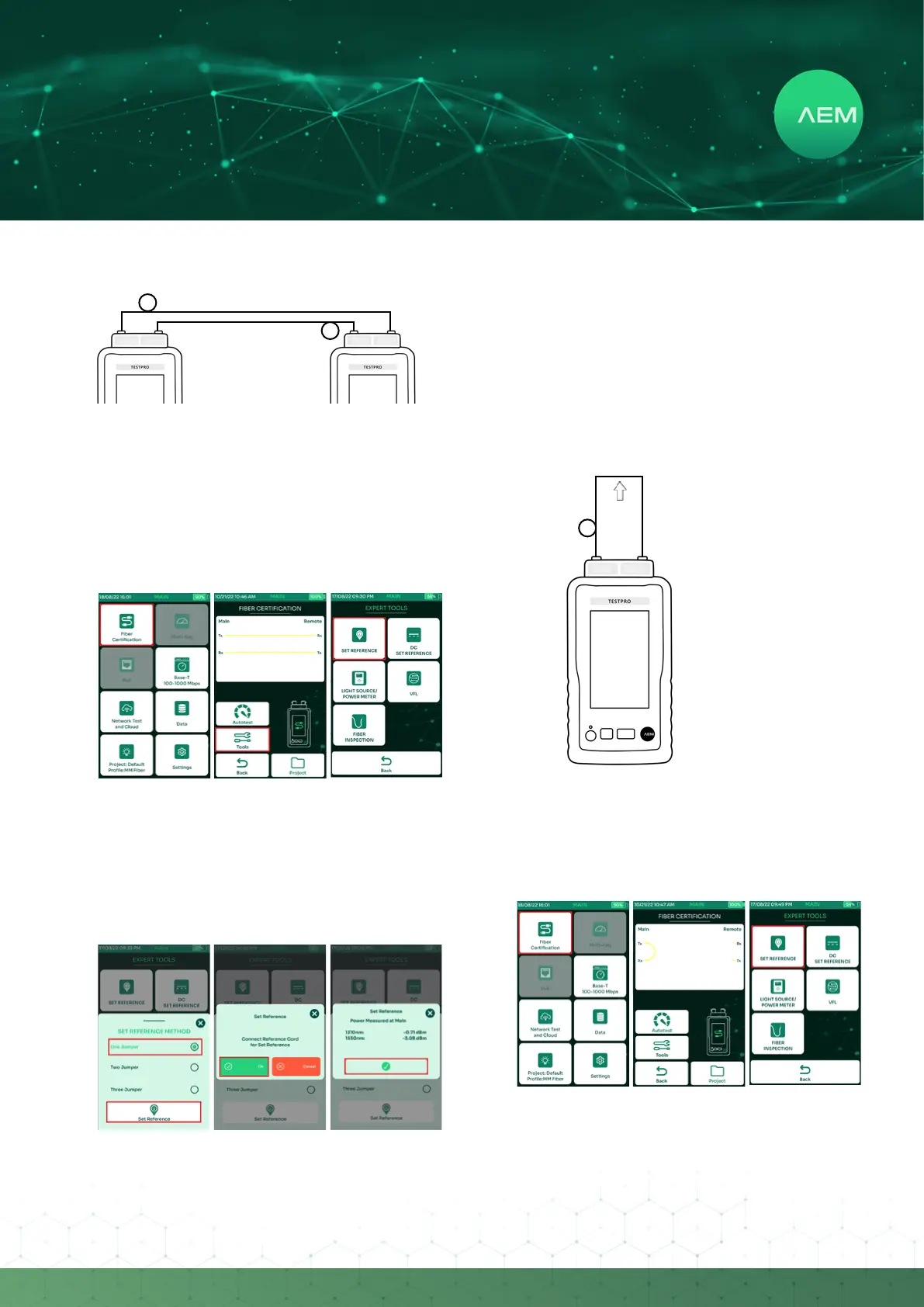
ii:FiberDualEndedSetReference
MandrelWrapfor
Multi-Mode (if required)
MandrelWrapfor
Multi-Mode (if required)
Upto2meters
Noconnectorsinthepaths
Tx Rx
Tx Rx
Main Remote
Attachthesinglemodeormultimodeberadapter
to the TestPro main and remote units.
Connect one end of a 2-meter reference cord to the
TestPro main unit’s Tx port and connect the other end
of that cord to the TestPro remote unit’s Rx port.
Connect another 2-meter reference cord to the
TestPro main unit’s RX port, and the other end of that
cord to the TestPro remote unit’s Tx port.
•
•
•
OntheTestPromainscreenselect[FiberCertication].
Select[Tools].
Select[SetReference].
•
•
•
Note:Waitfor5minutesforthebercomponentsto
warm up before performing the set reference. Doing
this will help to produce more stable & consistent
results.
Select[OneJumper]andthenselect[SetReference].
Select[Ok]onthedialogbox.
TestPro will start the set reference process. Once it is
complete, the set reference values will be displayed.
Select[Accept]tocontinue.
•
•
•
Note: For multimode the acceptable value is -24dBm
and higher and for single mode the acceptable value
is -4dBm and higher.
iii:FiberLoopbackSetReference
MandrelWrap
for Multi-Mode
(if required)
2meterreference
Tx Rx
Attachthesinglemodeormultimodeberadapter
to the TestPro main unit.
Connect one end of a 2-meter reference cord to the
TestPro main unit’s Tx port and connect the other
end of that cord to the TestPro main unit’s Rx port
forming a loopback connection.
•
•
OntheTestPromainscreenselect[FiberCertication].
Select[Tools].
Select[SetReference].
•
•
•


 To Next Page