29
WWW.AEM
-
TEST.COM
customercare@aem-test.com | Version # : 2.2
TestPro CV100
User Manual
Connect one end of a 2-meter reference cable to the
TestPro main unit’s Tx port and connect the other end
to the TestPro remote unit’s Rx port. Connect another
2-meter reference cable to the TestPro remote unit’s
Tx port, and the other end of that cable to the TestPro
main unit’s Rx port.
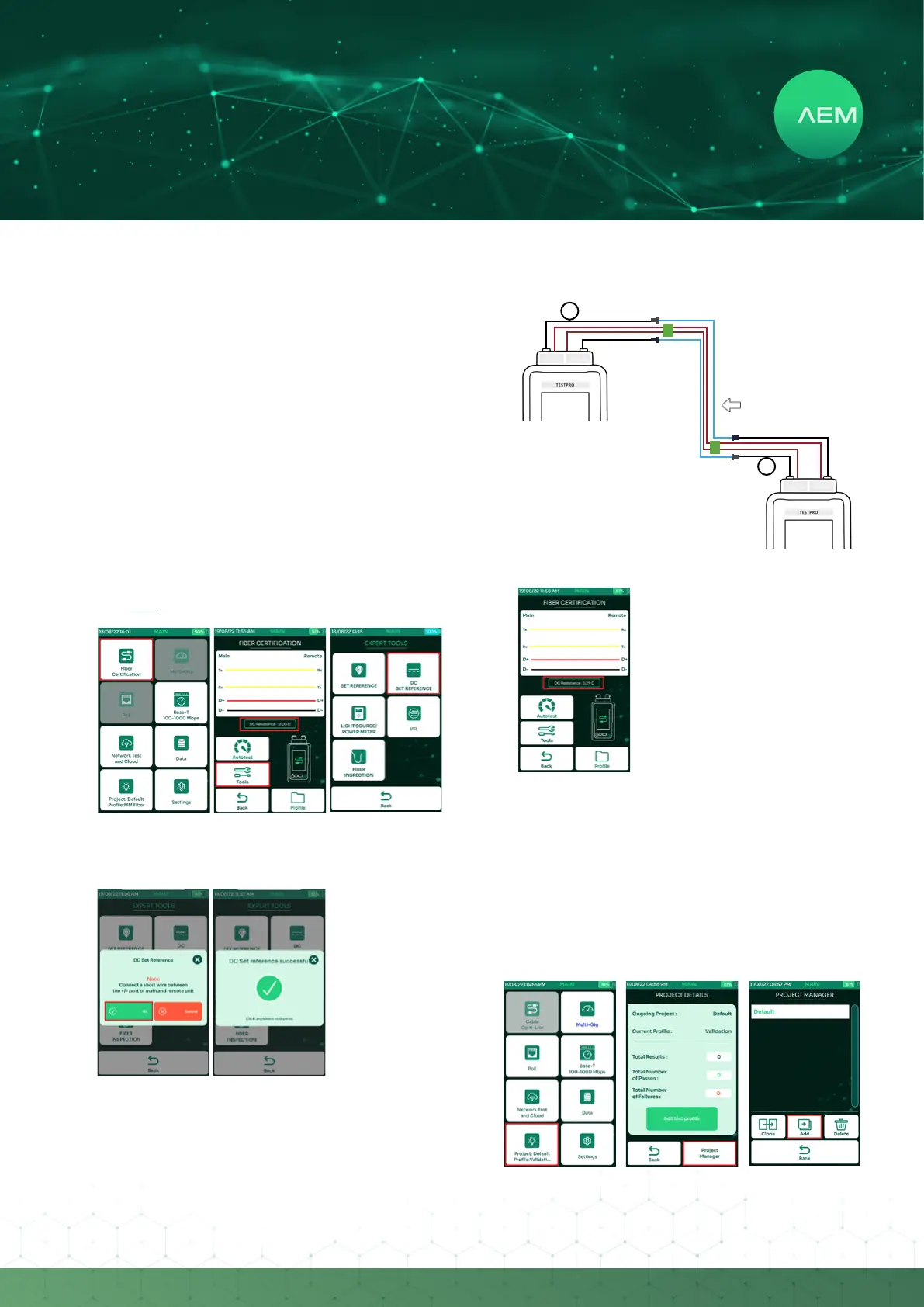
Connect one end of the DC Resistance reference
cable to the TestPro main unit’s DC port and connect
the other end to the TestPro remote unit’s DC port.
•
•
Perform Fiber DC set reference only after:
PoweringoandthenpoweringontheTestProunit.
Disconnecting&thenreconnectingtheberadapter.
Replacing DC reference cord.
•
•
•
AEM recommendations for Fiber DC set reference:
UsetheDCresistancecablethatcamewiththeber
kit.
•
Click here for more information on Fiber Set Reference.
OntheTestPromainscreen,select[FiberCertication].
Select[Tools].
Select[DCSetReference].
•
•
•
Select[Ok]tocontinue.MakesuretheDCreference
cable is attached to TestPro main & remote unit’s DC
port.
DC set Reference successful dialog box comes up.
•
•
ii:FiberPoEDCResistanceTest
Tx Rx
MandrelWrapfor
Multi-Mode (if required)
2 meters
Tx Rx
MandrelWrapfor
Multi-Mode (if required)
2 meters
PoweredCable(hybridcable)
FiberPOEDCResistancetestsetup:
Connect the DC connector/cable
to the TestPro main DC port
and the other end of the cable
under test. Connect another DC
connector/cable to the TestPro
remote DC port and the other
end of the cable to the cable
under test.
1.
Fibertestsetup:
Connect the ends of two 2-meter
reference cords to a TestPro main unit’s
Tx and Rx ports and the other ends of
the reference cords to the ber adapter/
connector.
Connect a separate set of two 2-meter
reference cords to a TestPro remote
unit’s Tx and Rx ports and the other
ends to a separate set of ber adapter of
connectors.
Connect two cables under test to the ber
adapters/connectors.
1.
2.
3.
Fiber POE DC measurements automatically appear in
theFiberCerticationScreen.
4 Multi-Gig, PoE and BASE-T Test
a.CreatingProject/Prole
TheTestProsupportscustomerworkowsthroughprojects
and prole descriptions. [Project] is an identier of the
customer site/location, whereas [Prole] refers to specic
testcongurations.


 To Next Page