26
WWW.AEM
-
TEST.COM
customercare@aem-test.com | Version # : 2.2
TestPro CV100
User Manual
Note: For Loss/KM, End Connector Loss, Connector Loss
and Splice Loss, TestPro will only accept values that are
equaltoorlower(stricter)thanthestandardsspecied
inthe[CerticationLimit]screen.
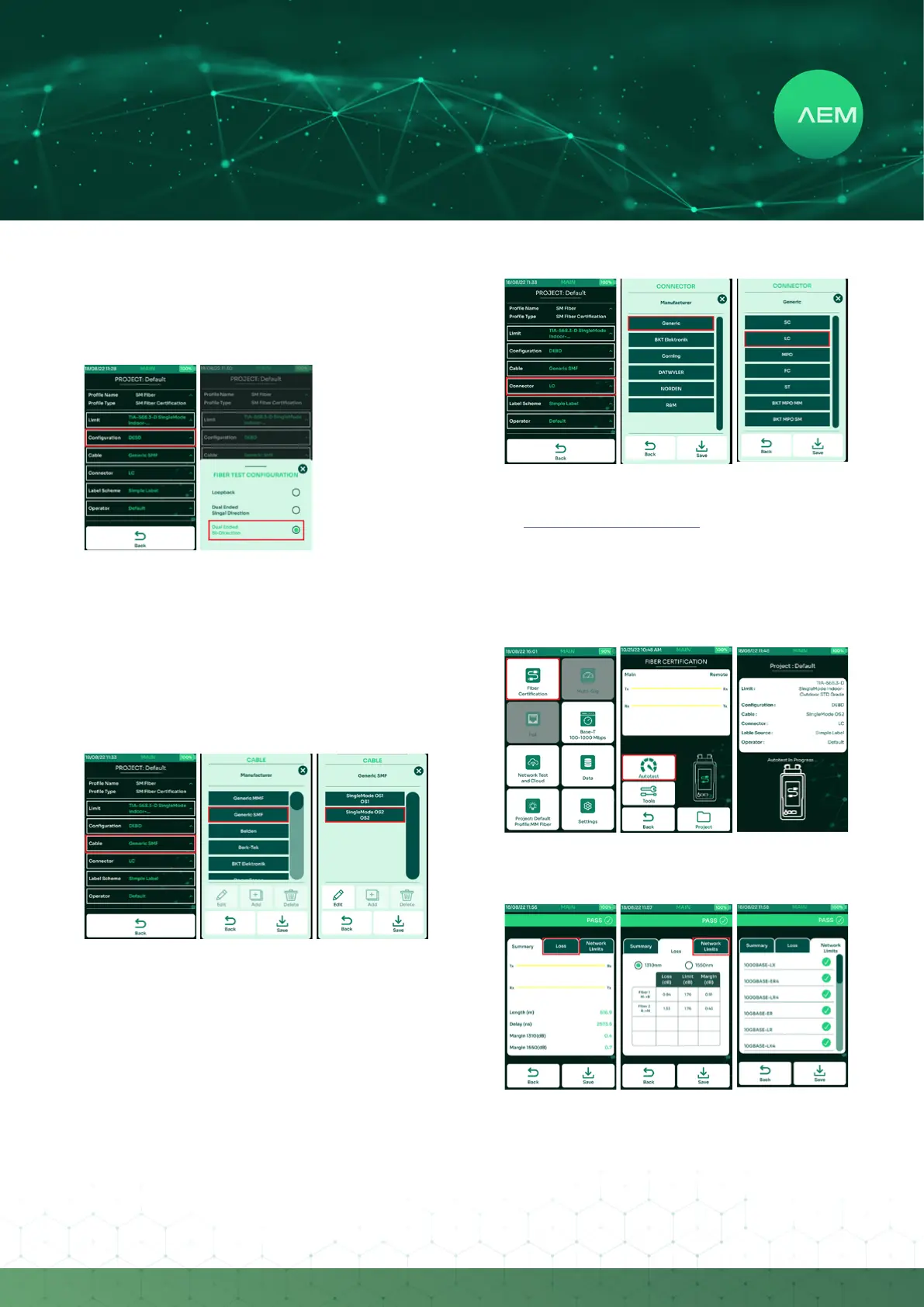
e.FiberConguration
TestPro supports loopback, dual ended single directional
(DESD) and dual ended bi-directional test (DEBD)
congurations.
Select[Conguration].
Select from one of the three conguration options
[Loopback], [Dual Ended Single Bi-directional]
or [Dual ended Bi-directional]. Changes to the
congurationisautomaticallysaved.
•
•
f. Fiber Cable
TestProsupports a widerange ofber cable vendors.If
unsureof the cable manufacturer, select [Generic MMF]
formulti-modeand[GenericSMF]forsinglemode.Toadd
a manufacturer’s cable to our database, please email to:
customercare@aem-test.com
Select[Cable].
Select from the list of ber cable manufacturers or
[GenericSMF].
Selecttherequiredcabletypeandselect[Save].
•
•
•
g.FiberConnector
TestProsupportsadierentkindsofberconnectors.To
add a manufacturer’s cable to our database, please email
to: customercare@aem-test.com
Select[Connector].
Select[Generic].
Select the connector type. Changes are automatically
saved.
•
•
•
h. Performing Fiber Autotest
Inthemainscreen,select[FiberCertication].
Select[Autotest].
TestProwillconrmthatautotestisinprogress.
•
•
•
Once the Autotest is complete, TestPro will display a
summary.
•


 To Next Page