31
WWW.AEM
-
TEST.COM
customercare@aem-test.com | Version # : 2.2
TestPro CV100
User Manual
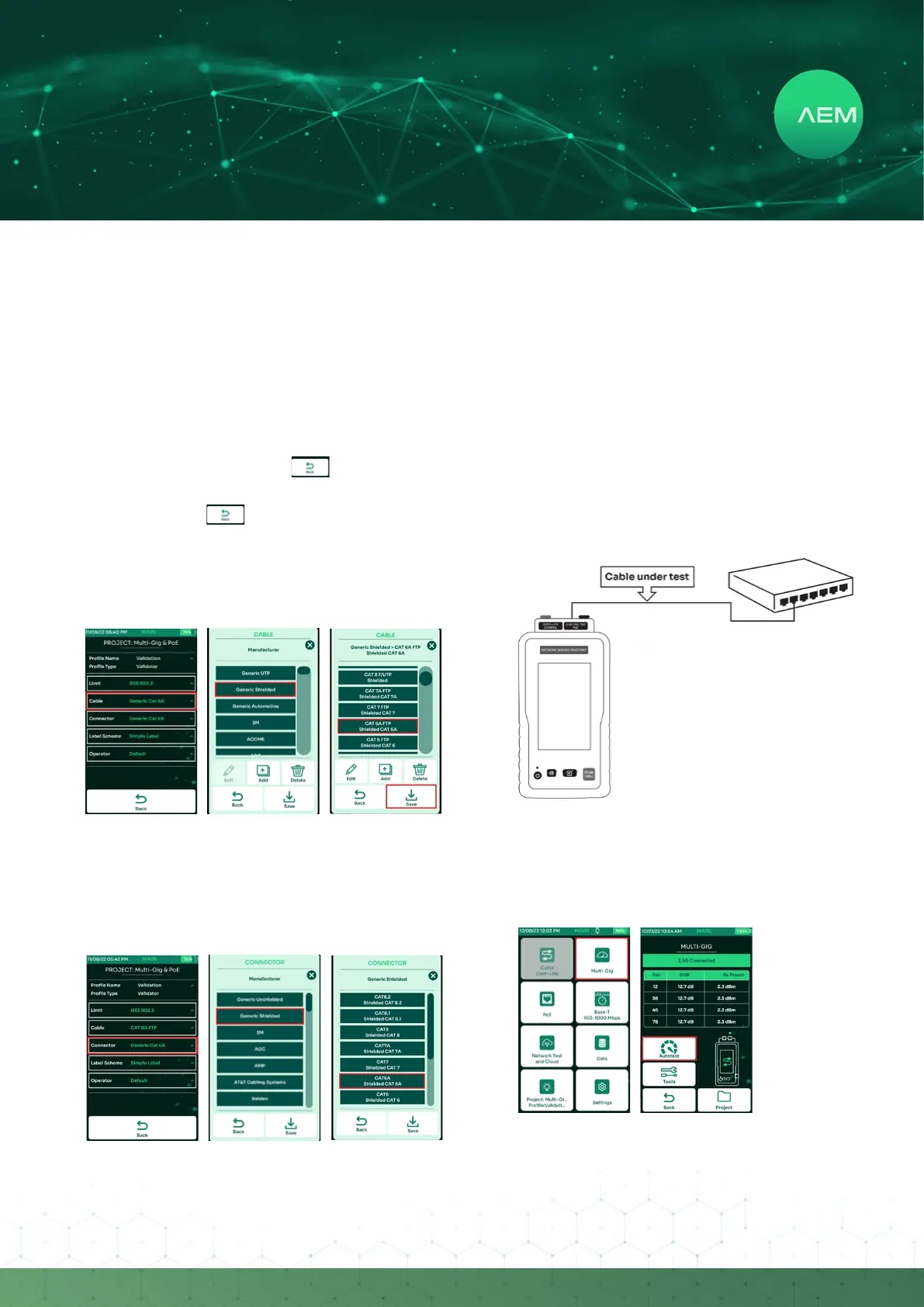
Select[Project]onthehomescreentochooseanactive
test project.
Select[Edittestprole]toupdatethecurrenttestprole.
Inthevalidationprole,[Limit]allowsyoutochoosethe
minimum SNR required for dierent network speeds
(note: keep the SNR limit at 0 dB if in doubt. If SNR
is positive, then the corresponding network speed is
functioning properly for the cable under test).
In this example, the limit is set at 10G -> 2dB (which
means TestPro will fail cables having less than a 2dB
margin for 10GBASE-T). Press to go back to the
main menu.
•
•
•
•
Note : Pressing in any of the screens will accept
changes and take user back to the home screen.
c.SelectingCable/Connector
It is important to document the cables and connectors for
the purpose of good reporting.
Select[Cable:GenericCat6A].
Ifunsure of thetype ofcable,select[Generic UTP]for
unshielded cable & [Generic Shielded] for shielded
cable.
Choosethespecictypeofcable.
•
•
•
Follow a similar process for choosing connectors:
Select[Connector:GenericCat6A].
Select[GenericShielded].
Select[CAT6A].
•
•
•
d.ValidationTestOptions
i: Multi-Gig Validation
This function allows for Multi-Gigabit link validation and
PoEcharacterization.Itwillquicklyconrmthesuitability
of a cabling link to support 2.5Gbps, 5Gbps, and 10Gbps
data rates, and validate PoE performances up to the
highestpowerlevelspecicationsof90W.
To validate support for 2.5Gbps/5Gbps/10Gbps link
speeds, the TestPro needs to be connected via the
Ethernet cable under test to a router, switch, PoE or any
network enabled device.
Connectthe rstend ofthecable to-bevalidatedto
the Multi-Gig (2.5G/5G/10G/PoE) port of the AD-
TestPro adapter, attached to the TestPro unit.
Connect the second end of the cable to a network
device i.e., network switch/router.
•
•


 To Next Page