7
WWW.AEM
-
TEST.COM
customercare@aem-test.com | Version # : 2.2
TestPro CV100
User Manual
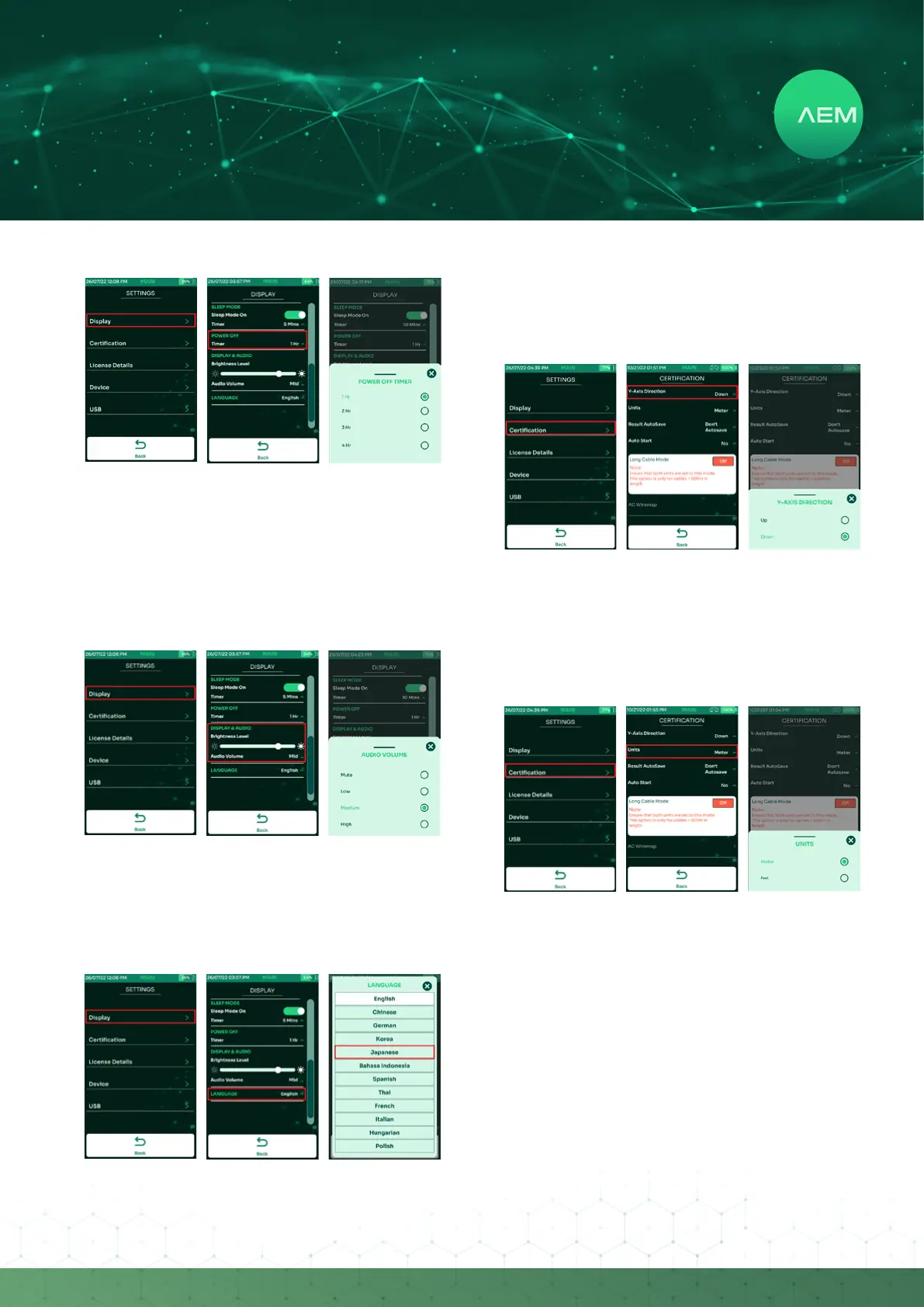
d.Display&Audio
c.PowerO
PowerOtimerfunctionisonlyavailablewhentheTestPro
is in battery mode. It is not available when the device is
attached to a power supply.
Select[Display].
Scrolldowntothe[PowerO]section.
Select the timer & choose the preferred time duration
ofinactivityafterwhichTestProshouldpowero.
•
•
•
Select[Display].
Scrolldownto[Display&Audio].
Adjust the display brightness by dragging the brightness
level bar left or right. To adjust the volume, select Audio
Volume & choose Mute, Low, Medium or High.
•
•
•
e. Language
Select[Display].
Scrolldownto[Language].
Select one of the languages available and TestPro will
reboot to save the settings.
•
•
•
f.Y-AxisDirection
Plot Y-Axis Direction changes the graph direction of copper
certicationtestresulttoeitherUporDown.
Select[Certication].
Select[Y-AxisDirection].
Select Up or Down.
•
•
•
g. Units
Select[Certication].
Select[Units.]
Select the preferred measurement standard - Metric
(Meter) or US units (Feet).
•
•
•


 To Next Page