drone position".
Requirement: The reference point must be in an open position to facilitate safe landing .
Reference points must have long-term fixed obvious location characteristics to facilitate
identification when the reference points are corrected.
⑤Save: Click "Save" to enter the plot name to save the plot
⑥ Clear: Click "Clear" to clear the obstacle area, clear the operation area, and clear the spray-
forbidden area.
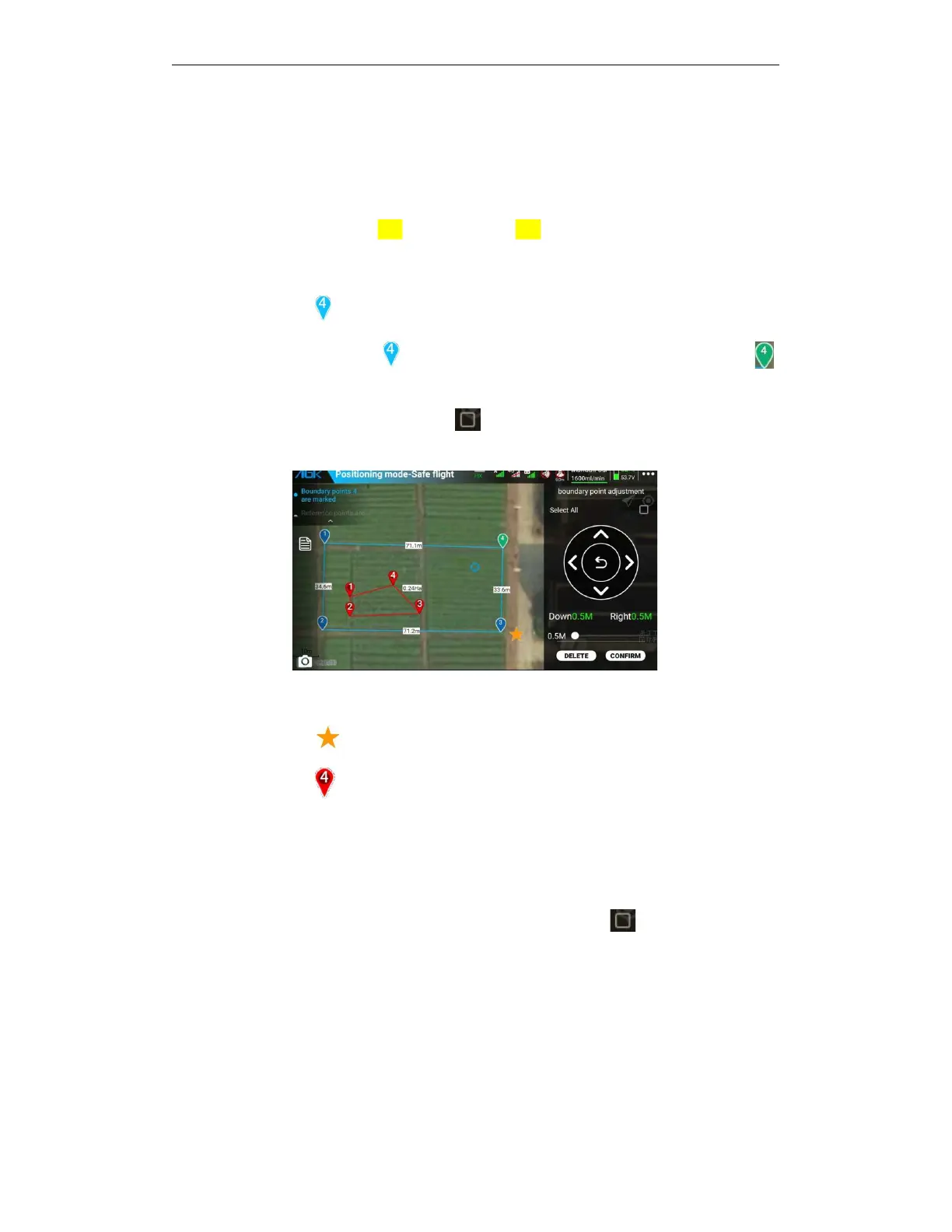
⑦Boundary point icon : Add no less than 3 boundary points.
Click the current boundary point , the boundary point is selected, and when it becomes ,
adjust the boundary point position.
Enter the adjustment interface and click Select all boundary points to adjust all the
boundary points.
⑧19.9 meters: display of the distance between one boundary point and another boundary point
⑨Reference point icon : indicates the position of the reference point.
⑩Obstacle point icon : Click the obstacle point icon to enter the obstacle point adjustment
interface for debugging.
A.
Adding no fewer than 3 obstacle points.
B.
If you need to adjust, click the current obstacle point and the icon will change to adjust the
position of the obstacle point.
C.
Enter the adjustment interface and click "Select all obstacle points " to adjust all obstacle
points added below.



 To Next Page