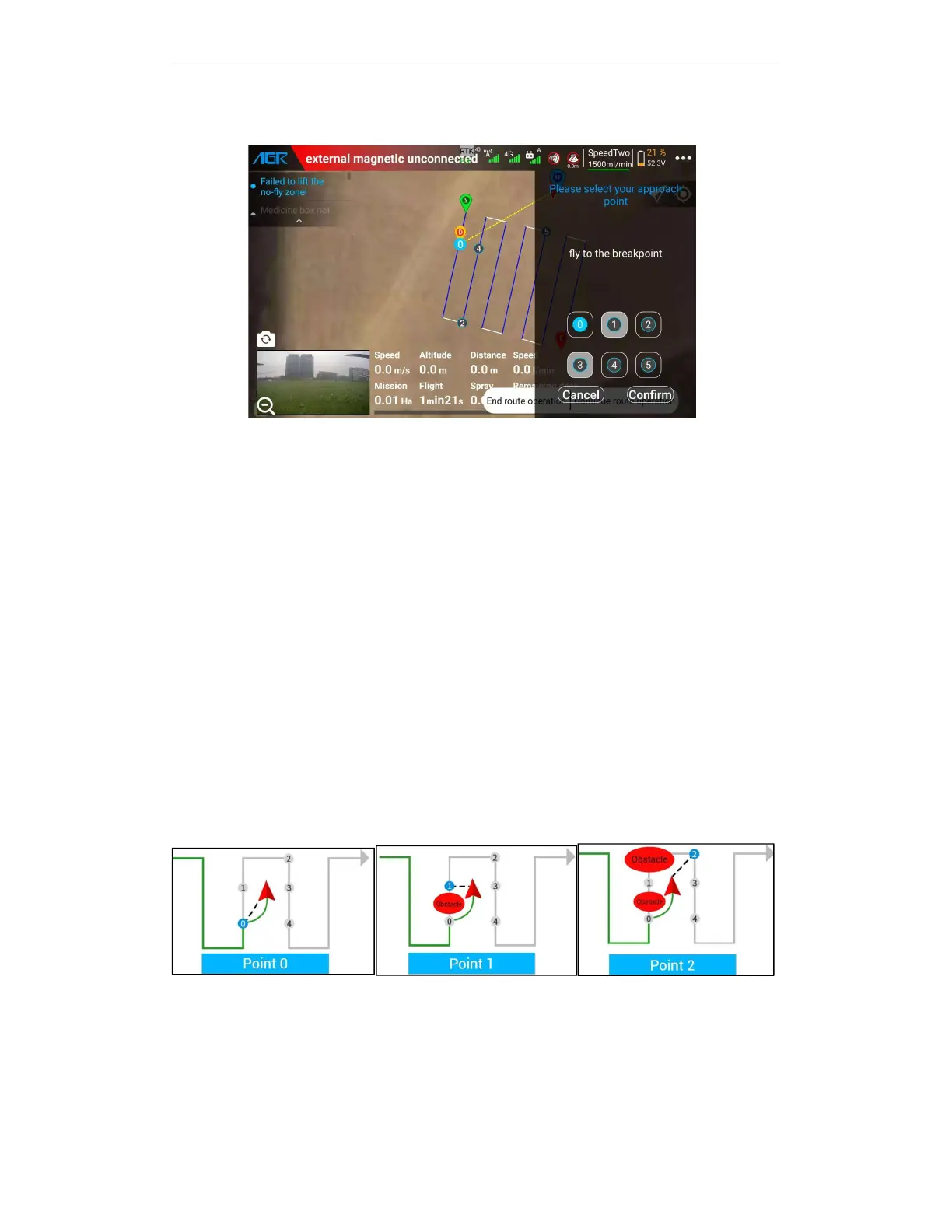
5.5.3.12. Continue AB point work——break point and projection point
After the AB operation is paused, you can click the "Continue AB operation" button and select the
corresponding point to continue the AB operation.
When the drone is on the AB route, the following way points can be selected to resume
operations:
A.
The "0" interruption point, that is, the point at which the operation at point AB is suspended, it
is suitable for situations where there are no obstacles on the air route.
B.
Projection point "1", that is, the projection point of the drone position on the route where the
interruption point is located. Applicable to the situation where there is an obstacle between the
interruption points 0 to 1.
C.
Endpoint "2", that is, the endpoint of the next route of the current route where the
interruption point is located. Applicable to the situation where there are obstacles on the route
between breakpoints 0—1—2.
D.
Projection point "3", that is, the projection point of the drone position on the next route
following the break point. Applicable to the situation where there are obstacles on the route
between the breakpoints 0—1—2—3.
E.
Projection point "4", that is, the projection point of the interruption point on the next route.
Applicable to situations where obstacles exist on the route between breakpoints 0—2—3—4.



 To Next Page